
jkgcomcpcifialmcnggiifiobflokncf
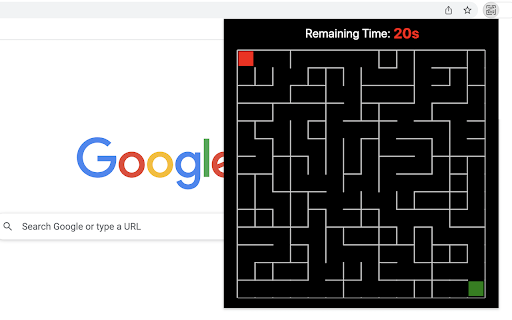
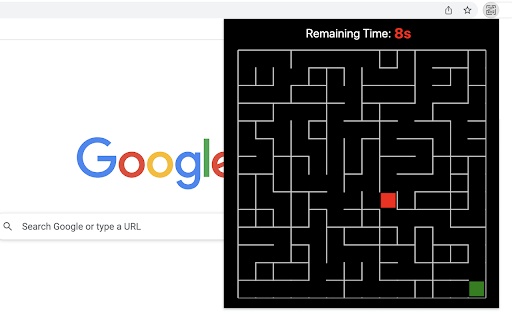


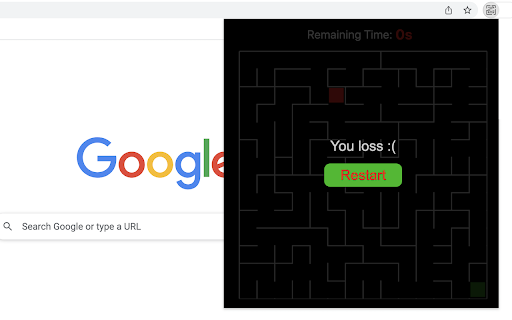
Just click on the maze extension icon in the top right corner of your browser and the game will start immediately in a popup! The maze is randomly generated and changes every time the game starts or restarts. Your goal is to move the red block from the top-left corner to the green block in the bottom-right corner within 20 seconds. Use either the Arrow keys or WASD keys to move. The bar at the top of your maze shows how much time you have left. When the game ends, press the Restart button or the Space/Enter key to begin a new game. Have fun with the maze game! If you'd like to play the next level or check the shortest path, simply click the corresponding links below the 'Restart' button. Additionally, we've added some of our featured game extensions to the game over page for extra enjoyment. CHANGELOG ========== Version 0.3.0 - 0.4.2 - Update the link of the shortest path - Add the link of playing the next level - Dynamic update of featured game list - Add WASD movement support - Prettify code and styles Version 0.2.0 - 0.2.9 - Add the link of bonus features - Add the link of the shortest path - Display featured products after game over Version 0.1.7 - 0.1.8 - Add the section on new games - Update the game list with time Version 0.1.0 - 0.1.6 - Initial release and feature updates

Space Fighter Game
A classic shooter game that plays in a popup. Beat enemy aircraft and get high score! Space Fighter is a simple and fun shooter game you can play for as long as you want. Just beat more enemy aircraft to get as much score as possible! 1) Click the game icon on the Chrome toolbar. The game window will be opened while the game will be started immediately. 2) Use your mouse to control the location of space fighter which moves as your mouse. 3) No worry about the control of shooting. Your fighter will continuously shoot enemy aircraft in front of it, with a given bullet speed. 4) Click on your fighter if you want to pause / continue with current game. - Three types of enemy aircraft are available for now. More will be added in the future version. - The enemy aircraft will be gradually accelerated as you reach higher scores. - You can close the popup to exit current game anytime. The extension can remember where you left off and start from it when you open the popup again. Enjoy the game! After gameplay ends, we may recommend other game extensions from us that you can choose to explore or ignore. CHANGELOG ========== Version 0.1.4 - 0.2.4 - Display featured games after game over - Update featured game name - Dynamic update of featured game list - Prettify code and styles - Update google analytics Version 0.1.2 - 0.1.3 - Refactor the codes - Add the section of new games Version 0.1.0 - 0.1.1 - Initial release and feature updates

3D Rolling Ball Game
You have to reach the finish line as soon as possible by passing the ball through the obstacles. Get ready for a 3D puzzle frenzy! Pass the challenging and fun levels, become the legend of the puzzle game. There are more than ninety challenging puzzle levels in the 3D Rolling Ball game. Only the first level is unlocked to make the game more enjoyable, and the next level is unlocked when you complete each level. This way, you can complete all puzzle game levels by playing each level starting from the first. The primary purpose of the 3D Rolling Ball game is to drop the white ball from the hole on the finish line by moving the track. How To Play With the help of the mouse, you can move the track to the right, left, up, and down to drop the ball down the hole. When you move the track, the ball will start to move according to the laws of physics, and you will have the opportunity to complete the level. Finally, you can enjoy these game for free (and more requests will be added)! 3D Rolling Ball Game extension does not contain any hidden ads. Help and Contact Contact with us at info@gamebol.com and share your thoughts and problems.

Gun Fest Arcade Game
In this arcade game, collect ammo using math operations as you progress on the road. Do you like gun games! Complete challenging levels and join the fun in this extreme shooter game. Sniper, Deagle, and four different weapons are in the gun fest game. Gun Fest players must increase their weapon count by going through the correct math operations on the parkour with their chosen weapons. You must eliminate the bank robbers in front of you on the track with your armed army that you have grown from mathematical operations and make high scores. With the combos you make at the end of the levels, you can get better scores and be the star of the gun fest game. How To Play You can move your army of weapons left and right on the track with the mouse. You should choose the correct ones from the mathematical operations, such as addition, subtraction, etc., that appear in front of you. The more correct processes you go through, your armed army will be more enormous. Finally, you can enjoy these game for free (and more requests will be added)! Gun Fest Arcade Game extension does not contain any hidden ads. Help and Contact Contact with us at info@gamebol.com and share your thoughts and problems.

Apple Snake Game
The objective of the game is to eat as much fruit as possible without colliding four borders of game area. The snake must move around the board to collect apple, which appears randomly on the screen. The player can control the snake's direction by using the Arrow keys or WASD. As the snake eats apple, its body grows longer, making it more challenging to navigate through the board without running into something. To boost the game's excitement, we've set the snake to move fast right from the start. Have fun with it! If you'd like to try its professional version, use the link below the Restart button. Additionally, we've showcased our featured game extensions after game over for even more fun options! CHANGELOG ========== Version 0.2.4 - 0.3.1 - Remove new game section in the footer - Update game pro version link - Add WASD movement support - Prettify code and styles - Update google analytics Version 0.1.6 - 0.2.3 - Display featured games after game over - Update featured game name - Present game pro version link - Enable dynamic updates for featured game list Version 0.1.4 - 0.1.5 - Improve the section on new games Version 0.1.0 - 0.1.3 - Initial release and feature updates
