
elfhjnoikdaaahliajecbhbnkahpaocf

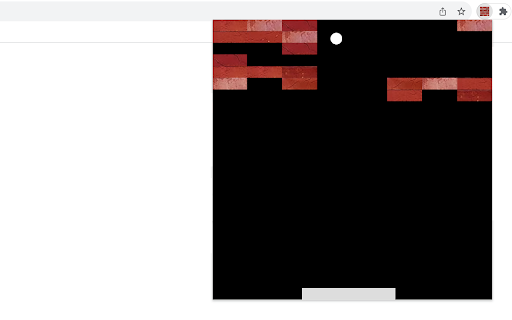


Bounce the ball to break bricks placed in random locations. Brick Break is an entertaining game where you control a paddle to bounce a ball and destroy bricks. This game combines strategy, precision, and timing, offering endless fun directly from your browser. 1) Click the extension icon in your Chrome browser to open the game. You'll be presented with a 480x480 game area. 2) Game Area Layout: - Paddle: Located at the bottom, it's your tool to control the game. - Ball: Begins in the middle of game area, moving in a random downward direction. - Bricks: Randomly placed at the top of the game area in each round. 3) Controlling the Paddle: - Slide your mouse horizontally across the game area and the paddle will mirror its movement. 4) Game Rule: - The ball bounce off the paddle and left/right/top walls until all bricks are broken or it misses the paddle and hits the bottom wall. - Win: Clear all bricks to win the game. - Lose: The game ends if the ball passes the paddle and touches the bottom wall. - Restart: In case of a win/loss, a "Restart" button will appear. Click this button to reset the game and start fresh. 5) Tips for Success: - Focus: Keep a close eye on the ball and anticipate its bounce angles. - Strategic Positioning: Move the paddle to strategic positions to target hard-to-reach bricks. Give it a try and see how quickly you can break all the bricks! Ready for a challenge? Click 'Play More Levels' below the restart button to try Level-Up mode. Additionally, once you've finished the game, you'll find a selection of our featured game extensions at the bottom, added for your extra enjoyment. CHANGELOG ========== Version 0.1.1 - 0.1.9 - Add google analytics - Add the link of more levels - Show featured games after game over - Dynamic update of feature game list - Prettify code and styles Version 0.1.0 - Initial release of the game

Balloon Pop Game
Pop as many balloons as you can to get the highest score! This simple game will test your reflexes and aim as you try to pop as many balloons as you can. Your goal is to accumulate the highest score possible by clicking on the balloons as they float upwards. The more balloons you pop, the faster they will rise! Let's get started with this fun and exciting game. How to play: - To play the game, simply click on a balloon as it rises through the game area. - When you click on a balloon, it will disappear, and its score value will be added to your total score. - Keep clicking on balloons to accumulate points and watch your total score grow. Game Rules: - Balloons' starting positions are random horizontally along the bottom of the game area. - As your total score increases, the speed at which the balloons rise will also increase, making the game more challenging. Enjoy the game and have fun! Additionally, we've presented some of our featured game extensions to provide extra enjoyment options after game over. CHANGELOG ========== Version 0.1.1 - 0.1.8 - Add google analytics - Show featured games after game over - Dynamic update of featured game list - Prettify code and styles

Star Match Game
The Star Match Game requires you to match at least 3 adjacent stars of the same colors. The rule is very simple. Try to find 3 or more adjacent stars with the same color. These stars will be automatically highlighted when you mouse over them. Just click on any of the stars to crush them. The more adjacent stars crushed, the higher score you will get. When reaching the target score of current level, the game will automatically go to next level in a few seconds. Reminder: No time limit has been set for each level, so you have enough time to find more adjacent stars and get the higher score, no hurry! Go ahead and test your skills to see how far you can progress! For a variety of gaming experiences, feel free to explore our featured game extensions listed at the bottom of the game window at any time. CHANGELOG ========== Version 0.1.4 - 0.1.5 - Add google analytics - Show the list of new games - Prettify code and styles Version 0.1.0 - 0.1.3 - Initial release of the game - Update interface & features

Space Fighter Game
A classic shooter game that plays in a popup. Beat enemy aircraft and get high score! Space Fighter is a simple and fun shooter game you can play for as long as you want. Just beat more enemy aircraft to get as much score as possible! 1) Click the game icon on the Chrome toolbar. The game window will be opened while the game will be started immediately. 2) Use your mouse to control the location of space fighter which moves as your mouse. 3) No worry about the control of shooting. Your fighter will continuously shoot enemy aircraft in front of it, with a given bullet speed. 4) Click on your fighter if you want to pause / continue with current game. - Three types of enemy aircraft are available for now. More will be added in the future version. - The enemy aircraft will be gradually accelerated as you reach higher scores. - You can close the popup to exit current game anytime. The extension can remember where you left off and start from it when you open the popup again. Enjoy the game! After gameplay ends, we may recommend other game extensions from us that you can choose to explore or ignore. CHANGELOG ========== Version 0.1.4 - 0.2.3 - Display featured games after game over - Update featured game name - Dynamic update of featured game list - Prettify code and styles Version 0.1.2 - 0.1.3 - Refactor the codes - Add the section of new games Version 0.1.0 - 0.1.1 - Initial release and feature updates

Drag Maze
Quickly drag the red dot to the orange exit while avoiding borders. Just click on the maze extension icon in the top right corner of your browser and the game will start immediately in a popup! All you need to do is to move the red dot along the white path until it reaches the orange exit. • For moving the red dot, just click on it and drag it with your mouse. Just be careful not to touch the blue borders as you move. • A timer is displayed in the top bar of the maze, indicating the amount of time you've spent on the current level. Once you've completed all the levels, you'll be able to view the total time used. • To advance to the next level, completion of the current level is required. To return to level one, just click the reset button whenever you wish. • If you happen to fail the current level, the game will automatically restart shortly thereafter. The extension has thirteen built-in maps and if you want to try more maps, just visit our website to access them. Beat the maze challenge and have fun! CHANGELOG ========== Version 0.1.1 - 0.1.8 - Add google analytics - Update the link to more maps - Prettify code and styles
