
cilmialfmpdohhenkpadkgengcapciap

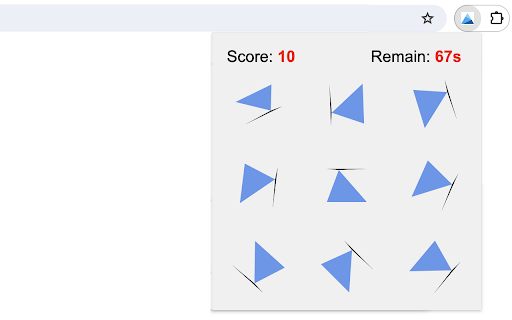
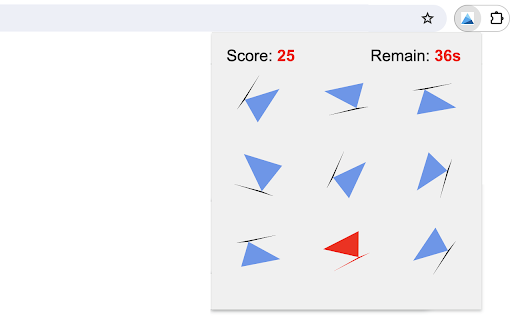


Find unique triangle from the grid. This triangle hunt game is a fun and challenging way to test how well you notice details when you're in a hurry. The goal is to find the one unique triangle in a 3x3 grid within 100 seconds. Eight of these triangles are identical, but one is different and marked uniquely. To increase game difficulty, each triangle is rotated randomly, with a black line beneath it indicating its orientation. 1. Just click on the extension icon in the browser, you'll be presented with a grid of nine triangles and a section at the top showing your points and time left. 2. Click on the one you think is different. It will light up red. 3. If you're right, you get 5 points and automatically move to the next round. If you're wrong, keep guessing by clicking on another triangle. 4. You can keep playing to get as many points as you can until the time runs out. - In your quick review of the grid, focus more on any triangle that noticeably differs from the rest in triangle area. - Find the right mix of quickness and precision to boost your score the most. Good luck and enjoy the game! Plus, we've featured our other exciting game extensions after the game ends for even more fun! CHANGELOG ========== Version 0.1.1 - 0.1.7 - Add google analytics - Show featured games after game over - Dynamic update of featured game list - Prettify code and styles

Maze
Just click on the maze extension icon in the top right corner of your browser and the game will start immediately in a popup! The maze is randomly generated and changes every time the game starts or restarts. Your goal is to move the red block from the top-left corner to the green block in the bottom-right corner within 20 seconds. Use either the Arrow keys or WASD keys to move. The bar at the top of your maze shows how much time you have left. When the game ends, press the Restart button or the Space/Enter key to begin a new game. Have fun with the maze game! If you'd like to play the next level or check the shortest path, simply click the corresponding links below the 'Restart' button. Additionally, we've added some of our featured game extensions to the game over page for extra enjoyment. CHANGELOG ========== Version 0.3.0 - 0.4.2 - Update the link of the shortest path - Add the link of playing the next level - Dynamic update of featured game list - Add WASD movement support - Prettify code and styles Version 0.2.0 - 0.2.9 - Add the link of bonus features - Add the link of the shortest path - Display featured products after game over Version 0.1.7 - 0.1.8 - Add the section on new games - Update the game list with time Version 0.1.0 - 0.1.6 - Initial release and feature updates

Tic-Tac-Toe Game
A classic tic-tac-toe game that plays with AI player in a popup Play Tic-Tac-Toe game in single player mode against an AI player. Try to set different difficulty levels and see if you can beat the AI. You may love the smartest AI player with master level. Have fun with this classic puzzle game! Additionally, we've added some of our featured game extensions at the bottom for your extra enjoyment. CHANGELOG ========== Version 0.1.3 - 0.1.5 - Add the section on new games - Prettify code and styles Version 0.1.0 - 0.1.2 - Initial release of the game - Improve game interface

Fruit Collect Game
Collect as many fruits as you can in a given time! Playing the game is easy. Just move the collector (basket) across the screen to pick up as many fruits as possible in 20 seconds. Try to win the game faster each time you play and have fun! 1) Start the Game: Click the extension icon, and the game window will open immediately in a pop-up. 2) Control the Collector: Use the Arrow keys or WASD on your keyboard to move the basket around the game area. 3) Collect Fruits: Navigate the basket to the fruits that appear randomly on the screen. Each fruit you collect will increase your score. 4) Scoring: Different fruits have different point values. Aim for the ones that will give you the most points! The game ends after 20 seconds. Plan your route wisely and move quickly to gather all the fruits within this time. Have fun playing the fruit collect game! Additionally, we've shown our featured game extensions after the game ends to give you more options for fun. CHANGELOG ========== Version 0.1.1 - 0.1.7 - Add google analytics - Show featured games after game over - Enable dynamic update of featured games - Add WASD movement support - Prettify code and styles

Letter Swap Game
In this game, your goal is to clear sets of three identical letters within a limited 60-second period. The game consists of a 6x6 grid filled with 36 randomly placed letters. In the upper-left corner of the game screen, you'll see a timer counting down from 60 seconds. On the top-right, your current score is shown. 1. Click on a cell with a letter to choose it. Once selected, the cell will be highlighted. 2. Click on another cell with a letter to exchange their positions. The highlight will disappear from the first cell after the swap. You can also swap with an empty cell. 3. If you have three identical letters arranged horizontally or vertically as neighbors, they will vanish from the grid, and your score will go up by 3 points. 4. If you successfully remove all sets of three identical letters from the grid before the timer runs out, you win, and a victory message will appear in an overlay. Otherwise, you lose. - Have a quick scan of the entire grid for potential matches. Pay extra attention to neighboring identical letters and eliminate them first. - Swap letters with empty cells can help you create new matches. Enjoy playing the Letter Swap Game! Strive to achieve the highest score by cleverly swapping letters and removing matching sets! Plus, we've showcased our other exciting game products after the game ends for even more enjoyment. CHANGELOG ========== Version 0.1.1 - 0.1.6 - Add google analytics - Show featured games after game over - Enable dynamic update of featured games - Prettify code and styles
