
gcmncppaaebldbkgkcbojghpmpjkdlmp

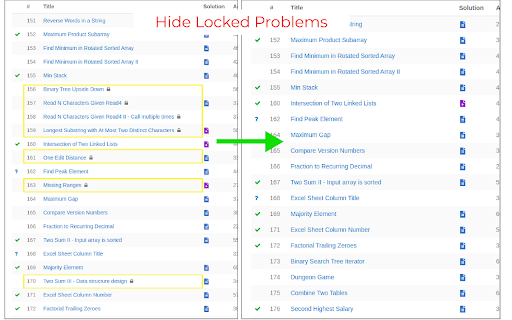

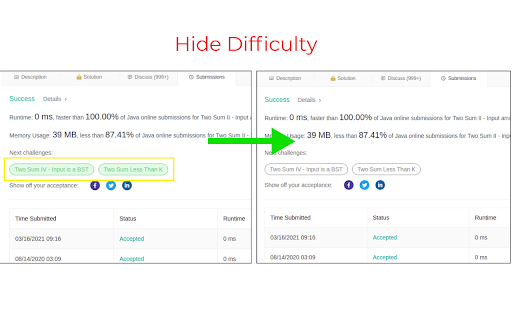

A browser extension to improve productivity on Leetcode. It is a light-weight browser extension which boosts your productivity by hiding unnecessary visual elements from the screen, enabling you to focus on what is important. You can change your preferences form the popup menu and find out what best suits your needs. Its has the following features: **[Supports new UI]** - Hide locked problems from the table - Hide / Show any table column - Highlight solved problems - Hide difficulty count - Hide solved problems STOP getting intimidated by difficulty and FOCUS on problem-solving!

Leetcode Explained
Enhances Leetcode problems with solution code, video explanations, and GPT code analysis. Key features 🚀 Added into the Leetcode problem page 1️⃣ Code solutions in Python, Java, C++, and Javascript. 2️⃣ Top 5 popular youtube solution videos. 3️⃣ Top 5 companies asking that problem. Click the company tag to view all problems asked by that company GPT Features 🤖 Pin and open the extension and open to access 1️⃣ Generates the solution code using the problem description, constraints, hints, etc. 2️⃣ Gets the time and space complexity of your code Additional Features ⭐ 1️⃣ Elo rating added to 1500 problems. Number difficulty instead of Easy, Medium, Hard 2️⃣ Open settings in the popup to hide Leetcode examples and difficulty to simulate a real interview environment. Tutorial 📚 This extension only works with the new Leetcode UI. 1️⃣ Solution videos & code are available in the "Solutions" tab 2️⃣ Company tags are available in the Description tab Privacy 🔒 Everything is stored locally in your browser. No API key needed for GPT functionality. Simply login to chat.openai.com in your browser.

Leet Xt - Supercharge your Leetcode practice
Supercharge your LeetCode practice - Add to Friends, Premium Features, per Contest Friends Rating, and more! 🚀 Leetcode just got a lot better with Leet Xt! 🚀 🧐 Add Users to Friends Page: Easily add your friends from their profile page using the star button, making it simpler than ever to connect and compete. 🧑🤝🧑 Friends Page: Sort and organize your friends on the Friends Page, making it effortless to keep track of your network. 🔄 Import and Export Friends: Seamlessly import and export friends using extension options, making it a breeze to manage your LeetCode connections. 🏆 Contest Rating Predict: Get ahead of the curve by predicting your rating before official contest results are out. Just hit the special button on the contest page. 👥 View Friends Participating: Stay in the know about which of your friends are participating in contests, and check out their predicted ratings, even for past contests. 📚 Explore Company Problems: Easily access all problems from a specific company, complete with duration and frequency data. 🔓 Unlock Editorials: View locked editorials for problems to help you understand the solutions better. 📊 Problem Rating and Tags: Quickly access problem ratings and see contest and company tags on the problems page using the locked companies button. Ready to enhance your LeetCode journey?

LeetCode Timer
Leetcode timer and performance tracking This Chrome browser extension is a must-have for coders who want to track their coding time on LeetCode.com and set time limits for themselves. With this extension, you can: - Track your coding time on each LeetCode problem. The extension will automatically start a timer when you start working on a problem and stop it when you submit your solution. You can then view your total coding time at the end for each problem. - Set time limits for yourself based on problem difficulty. The extension allows you to set different time limits for easy, medium, and hard problems. This can help you to focus on and complete problems more efficiently. Release notes for Ver. 4.2: - Revert the timer hiding behavior to its previous version. Release notes for Ver. 4.1: - Fix broken features (Hiding difficulty and acceptance rates) due to UI changes. - The timer has been made robust to handle inactive tabs when practicing outside of the browser tab. Release notes for Ver. 4.0: - Fix timer not showing up due to recent Leetcode layout changes. Release notes for Ver. 3.9: - Minor bug fixes Release notes for Ver. 3.8: - Fix a bug in timer toggling functionality. Release notes for Ver. 3.7: - Fix a bug in timer auto pause functionality when a problem is submitted multiple times. Release notes for Ver. 3.6: - Fix a bug in timer auto pause functionality when a problem is submitted multiple times. Release notes for Ver. 3.5: - Show/Hide Difficulty in recommended problems list - Many more bug fixes and improvements Release notes for Ver. 3.4: - Fix broken Auto pause functionality in Dynamic layout Release notes for Ver. 3.3: - Fix broken timer animation when paused in new layouts - Fix broken Hide Acceptance rate feature in Dynamic layout - Fix timer reset button not working when problem page is loaded Release notes for Ver. 3.2: - Fix timer stuck at loading in Dynamic layout when Hide difficulty setting is turned on. Release notes for Ver. 3.1: - Fix broken styles causing timer text invisible in dark mode - Update feedback/bug report link - Add extension rating link in the popup page. Release notes for Ver. 3.0: - New Timer Design - Timer is now draggable and can be placed where ever you want on the page. - Added support for all Leetcode UI modes(Old, Split View , Dynamic) - Bug fixes Update: 2023-08-16 Fix Broken features in old UI due to the recent release. Update: 2022-09-16 New Features: 1. Improved UI. 2. Timer will now appear for all LeetCode Explore problems. 3. Set time limits for each difficulty. Bug fixes: 1. Fix: Timer showing up in the problem discussion page 2. Fix: Hide time icon not showing up Please rate it if you find this extension useful and provide feedback if you are uninstalling.

Leetcode format
Adds Format code button on leetcode to format the code using Prettier code formatter This Google chrome extension adds the Format button to the LeetCode code editor. Currently supported programming languages are Java, C++, JavaScript, TypeScript and Dart. Supports LeetCode old and new UI both, including dynamic layout. Release Notes 1.9: * Bug fix with dynamic layout Release Notes 1.7: * Bug fixes for new UI * Add hotkey support for old UI as well Release Notes v1.5: * Added support for both old and new UI.
