
gfkgelnlcnomnahkfmhemgpahgmibofd


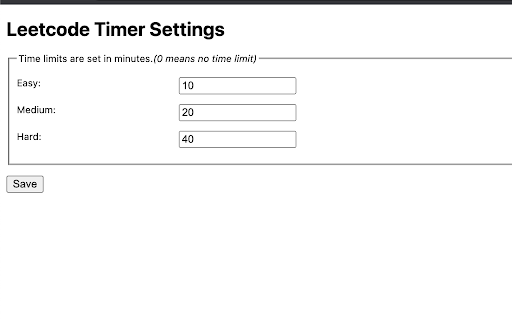

Leetcode timer and performance tracking This Chrome browser extension is a must-have for coders who want to track their coding time on LeetCode.com and set time limits for themselves. With this extension, you can: - Track your coding time on each LeetCode problem. The extension will automatically start a timer when you start working on a problem and stop it when you submit your solution. You can then view your total coding time at the end for each problem. - Set time limits for yourself based on problem difficulty. The extension allows you to set different time limits for easy, medium, and hard problems. This can help you to focus on and complete problems more efficiently. Release notes for Ver. 4.2: - Revert the timer hiding behavior to its previous version. Release notes for Ver. 4.1: - Fix broken features (Hiding difficulty and acceptance rates) due to UI changes. - The timer has been made robust to handle inactive tabs when practicing outside of the browser tab. Release notes for Ver. 4.0: - Fix timer not showing up due to recent Leetcode layout changes. Release notes for Ver. 3.9: - Minor bug fixes Release notes for Ver. 3.8: - Fix a bug in timer toggling functionality. Release notes for Ver. 3.7: - Fix a bug in timer auto pause functionality when a problem is submitted multiple times. Release notes for Ver. 3.6: - Fix a bug in timer auto pause functionality when a problem is submitted multiple times. Release notes for Ver. 3.5: - Show/Hide Difficulty in recommended problems list - Many more bug fixes and improvements Release notes for Ver. 3.4: - Fix broken Auto pause functionality in Dynamic layout Release notes for Ver. 3.3: - Fix broken timer animation when paused in new layouts - Fix broken Hide Acceptance rate feature in Dynamic layout - Fix timer reset button not working when problem page is loaded Release notes for Ver. 3.2: - Fix timer stuck at loading in Dynamic layout when Hide difficulty setting is turned on. Release notes for Ver. 3.1: - Fix broken styles causing timer text invisible in dark mode - Update feedback/bug report link - Add extension rating link in the popup page. Release notes for Ver. 3.0: - New Timer Design - Timer is now draggable and can be placed where ever you want on the page. - Added support for all Leetcode UI modes(Old, Split View , Dynamic) - Bug fixes Update: 2023-08-16 Fix Broken features in old UI due to the recent release. Update: 2022-09-16 New Features: 1. Improved UI. 2. Timer will now appear for all LeetCode Explore problems. 3. Set time limits for each difficulty. Bug fixes: 1. Fix: Timer showing up in the problem discussion page 2. Fix: Hide time icon not showing up Please rate it if you find this extension useful and provide feedback if you are uninstalling.

Competitive Companion
Parses competitive programming problems and sends them to various tools like CP Editor and CPH. Competitive Companion parses competitive programming problems and contests and sends the parsed data to various tools like CP Editor and CPH. At the moment it supports 117 online judges, including most major ones like AtCoder and Codeforces. Using it is very simple. Just install the extension, make sure you got one of the supported tools open, navigate to a problem page and click on the green plus icon in the top-left of your browser. On websites where Competitive Companion is able to parse contests, navigating to the page with all the problems and clicking on the green plus icon will download and parse all problems in the contest at once. You can also use the Ctrl+Shift+U shortcut instead of the green plus icon (configurable on chrome://extensions/shortcuts).

LeetHub v2
Automatically integrate your Leetcode & GeeksforGeeks submissions to GitHub What is LeetHub v2? A chrome extension that automatically pushes your code to GitHub when you pass all tests on a Leetcode problem. Re-built from the original popular LeetHub extension, it improves and expands upon the original, now featuring support for the new Leetcode UI. Why LeetHub? 1. Recruiters *want* to see your contributions to the Open Source community, be it through side projects, solving algorithms/data-structures, or contributing to existing OS projects. As of now, GitHub is developers' #1 portfolio. LeetHub just makes it much easier (autonomous) to keep track of progress and contributions on the largest network of engineering community, GitHub. 2. There's no easy way of accessing your leetcode problems in one place! Moreover, pushing code manually to GitHub from Leetcode is very time consuming. So, why not just automate it entirely without spending a SINGLE additional second on it? 3. Completely secure! The extension runs entirely on your device and only makes 3rd-party API calls to GitHub for authentication. How does LeetHub work? After installing the extension and launching LeetHub, it's as simple as: 1. Click on "authorize with GitHub" button to automatically set up your account with LeetHub. 2. Setup an existing/new repository with LeetHub (private by default) by clicking "Get Started" button. 3. And that's it 🎉 ...begin Leetcoding! To view your progress, simply click on the LeetHub icon! BONUS: Star LeetHub v2 on GitHub for further development of features @ https://github.com/arunbhardwaj/LeetHub-2.0 Let's see you ACE that coding interview! UPDATES: ** Nov. 19 2025 ** - Fixes mismatch with problem numbers. Now uses the proper id numbers visible on LeetCode. ** Jun. 2 2024 ** - Manual submission button (beta) - fixes GitHub rate-limit issue with problem/topic organization README feature ** May. 30 2024 ** - fixes issue where submission sometimes does not upload to GitHub - fixes upload progress spinner not appearing - fixes issue with submissions not going through on study plan pages ** Jul. 24 2023** - fixes an issue preventing submission to GitHub for LeetCode submissions due to UI change

Leetcode format
Adds Format code button on leetcode to format the code using Prettier code formatter This Google chrome extension adds the Format button to the LeetCode code editor. Currently supported programming languages are Java, C++, JavaScript, TypeScript and Dart. Supports LeetCode old and new UI both, including dynamic layout. Release Notes 1.9: * Bug fix with dynamic layout Release Notes 1.7: * Bug fixes for new UI * Add hotkey support for old UI as well Release Notes v1.5: * Added support for both old and new UI.

Leetcode Enhancer
A browser extension to improve productivity on Leetcode. It is a light-weight browser extension which boosts your productivity by hiding unnecessary visual elements from the screen, enabling you to focus on what is important. You can change your preferences form the popup menu and find out what best suits your needs. Its has the following features: **[Supports new UI]** - Hide locked problems from the table - Hide / Show any table column - Highlight solved problems - Hide difficulty count - Hide solved problems STOP getting intimidated by difficulty and FOCUS on problem-solving!
