
cofoinjfjcpgcjiinjhcpomcjoalijbe
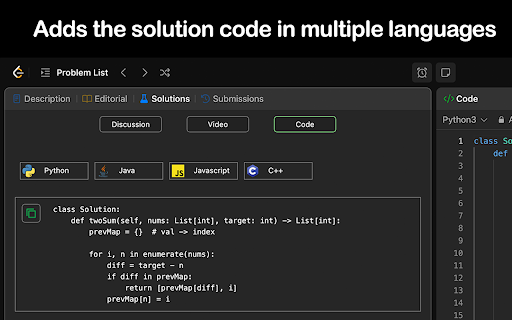


Enhances Leetcode problems with solution code, video explanations, and GPT code analysis. Key features 🚀 Added into the Leetcode problem page 1️⃣ Code solutions in Python, Java, C++, and Javascript. 2️⃣ Top 5 popular youtube solution videos. 3️⃣ Top 5 companies asking that problem. Click the company tag to view all problems asked by that company GPT Features 🤖 Pin and open the extension and open to access 1️⃣ Generates the solution code using the problem description, constraints, hints, etc. 2️⃣ Gets the time and space complexity of your code Additional Features ⭐ 1️⃣ Elo rating added to 1500 problems. Number difficulty instead of Easy, Medium, Hard 2️⃣ Open settings in the popup to hide Leetcode examples and difficulty to simulate a real interview environment. Tutorial 📚 This extension only works with the new Leetcode UI. 1️⃣ Solution videos & code are available in the "Solutions" tab 2️⃣ Company tags are available in the Description tab Privacy 🔒 Everything is stored locally in your browser. No API key needed for GPT functionality. Simply login to chat.openai.com in your browser.

BetterLC
Chrome extension to unlock leetcode company tags. BetterLC - Unlock Company Tags on LeetCode for Free Enhance your LeetCode experience with BetterLC! Unlock company tags effortlessly by simply opening any LeetCode problem and hovering over the embedded BetterLC icon. Gain insights into which companies ask specific problems, helping you prepare more effectively for interviews. Empower your preparation with BetterLC!

Marble - LeetCode Tutor
AI-powered interactive walkthroughs for any leetcode problem Marble adds an AI-powered tutor on top of leetcode for any problem in any language. The tutor allows for interactive walkthroughs which promote a deep understanding of leetcode patterns. **The walkthroughs involve**: 1. Understanding the problem 2. Creating a plan 3. Implementing the plan by coding it This process is very similar to what technical interviewers want to see in your thinking process. - - - - - How does it work? Open a leetcode problem, then click on the circle pin to start the interactive walkthrough. Email me with any questions or feedback: miguel@opencode.so

LeetCode Video Soltuions(New Ui)
Watch Youtube video Solutions of Leetcode problems on the Leetcode page itself for free IMPORTANT NOTE: The extension is not working properly now due to recent changes in the LeetCode UI. I'll fix it as soon as I get time. Your cooperation will be helpful! Watch LeetCode Video Solutions on the Leetcode page itself for free Features: . Adds a Button on the problem page which shows the video solutions when clicked. . shows the the top 10 solutions of a problem from Youtube. . Increases productivity. LeetCode Video Solutions extension works with the NEW UI of Leetcode With this extension You don't need to search for a video solution on youtube u can see it on the leetcode page itself.say goodbye to getting distracted on Youtube while searching for solutions! The Videos are fetched from youtube and they're in all programming languages. Report any bugs or new features to the developer on LinkedIn(https://www.linkedin.com/in/mohammad-shoeib-55766a215/) Don't forget to leave a review in the Review tab :) if u liked my work and want to support me : https://www.buymeacoffee.com/mohammadshD

Competitive Companion
Parses competitive programming problems and sends them to various tools like CP Editor and CPH. Competitive Companion parses competitive programming problems and contests and sends the parsed data to various tools like CP Editor and CPH. At the moment it supports 117 online judges, including most major ones like AtCoder and Codeforces. Using it is very simple. Just install the extension, make sure you got one of the supported tools open, navigate to a problem page and click on the green plus icon in the top-left of your browser. On websites where Competitive Companion is able to parse contests, navigating to the page with all the problems and clicking on the green plus icon will download and parse all problems in the contest at once. You can also use the Ctrl+Shift+U shortcut instead of the green plus icon (configurable on chrome://extensions/shortcuts).
