
dlahgjgaomjgkknpcbkhjpapcflphgle
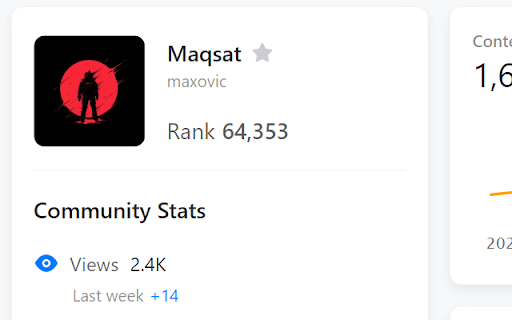

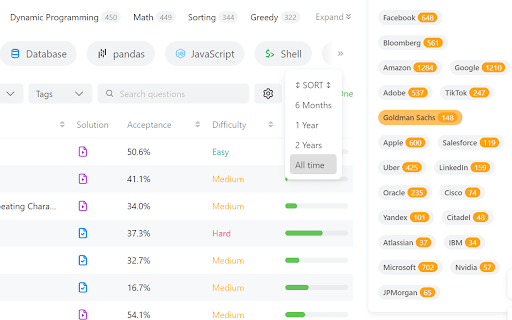
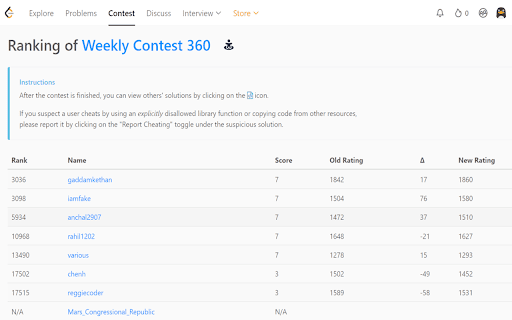

Supercharge your LeetCode practice - Add to Friends, Premium Features, per Contest Friends Rating, and more! 🚀 Leetcode just got a lot better with Leet Xt! 🚀 🧐 Add Users to Friends Page: Easily add your friends from their profile page using the star button, making it simpler than ever to connect and compete. 🧑🤝🧑 Friends Page: Sort and organize your friends on the Friends Page, making it effortless to keep track of your network. 🔄 Import and Export Friends: Seamlessly import and export friends using extension options, making it a breeze to manage your LeetCode connections. 🏆 Contest Rating Predict: Get ahead of the curve by predicting your rating before official contest results are out. Just hit the special button on the contest page. 👥 View Friends Participating: Stay in the know about which of your friends are participating in contests, and check out their predicted ratings, even for past contests. 📚 Explore Company Problems: Easily access all problems from a specific company, complete with duration and frequency data. 🔓 Unlock Editorials: View locked editorials for problems to help you understand the solutions better. 📊 Problem Rating and Tags: Quickly access problem ratings and see contest and company tags on the problems page using the locked companies button. Ready to enhance your LeetCode journey?

BetterLC
Chrome extension to unlock leetcode company tags. BetterLC - Unlock Company Tags on LeetCode for Free Enhance your LeetCode experience with BetterLC! Unlock company tags effortlessly by simply opening any LeetCode problem and hovering over the embedded BetterLC icon. Gain insights into which companies ask specific problems, helping you prepare more effectively for interviews. Empower your preparation with BetterLC!

LeetCode Video Solutions
Watch free LeetCode video ▶ solutions on the problem page itself. MASSIVE UPDATE (again) 🎉: I have completely updated the extension to work with the NEW UI of LeetCode, including the dynamic UI layout. This has been long time coming and has been requested so many times by you guys. Thanks for supporting the extension so much and yeah, keep LeetCoding! (Stay tuned for more new exciting features) With LeetCode Video Solutions extension, you can watch helpful video solutions of a problem without leaving the problem page! Now you don't have to be distracted by watching cat videos on YouTube when you should be solving a LeetCode problem! When using the extension, you can see the solution videos' duration, upload date, views, channel and other information. The solutions are sourced from all over the internet and they are in different programming languages and cover different solving techniques and algorithms. Report any bugs/ suggest features to the developer: Soumya (@geekysrm) on Twitter 🐜 Don't forget to give a review on the Reviews tab if this extension helped you! :) ⭐ Buy Me a Coffee if you really love this and want to support me: https://coffee.soumya.dev/ ☕

CrackTech - Tech Interview Preparation
A tool that can help candidate to prepare for a tech interview preparation. [v2.2.0] - Name modified to CrackTech - Tech Interview Preparation - Daily system design, low-level design, test engineering, behavioral content recommendation. - Relevant database preparation. - List of system design, low-level design, test engineering, behavioral contents. - Removed the contest and notification features [v2.1.0] - Company-based problems filtering. - Tabbed layout to add Company-based filtering. - `About Me` branding page. - Bring problems asked in companies into a tabbed layout. - Separate the database. - Create a company name database to parse company names. - Create a script to auto-parse company names. - Modify relevant pages. - Chrome-only update. - Notices updated. - README updated. [v2.0.0] - Prepare with Popular SDE Sheet. - Progress tracking window for each sheet. - Summarized progress tracking status. - Reset progress for the currently selected sheet and all available sheets. - Notices on top of the page. - Change the appearance of the DSA preparation section and the Contest viewing section. [v1.0.8] - (✯) Notation for recently asked questions reflected in the following page - Extension pop up window - All Company page - A public All Company information page has been published at https://ssavi-ict.github.io/LeetCode-Which-Company/ - A workaround All Company web link is added to the extension PopUP for those who are not able to see the company information for some reason. [v1.0.7] - Next To Solve suggestions for [Easy], [Medium], [Hard] category unsolved problems. - User Solving Summary categorized in difficulty level. - Solving percentage of [Easy], [Medium], [Hard] category problems shown in a PIE CHART. - Quick access panel added on Company Information and User Stats Analysis page. Are you preparing for your technical interviews? Are you looking for the question asked by companies like Microsoft, Google, Meta, Apple etc.? Then this extension gives you what you are looking for. This extension is my effort to make your preparation one step better. If you are solving problems on leetcode and you do not have premium account to see company information then I am definite that this extension will give you the same experience to some extent. You can prepare for you dream companies and sharpen your DSA skill accordingly. However, since I am continuously updating company information solely, you might not get company information for every single company like you can find in leetcode premium. I collect company information from different source of the internet and update in my database. So in some cases, you might get some more company information than Leetcode provides. Now what are you waiting for? Install this add-on and boost your prep up.

LeetHub v2
Automatically integrate your Leetcode & GeeksforGeeks submissions to GitHub What is LeetHub v2? A chrome extension that automatically pushes your code to GitHub when you pass all tests on a Leetcode problem. Re-built from the original popular LeetHub extension, it improves and expands upon the original, now featuring support for the new Leetcode UI. Why LeetHub? 1. Recruiters *want* to see your contributions to the Open Source community, be it through side projects, solving algorithms/data-structures, or contributing to existing OS projects. As of now, GitHub is developers' #1 portfolio. LeetHub just makes it much easier (autonomous) to keep track of progress and contributions on the largest network of engineering community, GitHub. 2. There's no easy way of accessing your leetcode problems in one place! Moreover, pushing code manually to GitHub from Leetcode is very time consuming. So, why not just automate it entirely without spending a SINGLE additional second on it? 3. Completely secure! The extension runs entirely on your device and only makes 3rd-party API calls to GitHub for authentication. How does LeetHub work? After installing the extension and launching LeetHub, it's as simple as: 1. Click on "authorize with GitHub" button to automatically set up your account with LeetHub. 2. Setup an existing/new repository with LeetHub (private by default) by clicking "Get Started" button. 3. And that's it 🎉 ...begin Leetcoding! To view your progress, simply click on the LeetHub icon! BONUS: Star LeetHub v2 on GitHub for further development of features @ https://github.com/arunbhardwaj/LeetHub-2.0 Let's see you ACE that coding interview! UPDATES: ** Nov. 19 2025 ** - Fixes mismatch with problem numbers. Now uses the proper id numbers visible on LeetCode. ** Jun. 2 2024 ** - Manual submission button (beta) - fixes GitHub rate-limit issue with problem/topic organization README feature ** May. 30 2024 ** - fixes issue where submission sometimes does not upload to GitHub - fixes upload progress spinner not appearing - fixes issue with submissions not going through on study plan pages ** Jul. 24 2023** - fixes an issue preventing submission to GitHub for LeetCode submissions due to UI change
