
gahcfmlnmednhnbkifdoffblfffpeljf
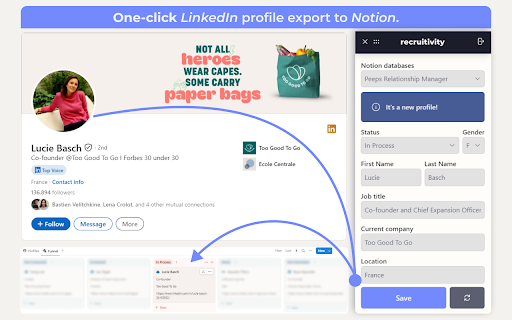

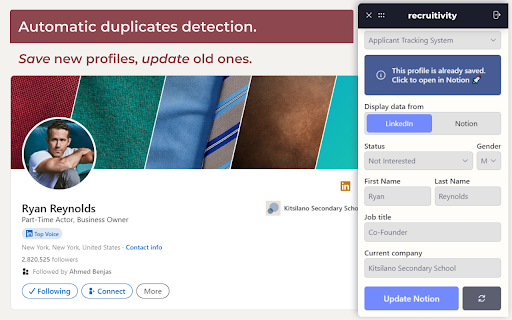
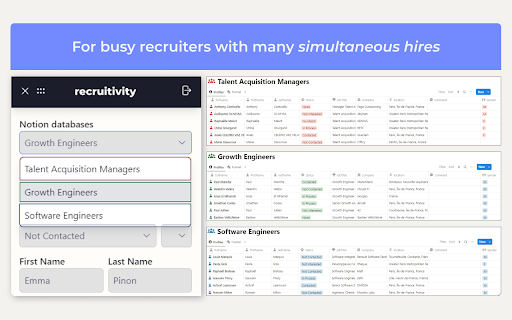
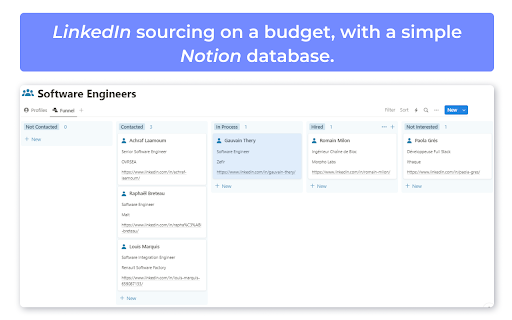
You’re a recruiter, on a budget, with no time to waste. You even might have thought about using Notion as your own ATS. But soon, you spent your days copy-pasting data from LinkedIn to Notion. What should have taken seconds, took hours… And got worse! If you didn’t pay enough attention, you ended up with duplicates in your database. Days went by, and you were still nowhere near finding the perfect candidate. Well, dear recruiter, I’m glad to tell you that your problem has a simple and free solution: recruitivity. It’s a no-brainer chrome extension that helps you save LinkedIn profiles in Notion databases, in no more than a click! 🚿 Not a single copy-paste in your life again with automatic fields filling 👬 Automatic duplicates detection. You can save new profiles, and update old ones. 👀 To each recruitment its Notion database. Just pick one before you save. Install recruitivity right now and watch profiles teleport from LinkedIn to Notion!

Bookmarker for Notion
Eye-candy 21st century bookmarks, straight into your notion workspace Forget your old-fashioned web-bookmarks and get auto generated content previews that magnify your content, creating amazing Notion collections.

PerfectPost: makes Linkedin 10x better
A browser extension to improve your LinkedIn writing experience PerfectPost is a Chrome extension designed to transform your LinkedIn experience and help you create, organize, and publish content more effectively, directly within the LinkedIn interface. It is built for content creators, freelancers, entrepreneurs, marketing teams, and community managers who want to structure their LinkedIn presence, save time, and engage with the right people at the right moment. Everything happens where you already work: on LinkedIn. Key features of the PerfectPost extension Rich text editor for LinkedIn Easily add bold text, italics, and emojis to your LinkedIn posts. Instantly see the final rendering without using external tools or copy-paste tricks. Built-in writing assistant Get help while writing your LinkedIn posts to improve clarity, impact, and overall quality. Publish faster while staying relevant and engaging. LinkedIn draft management Save your ideas and post drafts directly from LinkedIn. Prepare content in advance, organize your drafts, and come back to them anytime without losing your work. Post scheduling Schedule your LinkedIn posts in advance directly from the LinkedIn interface. Maintain a consistent posting rhythm without daily effort. Post preview before publishing See exactly how your post will look before publishing, including formatting, line breaks, and emojis. Mobile preview Preview how your LinkedIn posts will appear on mobile devices. Essential to ensure readability and impact on smartphones. “See more” line preview Know exactly where LinkedIn will cut your post with the “see more” line. Optimize your hooks and place key messages before the cut. Custom LinkedIn Feeds Create personalized LinkedIn feeds directly inside LinkedIn. Custom Feeds allow you to group specific profiles and follow only the posts from people that matter most to you. Perfect for • Tracking prospects • Engaging with clients • Following strategic connections • Never missing important posts Custom Feeds replace the standard LinkedIn feed with a focused, engagement-driven view. Engagement and interaction tracking Access key metrics to better understand your LinkedIn performance. Identify your best posts, top commenters, and quickly spot comments that still need a reply. Organization and productivity PerfectPost turns LinkedIn into a real content and engagement workspace. You centralize your posts, interactions, and daily LinkedIn activity in one place. • Save time every day • Publish higher-quality content • Focus on meaningful engagement • Clear and structured workflow • No need to leave LinkedIn PerfectPost does not modify LinkedIn. The extension adds powerful features directly into the existing interface, seamlessly and naturally. Easy installation and instant onboarding Once installed, the extension automatically activates on LinkedIn with no complex setup required. PerfectPost is the ideal tool to write, organize, schedule, and engage effectively on LinkedIn, directly from your browser.

Scheduled Analytics
Get the stats of your LinkedIn posts into Notion Get your LinkedIn posts analytics into Notion. Scheduled is the chosen Notion integration tool used by soloproneurs, ghostwriters and social media teams to publish and track their LinkedIn posts from Notion. - Be organized by centralizing all your content in Notion - Be disciplined and efficient by building a content process creation in Notion - Never leave Notion to publish your LinkedIn posts - Get your LinkedIn posts analytics in Notion automatically (1) Use this extension to synchronize your Scheduled account with your LinkedIn profile. (2) Connect your Notion database with your Scheduled account. (3) Test and activate your reporting to get your stats automatically into Notion. Here is the data you'll have into Notion about your LinkedIn posts: - The content of the post - The publication date - The format - The link of the post - The number of impressions, reactions and comments Contact the developer if you have any questions. To use this extension you'll need to sign up (or sign in) to Scheduled. Scheduled will use your LinkedIn session to get only your LinkedIn posts.

Notion Table of Contents (Outline)
Show table of contents (outline) in the sidebar for Notion pages Show table of contents (outline) in the sidebar for Notion pages Show a table of contents (outline) in the sidebar for Notion pages. You can quickly navigate through your long Notion pages. (When you visit to a page without headings, the table of contents is automatically hidden.)
