
ifghafniffhbggdjmcmhnpcdcnlpjflh
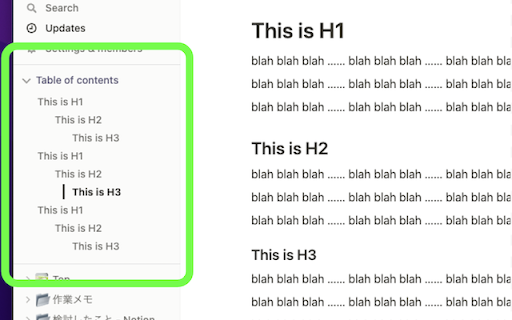
Show table of contents (outline) in the sidebar for Notion pages Show table of contents (outline) in the sidebar for Notion pages Show a table of contents (outline) in the sidebar for Notion pages. You can quickly navigate through your long Notion pages. (When you visit to a page without headings, the table of contents is automatically hidden.)

Notion Charts
A simple chart plugin for Notion, powered by Mermaid. Introduction This extension uses Mermaid syntax, providing convenience for Notion users to easily insert various charts and diagrams in the document. Instructions 1. Switch between different tabs in the extension page to view different types of charts. Click the copy button in the upper right corner of the chart. 2. In Notion, paste at the position where the charts or diagrams need to be inserted. 3. Switch the code block language in the upper left corner to Mermaid, and use Split mode to display both code and chart. We will continue to optimize and update this extension. If you have any questions and enquiries for optimizations, please click the button on the upper right corner of the extension to join our Slack channel.

Notion Power
Numerous customization features, enhancing UX/UI for Notion page. Fixed TOC, change theme and font, scroll-to-top button, more... --------------------------------------------------------------------------- Tired of Notion's ugly, boring and inconvenient UI/UX? Notion is: 1. Lack of Fixed Table of Contents 2. Endlessly scrolling through pages to find what you need 3. Only the default theme and font 4. Distracting horizontal scrollbar in board view 5. No Scroll to Top Button 6. Uninspiring UI: The default Notion interface fails to inspire creativity and motivation. --------------------------------------------------------------------------- Why NotionPower? Why use this extension with Notion.so? This extension can help you: - Empower your notion experience with more than 20+ UX/UI features. - Supercharge productivity. - Make notion more attriactive and less boring. - Visualize Your Progress! Track your activity with NotionPower's insightful graphs. - Your data stays safe in your browser. - Increase Line Spacing - Hide Page Properties - Hide Breadcrumb And more...

Notion Sidebar Tamer
Disable the hover sidebar in Notion. The sidebar in Notion is a great way to navigate between pages, but it can be distracting when you're working between windows. This Chrome extension prevents the sidebar from appearing on hover.

Notion Tools
Make your Notion experience a little bit better with some QOL including colored headings, folded sidebar buttons and more. This extension provides a group of options that aim to improve your experience with the Notion website. These include: + ⭐ Automatically highlighting every heading across all your Notions. + 🔥 Having more vertical space in the sidebar by folding the "Search", "Inbox", and "Settings" buttons into horizontally lined icons (the notification counter also works). + Additional headings indication by adding # symbol at the end of it. + More horizontal space for your database board view. + Slightly more vertical space on page by reduced margin above it icon/name. + Ability to hide "invite members" button from sidebar. Every option can be disabled, if you want. I will continue adding more features over time. Hope you like it! ♥ UPDATE 1.2.2 - Added support for dark theme.
