
bagapgnffhmfccajdbbjcgalkphdjccn
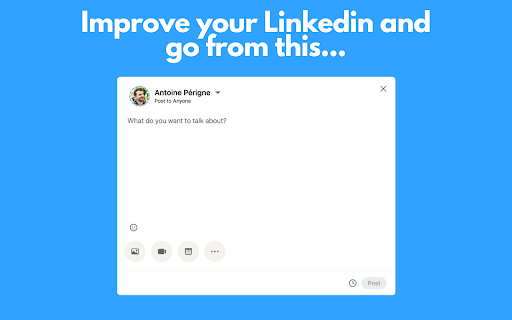
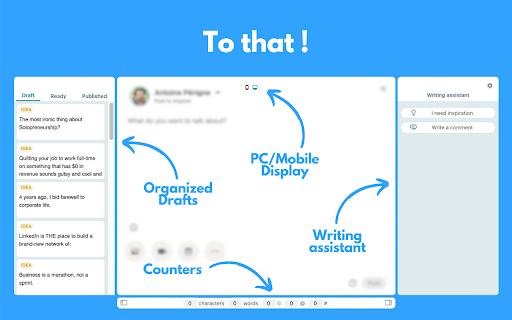


A browser extension to improve your LinkedIn writing experience PerfectPost is a Chrome extension designed to transform your LinkedIn experience and help you create, organize, and publish content more effectively, directly within the LinkedIn interface. It is built for content creators, freelancers, entrepreneurs, marketing teams, and community managers who want to structure their LinkedIn presence, save time, and engage with the right people at the right moment. Everything happens where you already work: on LinkedIn. Key features of the PerfectPost extension Rich text editor for LinkedIn Easily add bold text, italics, and emojis to your LinkedIn posts. Instantly see the final rendering without using external tools or copy-paste tricks. Built-in writing assistant Get help while writing your LinkedIn posts to improve clarity, impact, and overall quality. Publish faster while staying relevant and engaging. LinkedIn draft management Save your ideas and post drafts directly from LinkedIn. Prepare content in advance, organize your drafts, and come back to them anytime without losing your work. Post scheduling Schedule your LinkedIn posts in advance directly from the LinkedIn interface. Maintain a consistent posting rhythm without daily effort. Post preview before publishing See exactly how your post will look before publishing, including formatting, line breaks, and emojis. Mobile preview Preview how your LinkedIn posts will appear on mobile devices. Essential to ensure readability and impact on smartphones. “See more” line preview Know exactly where LinkedIn will cut your post with the “see more” line. Optimize your hooks and place key messages before the cut. Custom LinkedIn Feeds Create personalized LinkedIn feeds directly inside LinkedIn. Custom Feeds allow you to group specific profiles and follow only the posts from people that matter most to you. Perfect for • Tracking prospects • Engaging with clients • Following strategic connections • Never missing important posts Custom Feeds replace the standard LinkedIn feed with a focused, engagement-driven view. Engagement and interaction tracking Access key metrics to better understand your LinkedIn performance. Identify your best posts, top commenters, and quickly spot comments that still need a reply. Organization and productivity PerfectPost turns LinkedIn into a real content and engagement workspace. You centralize your posts, interactions, and daily LinkedIn activity in one place. • Save time every day • Publish higher-quality content • Focus on meaningful engagement • Clear and structured workflow • No need to leave LinkedIn PerfectPost does not modify LinkedIn. The extension adds powerful features directly into the existing interface, seamlessly and naturally. Easy installation and instant onboarding Once installed, the extension automatically activates on LinkedIn with no complex setup required. PerfectPost is the ideal tool to write, organize, schedule, and engage effectively on LinkedIn, directly from your browser.

MyFeedIn : LinkedIn Analytics & Feeds
The all-in-one toolkit for LinkedIn creators — analytics, focused feeds, and smart engagement tools to grow your audience. MyFeedIn is the all-in-one LinkedIn analytics extension and LinkedIn engagement tool for creators. Track your LinkedIn post performance, analyze your comments, and engage with a distraction-free LinkedIn feed reader — everything you need for LinkedIn growth in one productivity tool. 🎯 TAKE BACK CONTROL OF YOUR LINKEDIN FEED LinkedIn's algorithm decides what you see. With MyFeedIn's Focus Feed, YOU decide. Create custom feeds with the people you want to engage with, browse their posts one at a time, and react or comment directly — no distractions, no noise. 🔹 WHAT YOU CAN DO WITH MYFEEDIN 📊 LinkedIn Post Analytics & Performance Tracker — Track views, likes, comments, impressions, and engagement rate for every post. Spot trends with heatmaps, performance charts, and content breakdowns by type (text, image, video, carousel). Build your LinkedIn content strategy with data. 💬 LinkedIn Comment Tracker & Analytics — See your commenting activity at a glance. Track which comments get the most likes and replies, discover your top engaged authors, and find your most active days and times. 🎯 Distraction-Free LinkedIn Feed Reader — Build custom feeds with your key connections. Browse their latest posts one by one, react and comment without leaving the dashboard, and track your engagement history for each post. 🎙️ AI Voice Comments for LinkedIn — Dictate comments with your voice on any LinkedIn post. AI-powered text polishing turns your speech into natural, well-written comments in your preferred style. 👥 LinkedIn CRM & Contact Management — Organize your LinkedIn network into engagement lists. Add notes, tags, and custom fields. Visualize your connections with an interactive mind map. 1. Install MyFeedIn and sign up — it takes 30 seconds 2. Sync your LinkedIn posts and comments with one click 3. Explore your analytics dashboard — heatmaps, trends, and insights 4. Create engagement feeds with the people you want to follow closely 5. React, comment, and engage directly from your Focus Feed 6. Watch your LinkedIn growth accelerate ✅ Know exactly which posts perform best and why ✅ Engage consistently with the people who matter ✅ Comment faster with voice-to-text and AI polishing ✅ Stop wasting time scrolling — focus on what drives LinkedIn growth ✅ All your LinkedIn analytics and engagement tools in one place 🙌 PERFECT FOR → LinkedIn creators who want to understand what content resonates → Solopreneurs and founders building their personal brand → Sales professionals engaging with prospects consistently → Community managers tracking engagement across their network → Anyone serious about growing on LinkedIn without wasting time ──────────────────────── Built by a creator, for creators. Have feedback or feature requests? We'd love to hear from you! MyFeedIn — Grow smarter on LinkedIn. MyFeedIn is not affiliated with, endorsed by, or sponsored by LinkedIn Corporation. LinkedIn is a registered trademark of LinkedIn Corporation.

Kleo
Kleo is the browser extension that helps you discover and create the best content. Go to Kleo.so for more information.

Scheduled Analytics
Get the stats of your LinkedIn posts into Notion Get your LinkedIn posts analytics into Notion. Scheduled is the chosen Notion integration tool used by soloproneurs, ghostwriters and social media teams to publish and track their LinkedIn posts from Notion. - Be organized by centralizing all your content in Notion - Be disciplined and efficient by building a content process creation in Notion - Never leave Notion to publish your LinkedIn posts - Get your LinkedIn posts analytics in Notion automatically (1) Use this extension to synchronize your Scheduled account with your LinkedIn profile. (2) Connect your Notion database with your Scheduled account. (3) Test and activate your reporting to get your stats automatically into Notion. Here is the data you'll have into Notion about your LinkedIn posts: - The content of the post - The publication date - The format - The link of the post - The number of impressions, reactions and comments Contact the developer if you have any questions. To use this extension you'll need to sign up (or sign in) to Scheduled. Scheduled will use your LinkedIn session to get only your LinkedIn posts.

lemlist
lemlist extension Work with lemlist from Gmail and your CRM. Enroll, enrich, personalize, and call - all in one interface. No more switching tabs or juggling tools. The lemlist Chrome extension brings the power of lemlist into the platforms you already use - Gmail, HubSpot, and Salesforce. - Enrich leads – Find valid emails, phone numbers with lemlist’s waterfall enrichment - Add in bulk – Send multiple leads to lemlist campaigns or contact lists in one click - Write with AI – Get smart suggestions or generate new personalized messages in seconds - Call instantly – Use the lemlist dialer directly to connect with leads from your CRM - Track activity – See key metrics and always have real-time lead statuses at a glance
