
khnbclggeggefodgimdekejhipkeobnc

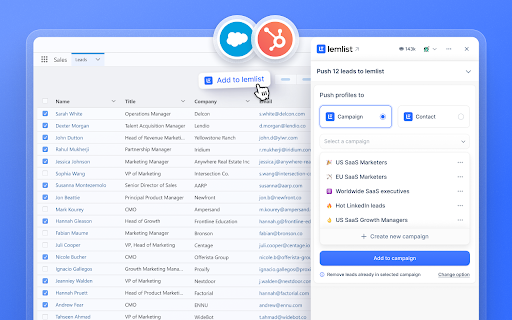
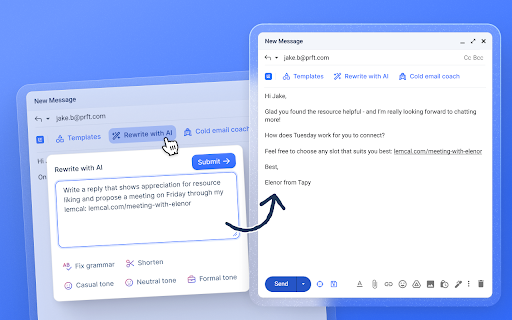
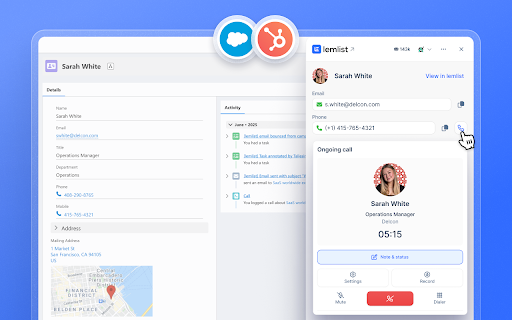

lemlist extension Work with lemlist from Gmail and your CRM. Enroll, enrich, personalize, and call - all in one interface. No more switching tabs or juggling tools. The lemlist Chrome extension brings the power of lemlist into the platforms you already use - Gmail, HubSpot, and Salesforce. - Enrich leads – Find valid emails, phone numbers with lemlist’s waterfall enrichment - Add in bulk – Send multiple leads to lemlist campaigns or contact lists in one click - Write with AI – Get smart suggestions or generate new personalized messages in seconds - Call instantly – Use the lemlist dialer directly to connect with leads from your CRM - Track activity – See key metrics and always have real-time lead statuses at a glance

Lusha - Easily find B2B contact information
Get access to the world's most accurate global B2B data. Find the most accurate and up-to-date emails and mobile phone numbers of decision makers from all around the world, together with rich company data, directly in your chrome browser. 👨💼🏢 Find Contact and Company Data Lusha extension goes beyond contact data, it provides you with comprehensive knowledge and insights into prospects and companies you're looking for, including: 1. Job changes 2. Buyer intent signals 3. Fundings 4. Revenue 5. Industry and specialties 6. Company employees and more! 🆓 Free to use Unlock prospecting power from the get-go with Lusha’s free tier and get free credits to use across Lusha platform and extension, no credit card required. 🔑 Extension Key Features - Enrich Data in Bulk: Quickly reveal and collect multiple contact details. - Save to a List: Organize your prospects for seamless follow-up. - Export to Your CRM: Sync your contacts instantly with your favorite CRM. - Add to an Email Sequence: Launch personalized outreach with Lusha Engage. 💻 Use it Everywhere Lusha’s extension simplifies your prospecting, ABM and ABS efforts, giving you instant access to decision-makers, wherever you work so you can stay productive and focus on closing deals: - On LinkedIn and Sales Navigator: Quickly discover verified emails, and phone numbers directly on decision-makers' profiles - On Company Websites: Instantly uncover decision-makers within the company and access their contact information. - In Gmail and Google Calendar: Learn more and enrich data of prospects you have connected via email or booked meetings with. - In Your CRM: Enrich and update the data of existing contacts and leads, ensuring your CRM is always accurate and actionable. 👩🏾💼 “Lusha is highly accurate, so I don’t need anything else, really.” - Catherine Gomis, SDR at Anaplan 👩🏻💼 “Lusha is the easiest way to find B2B contact information with just one click.” - Ines Ennaji, Head of Global Development at MONOGRAM PARIS 👨🏻💼 “The hardest part of my job is cold calling and getting in touch with the right people. Now with Lusha, I have a way in.” - Thayer Selleck, Account Manager at Insight Global

PhantomBuster
Retrieve session cookies and boost LinkedIn prospecting with contact saving and CRM sync via PhantomBuster. Use PhantomBuster seamlessly by installing our Chrome browser extension. The extension primarily enhances your LinkedIn prospecting workflow and simplifies your experience: Here's what the web extension allows you to do: 1. Automatically retrieve session cookies for websites you are connected to when logging into PhantomBuster.com. Simply click "Connect to [website name]" to fill the session cookies input field. 2. If the user opens the side panel and navigates to a LinkedIn profile page, the extension displays detailed contact information in the browser’s side panel. 3. If the user clicks ‘Get info’ in the side panel, verified emails and phone numbers can be requested through PhantomBuster’s integration with https://www.dropcontact.com/ and https://www.icypeas.com/. 4. If the user clicks “Save contact” in the side panel, the obtained LinkedIn contact information is saved directly to their PhantomBuster account. 5. If the user has connected their HubSpot account to PhantomBuster and clicks “Save contact” in the side panel, the same contact information is also synchronized with their HubSpot account via PhantomBuster’s servers. If you have any questions about this extension, feel free to contact our support team via email at support@phantombuster.com or through our live chat. - 1.3.9 update: - Added support for reddit.com. - 1.2.0 update: - Added new functionality for alpha users. - 1.1.16 update: - Added support for X - 1.1.7 update: - Remove the Shift+Click on the button to open a new session - 1.1.5 update: - Updated extension assets - 1.1.4 update: - Extension's button redirects to the dashboard - 1.1.3 update: - Added support for TikTok - 1.1.1 update: - Small css fix - Shift+Click on the button opens a new session - 1.1.0 update: - Added support for Quora and Pinterest - New UI - Better Zaps (Zapier) configuration page support - 1.0.10 update: - This version makes the extension working on the brand new PhantomBuster UI - 1.0.9 update: - This extension release handles correctly new PhantomBuster APIs configurations. Affected PhantomBuster APIs: Session Cookie Tester The session cookie button is now updated when you change the network select choice. 1.0.8 can only handle the very first choice of the select. - 1.0.8 update: - Support added for Zaps (Zapier) configuration page. - 1.0.7 update: - Added support for GitHub, Intercom and Uber APIs.

Claap - Sales meeting recorder
Record sales calls without a bot. Auto-update your CRM. Turn every conversation into AI follow-ups, coaching & agent context. Claap captures every sales conversation and turns it into follow-ups, CRM updates, coaching, and context for your own AI agents. ▶ RECORD EVERYTHING Sales calls on Zoom, Meet, Teams, in-person, or phone — Claap captures them all, without a bot showing up on the call. Multilingual transcription across 99+ languages. ▶ ENRICH YOUR CRM Auto-fill CRM after every meeting: structured deal data, custom field updates, MEDDIC / BANT scoring. Zero manual entry. ▶ ACTIVATE YOUR AI AGENTS Built-in agents draft follow-up emails, next-step recaps, and stakeholder briefs. Connect Claap to your own AI stack via MCP — your agents finally get the context they were missing. ▶ COACH AT SCALE Performance scorecards, skill gap detection, and snippet libraries pulled from real conversations. Coach reps on what actually happens on calls. GET STARTED 1. Install the extension 2. Sign in (free — no card required) 3. Record your next call — Claap takes it from there

Attio
Bring relationship insights into Attio from Twitter, Google Meets, and more. Attio’s browser extension does all the heavy-lifting for you, wherever you are on the web. With a click, you can add a lead from Gmail, Twitter, or even your Google Meets call, straight into your workspace, all enriched with valuable data. You can do so much more with Attio’s browser extension: • Run automations to speed up your workflow • Edit custom attributes • Edit data from associated lists and companies • And everything’s synced in real-time
