
gacibfihghnbpmkacjfkmhcpmhhmgahg


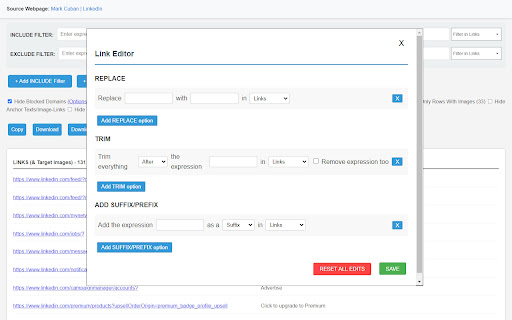
Extracts all links from a webpage and displays them on a new page with options. This ultimate link scraper for Chrome is packed with advanced features for SEO professionals, marketers, web developers, and generally anyone who need to efficiently handle and control URLs. From flexible filtering, down to bulk downloading, or quick editing on-the-go, "LinkScalper Advanced Link Grabber" takes it to a whole new level when it comes to fetching links off any webpage. → Advanced Filtering Options: The Include Filters offers the possibility to filter links and anchor-texts according to expressions you would like to keep on the list. The 'Exclude Filters' feature hides URLs that include unwanted terms. Save literally hours of work cleaning lists to capture relevant links, be it SEO targets, affiliate links, or wanted/unwanted domains. → Domain Control: Have easy access to a complete domain list of the extracted URLs. Then filter the list of links by filtering out unwanted domains. Save time with the 'Hide Blocked Domains' feature to disregard the clutter of irrelevant sites you had configured in your blacklist options. That makes LinkScalper an excellent website link grabber for projects that require domain-based information or targeting of specific sources. → No Duplicates, No Clutter: Once the link extractor fetches your URLs, refine your list by using our options to hide duplicate links, or links from the same origin as the original webpage itself. Ideal for anyone wanting a neat and clean set of unique external URLs, which would perfectly serve the purpose of creating backlink profiles or track outbound links. → Link and Image Extraction from All Sources: With LinkScalper, you are not limited to clickable links alone; it captures URLs from non-clickable raw text also, which makes it more than just a hyperlink extractor. Also, the image link grabber feature displays the images that are targets of links and the image-links of the webpage. → Bulk Link and Image Download Options: All the target links and image-links of a webpage can be downloaded in bulk, saving your time and effort. Also, the extracted list of links can be directly downloaded into your device as a .txt or.csv file. Hence it is actually the ultimate batch link downloader. → SEO Dofollow and Nofollow Link Detection: This feature turn LinkScalper into an essential tool in SEO, as it will help you identify in no time which URLs are nofollow or dofollow. These data can be used in the monitoring of SEO dofollow backlinks, which are critical to create link-building strategies. 👉 On-the-Go Link Editing & Customization → Link List Editor: Edit your list of extracted links with the 'Link Editor' option: Replace URLs/Anchor-Texts, Trim URLs/Anchor-Texts, Add Prefix or Add Suffix to both URLs and anchor texts. With this option, you will be able to mold the list of extracted links and anchor-texts exactly to fit the requirements of your project, whatever it is to prepare list of links to be used in a report and for outreach, or to prepare anchor texts for SEO keywords purposes. → Easy Sorting for Organized Lists: With our sorting features, sort your list of links and anchor-texts alphabetically, or simply randomize the list acordingly to your needs. This offers flexibility for SEO audits, content analysis, and bulk data processing in order to make patterns more visible or links easier to find. → Export & Import Options: LinkScalper can export and import your settings to easily transfer configurations across devices or even to team members. This way, no need to input the same option at each link extraction. → SEO Backlink Analysis: LinkScalper gives an all-in backlink extractor tool that identify nofollow and dofollow links from all your fetched links, ensuring quality and relevance monitoring of your backlinks in all completeness. → Download All Links on a Page for Content Curation: With the hyperlink extractor, you can quickly download all links on a page and save research articles, references, or even build resource pages. All the link getter functionalities makes it so easy to compile link lists for project documentation, sharing, and digital marketing uses. → Extract Links from Webpage for Affiliate Marketing or other purposes: Filter, sort, and export links from your competitor websites for a seamless performance in affiliate marketing. Having LinkScalper as a link grabber downloader allow you to collect links for marketing purposes in the blink of a moment and make your work as an marketer easier and faster. → Link Extraction Based on Domain for Targeted Campaigns: Options like domain list and link filter make LinkScalper extract links from specific domains only. That's a practical feature to build focused outreach lists on industry domains or filtering links based on their relevance. → Extract URLs from Text for Data Analysis: In addition to be able to extract clickable hyperlinks, LinkScalper can extract URLs from text, making it a smart website link scraper that can get URLs from raw data. Ideal for analysts who need to operate with datasets or extract links from big text files for their analysis. 👉 Why You Should Install LinkScalper? Unlike any other link extractor extension, LinkScalper offers every level of flexibility with the image extraction, and multi-format exports to allow you to extract all links from a website easily and with all the options you need for your projects. This URL grabber link filter feature makes it a must for marketers, developers, and SEO experts all around.

Link Grabber
An easy to use extractor or grabber for hyperlinks on an HTML page Extract links from an HTML page and display them in another tab. Permissions Required: Link Grabber requires permission to copy links to the clipboard. No other special permissions are required. Features: * No usage information / analytics are collected from you * Use either browser action button or context menu item to activate * Configurable list of blocked domains * Filter links by substring match * Copy links to clipboard * Show/hide links that appear more than once on the page * Show/hide links to the same origin as the source page * Group links by domain

Bulk Link Grabber: Copy, Extract & Open Multiple URLs
Grab, copy & open multiple links fast. Extract URLs from tabs or drag-selects. Export to CSV/TXT. The ultimate bulk URL opener tool. Bulk Link Grabber is the most powerful tool to copy, extract, and open multiple URLs instantly. Whether you need a bulk URL opener, a link extractor, or a way to manage browser tabs, this extension does it all with one click. Stop clicking links one by one. Use drag-select to capture every link in a specific area, or use the one-click tab manager to grab every URL in your current window. ▸ Link Grabber & Extractor: Smartly finds, cleans, and deduplicates http/https links from any page. ▸ Drag-to-Select: Simply drag your mouse over a group of links to act on them instantly. ▸ Tab Management: Copy all tab URLs, current selection, or specific windows to your clipboard. ▸ Advanced Copying: Export URLs only, Page Titles only, or Title + URL pairs. ▸ Review Dashboard: Edit, dedupe, and manage your last copied links before saving. ▸ Export to CSV/TXT: Save your research or link lists into structured files (Excel/Sheets compatible). ▸ Tab Importer: Easily pull all open tabs from your current window into the review page for bulk editing. ▸ YouTube: Drag-Select links from video and Shorts links for clean, duplicate-free lists. ▸ Drag-Select: Hold your trigger key (Alt/Shift/Ctrl) and drag over any links. ▸ Release: Your chosen action (Open, Copy, or Export) runs immediately. ▸ Popup Menu: Use the extension icon to quickly grab all tab URLs or reopen previous sessions. ▸ Customize: Visit Settings to change activation buttons and selection box styles. ▸ Local Processing: No external servers, no analytics, and no data collection. Your links stay private. ▸ Highly Configurable: Works on almost any website with adjustable hotkeys to avoid site conflicts. 🎯 Perfect For: ▸ Researchers & Students: Collecting sources and citations in seconds. ▸ Content Creators: Organizing YouTube playlists and resource lists for descriptions.

Link Grabber
🚀 Welcome to Link Grabber: Your Ultimate Tool for Effortless Link Extraction! 🚀 Are you tired of manually sifting through web pages to find the urls you need? Say goodbye to tedious tasks and hello to Link Grabber, the ultimate extension grabber designed to make your life easier. You can effortlessly extract all links from a webpage and streamline your online research or data collection process. 🌟 Why Choose it? 🌟 It is not just another url extractor chrome tool; it's a comprehensive solution for anyone looking to download all urls from a website quickly and efficiently. Whether you're a digital marketer, researcher, or just someone who needs to extract urls from page after page, Link Grabber is your go-to extension. 🔹 Key Features 🔹 1️⃣ Extract All Links from a Webpage: With just a click, extract all links from a webpage and save valuable time. 2️⃣ Download All Links from Webpage: Need to download all links from a website? It makes it a breeze. 3️⃣ Video Link Grabber Extension: Easily extract videos from webpage content without hassle. 4️⃣ Image Grabber: Find and download images effortlessly. 5️⃣ User-Friendly Interface: Intuitive design ensures that even beginners can use the link grabber extension with ease. 💡 How Does itWork? 💡 Using it is as simple as 1-2-3: 1. Install the Extension: Add the url extractor extension to your Chrome browser. 2. Navigate to Your Desired Page: Open the webpage from which you want to extract links. 3. Click and Extract: Hit the Grabber icon, and watch as it extracts all urls from a website in seconds. 📈 Benefits of Using 📈 ✔️ Efficiency: Save time by automating the process to extract urls from website pages. ✔️ Accuracy: Ensure you get all the information from a website without missing any crucial URLs. ✔️ Versatility: Whether you need to extract urls, find all links on a site, or grab download lnks from page, it has you covered. 🌐 Who Can Benefit from the extractor? 🌐 It is perfect for: 🔸 Digital Marketers: Quickly extract urls for backlink analysis or competitor research. 🔸 Researchers: Gather data by extracting urls from page sources for academic or professional projects. 🔸 Content Creators: Use the image urls extractor to find visual assets for your content. 🔸 Web Developers: Test and verify data on your site with ease using the linkextractor. 🎯 Advanced Features for Power Users 🎯 For those who need more than just basic extraction, it offers advanced features: ➤ Filter Options: Customize your extraction process by filtering specific types of data. ➤ Batch Processing: Extract all links from a webpage across multiple tabs simultaneously. ➤ Export Functionality: Easily export extracted uris to CSV or other formats for further analysis. 💎 Why URL Extractor Stands Out 💎 Unlike other tools, it is a dedicated link extractor chrome extension that focuses solely on providing the best url extraction experience. Its robust functionality and ease of use make it the preferred choice for professionals and casual users alike. 🔥 Get Started with it Today! 🔥 Don't let manual url extraction slow you down. Download Grabber now and experience the power of efficient url extraction. Whether you need to extract video links from webpage content or find all urls for a domain, it is the tool you need. 📌 Join Thousands of Satisfied Users 📌 Join the growing community of users who have transformed their workflow with this powerful web url extractor. Discover why it's the top choice for anyone needing a reliable url graber. ✨ Conclusion: Your Go-To Extraction Tool ✨ In a digital world where time is money, it is the ultimate solution for anyone looking to get all the URI from a website quickly and efficiently. With its user-friendly interface and powerful features, it's the URI extractor you've been waiting for. Download Grabber today and take the first step towards a more efficient and productive online experience. Whether you're looking to extract URI from website pages or need a reliable grabber URI tool, Grabber is here to help.

Online Link Extractor
View and Extract all links from webpages for SEO, audits, and research. The Online Link Extractor Chrome extension is a powerful tool designed to help website owners, SEO professionals, content creators, and researchers quickly and efficiently extract all links from a web page. With just a few clicks, you can generate a comprehensive list of all the links present on a webpage, including internal links, external links, links to social media platforms, images, and downloadable files. You can see how many do follow and no-follow links are there on any webpage right away on a single screen. This extension is particularly useful for a wide range of tasks, such as: 1. SEO Analysis: Analyze the inbound and outbound links of a website to understand its link structure, identify link-building opportunities, and detect potentially harmful links that may be negatively impacting your search engine rankings. 2. Website Audits: Conduct thorough website audits by extracting all links from every page, allowing you to identify broken links, redundant links, or links that may be affecting your website's user experience or performance. 3. Content Research: Quickly gather links from competitor websites or industry-related pages to inform your content strategy, find potential sources for backlinks, or uncover new content opportunities. 4. Contact Information Collection: Extract links to email addresses, social media profiles, or contact forms, making it easier to compile contact information for outreach, networking, or marketing purposes. 5. Image and File Management: Identify all linked images and downloadable files on a webpage, enabling better organization, backup, or optimization of these resources. 1. Time-Saving: Instantly extract all links from a webpage, eliminating the need for manual copying and pasting or cumbersome website crawling. 2. Comprehensive Link Analysis: Get a complete overview of a website's link structure, including internal and external links, social media links, and links to multimedia assets. 3. Broken Link Detection: Quickly identify and fix broken links, improving your website's user experience and search engine visibility. 4. Link Auditing: Analyze the quality and relevance of inbound and outbound links, ensuring your website adheres to best practices and avoids potential penalties from search engines. 5. Content Discovery: Uncover new content ideas, sources, and backlink opportunities by analyzing the links on competitor or industry-related websites. 1. SEO Professionals: Utilize the extension for comprehensive link analysis, link audits, and link-building strategies for their clients' websites. 2. Website Owners: Regularly audit your website's links to maintain a healthy link structure, identify broken links, and explore new linking opportunities. 3. Content Creators: Gather relevant links from various sources to enrich your content with credible references, backlinks, and multimedia assets. 4. Researchers: Extract links from academic or industry-specific websites to support your research, gather data, or build citations. 5. Marketing and Sales Teams: Collect contact information from websites for lead generation, outreach, or networking purposes.
