
lnajkglgcopallcelkglibliacibpehf

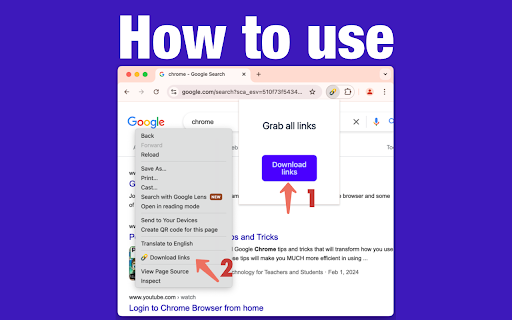
🚀 Welcome to Link Grabber: Your Ultimate Tool for Effortless Link Extraction! 🚀 Are you tired of manually sifting through web pages to find the urls you need? Say goodbye to tedious tasks and hello to Link Grabber, the ultimate extension grabber designed to make your life easier. You can effortlessly extract all links from a webpage and streamline your online research or data collection process. 🌟 Why Choose it? 🌟 It is not just another url extractor chrome tool; it's a comprehensive solution for anyone looking to download all urls from a website quickly and efficiently. Whether you're a digital marketer, researcher, or just someone who needs to extract urls from page after page, Link Grabber is your go-to extension. 🔹 Key Features 🔹 1️⃣ Extract All Links from a Webpage: With just a click, extract all links from a webpage and save valuable time. 2️⃣ Download All Links from Webpage: Need to download all links from a website? It makes it a breeze. 3️⃣ Video Link Grabber Extension: Easily extract videos from webpage content without hassle. 4️⃣ Image Grabber: Find and download images effortlessly. 5️⃣ User-Friendly Interface: Intuitive design ensures that even beginners can use the link grabber extension with ease. 💡 How Does itWork? 💡 Using it is as simple as 1-2-3: 1. Install the Extension: Add the url extractor extension to your Chrome browser. 2. Navigate to Your Desired Page: Open the webpage from which you want to extract links. 3. Click and Extract: Hit the Grabber icon, and watch as it extracts all urls from a website in seconds. 📈 Benefits of Using 📈 ✔️ Efficiency: Save time by automating the process to extract urls from website pages. ✔️ Accuracy: Ensure you get all the information from a website without missing any crucial URLs. ✔️ Versatility: Whether you need to extract urls, find all links on a site, or grab download lnks from page, it has you covered. 🌐 Who Can Benefit from the extractor? 🌐 It is perfect for: 🔸 Digital Marketers: Quickly extract urls for backlink analysis or competitor research. 🔸 Researchers: Gather data by extracting urls from page sources for academic or professional projects. 🔸 Content Creators: Use the image urls extractor to find visual assets for your content. 🔸 Web Developers: Test and verify data on your site with ease using the linkextractor. 🎯 Advanced Features for Power Users 🎯 For those who need more than just basic extraction, it offers advanced features: ➤ Filter Options: Customize your extraction process by filtering specific types of data. ➤ Batch Processing: Extract all links from a webpage across multiple tabs simultaneously. ➤ Export Functionality: Easily export extracted uris to CSV or other formats for further analysis. 💎 Why URL Extractor Stands Out 💎 Unlike other tools, it is a dedicated link extractor chrome extension that focuses solely on providing the best url extraction experience. Its robust functionality and ease of use make it the preferred choice for professionals and casual users alike. 🔥 Get Started with it Today! 🔥 Don't let manual url extraction slow you down. Download Grabber now and experience the power of efficient url extraction. Whether you need to extract video links from webpage content or find all urls for a domain, it is the tool you need. 📌 Join Thousands of Satisfied Users 📌 Join the growing community of users who have transformed their workflow with this powerful web url extractor. Discover why it's the top choice for anyone needing a reliable url graber. ✨ Conclusion: Your Go-To Extraction Tool ✨ In a digital world where time is money, it is the ultimate solution for anyone looking to get all the URI from a website quickly and efficiently. With its user-friendly interface and powerful features, it's the URI extractor you've been waiting for. Download Grabber today and take the first step towards a more efficient and productive online experience. Whether you're looking to extract URI from website pages or need a reliable grabber URI tool, Grabber is here to help.

Page Link Collect
Page Link Collect is a versatile Chrome extension designed to enhance your web browsing experience by effortlessly collecting all… Page Link Collect is a versatile Chrome extension designed to enhance your web browsing experience by effortlessly collecting all the links on a page, accompanied by their corresponding anchor text. Whether you're conducting research, saving references, or simply organizing your online findings, Page Link Collect simplifies the process, allowing you to extract and catalog the information that matters with ease. Effortless Link Collection: With a single click, Page Link Collect scans the current webpage and compiles a comprehensive list of all embedded links, presenting them in a convenient CSV file format. Comprehensive Information: Each entry in the CSV file includes two columns: the URL link and its corresponding anchor text. This pairing provides you with a complete understanding of the link's purpose without the need to navigate away from your current page. Customize and Export: Easily customize your collected links by adding personal notes, tags, or labels, ensuring seamless organization for future reference. Additionally, you can export your link collection in CSV format, allowing for easy integration with your preferred note-taking or productivity tools. Time-Saving Productivity: Say goodbye to manual copying and pasting. Page Link Collect streamlines your workflow, enabling you to focus on processing the information you've gathered rather than managing the collection process. User-Friendly Interface: With an intuitive interface, Page Link Collect caters to users of all levels, ensuring that everyone can harness the power of efficient link management. Install the Page Link Collect Chrome extension. While browsing a webpage, click on the extension icon located in your browser. Instantly access and interact with the list of links and their corresponding anchor text in the generated CSV file. Personalize your collection by adding notes, labels, or tags for streamlined organization. Export your link collection in CSV format, making it compatible with various note-taking and productivity tools. Why Choose Page Link Collect? Page Link Collect is not just a link extractor; it's a comprehensive productivity tool designed to save you time and enhance your link organization. Wave goodbye to manual link collection and welcome a streamlined process that empowers your research and browsing activities. Unleash the potential of the web with Page Link Collect – download the extension now and revolutionize the way you manage and utilize links!

URL Extractor
Extract URLs from any webpage with ease URL Extractor - Extract URLs from any webpage with ease Transform your web browsing experience with the most comprehensive URL extraction tool available on the Chrome Web Store. URL Extractor by Hitesh Wadhwa is a powerful, privacy-first Chrome extension designed to extract, analyze, and export all URLs from any webpage with unparalleled accuracy and ease. URL Extractor revolutionizes how you interact with web content by providing instant access to every URL embedded within a webpage. Whether you're conducting SEO analysis, performing security audits, managing content, or gathering data for research purposes, this tool delivers professional-grade results in seconds. The extension operates entirely within your browser, ensuring complete privacy and security. No data is ever transmitted to external servers, making it the safest choice for handling sensitive web content. Simply click the extension icon, and within moments, you'll have a comprehensive list of all URLs present on the current page. URL Extractor employs advanced DOM parsing techniques to identify and extract URLs from every conceivable HTML element. The tool goes far beyond simple link extraction, providing a complete inventory of all web resources present on a page. Anchor Links and Navigation Elements: Extract all clickable links, navigation menus, and interactive elements that users can engage with. This includes primary navigation links, footer links, sidebar navigation, breadcrumb trails, and any other anchor-based navigation systems. Media and Resource Files: Capture all image URLs, including product images, banners, icons, and decorative elements. Extract video sources, audio files, and multimedia content that enhances the user experience. Identify all stylesheet references, JavaScript files, and other resource dependencies. Embedded Content and Third-Party Integrations: Discover iframe sources, embedded widgets, social media integrations, and third-party content that may be loading on the page. Extract data from embed tags, object elements, and any external content sources. Meta Information and Structured Data: Identify URLs present in meta tags, Open Graph data, Twitter Card information, and other structured data formats. Extract canonical URLs, alternate language versions, and other SEO-related link information. Dynamic and Data-Driven Content: Capture URLs stored in data attributes, JavaScript variables, and other programmatic sources that may not be immediately visible in the HTML structure. URL Extractor doesn't just collect URLs—it intelligently categorizes and analyzes them to provide meaningful insights about the webpage's structure and external dependencies. Internal vs External URL Classification: Automatically distinguish between internal links (same domain) and external resources (different domains). This categorization is crucial for SEO analysis, security auditing, and understanding the page's relationship with external services. URL Type Identification: Intelligently classify each URL based on its purpose and file type. Categories include: • Links: Navigation elements, buttons, and clickable content • Images: Photos, graphics, icons, and visual elements • Scripts: JavaScript files, analytics, and interactive functionality • Stylesheets: CSS files and design resources • Media: Videos, audio files, and multimedia content • Documents: PDFs, Word documents, and other downloadable files • Email: Mailto links and contact information • Phone: Tel links and communication channels • Social Media: Platform-specific sharing and integration links Domain Analysis: Extract and display the domain name for each URL, providing clear visibility into which external services and resources the webpage depends on. URL Extractor features a modern, intuitive interface designed for both casual users and power users. The clean, gradient-based design provides a professional appearance while maintaining excellent usability. Smart Filtering System: The extension includes an intelligent filtering system that allows users to focus on specific types of URLs. Checkboxes for internal and external URLs enable targeted analysis, making it easy to separate same-domain resources from external dependencies. Real-Time Statistics: Get instant feedback on the extraction process with live statistics showing the total number of URLs found and the breakdown between internal and external resources. This information helps users quickly assess the scope and complexity of the webpage's URL structure. Visual URL Display: Each extracted URL is displayed with clear visual indicators showing its category (internal/external) and type. Color-coded badges make it easy to quickly identify different types of resources at a glance. Responsive Design: The popup interface adapts to different screen sizes and resolutions, ensuring optimal usability across various devices and display configurations. URL Extractor provides flexible export options to accommodate different use cases and workflow requirements. Both export formats include comprehensive metadata and categorization information. CSV Export Format: Export your URL data in industry-standard CSV format, perfect for spreadsheet applications like Microsoft Excel, Google Sheets, or any data analysis tool. The CSV export includes four essential columns: • URL Link: The complete URL with full path and parameters • URL Category: Internal or External classification • URL Type: Specific type identification (link, image, script, etc.) • Domain: The domain name extracted from the URL The CSV format ensures compatibility with virtually any data processing tool, making it easy to integrate URL extraction data into existing workflows and analysis processes. XML Export Format: For users requiring structured data formats, URL Extractor provides comprehensive XML export capabilities. The XML output includes detailed metadata and follows standard XML formatting conventions, making it ideal for: • API integrations and data processing pipelines • Content management systems and automation tools • Research and academic applications • Database imports and data warehousing The XML format includes timestamps, extraction metadata, and detailed categorization information, providing a complete audit trail of the extraction process. 🔒 PRIVACY AND SECURITY FIRST URL Extractor is built with privacy and security as fundamental design principles. The extension operates entirely within your browser environment, ensuring that no sensitive data ever leaves your local system. Local Processing: All URL extraction, analysis, and categorization happens locally within your browser. No data is transmitted to external servers, eliminating any risk of data breaches or unauthorized access to your browsing information. Minimal Permissions: The extension requires only the essential permissions needed for its core functionality: • activeTab: Access to the current tab's content for URL extraction • scripting: Ability to inject content scripts for DOM analysis These permissions are used only when you actively click the "Extract URLs" button, ensuring that the extension doesn't have unnecessary access to your browsing data. No Data Collection: URL Extractor does not collect, store, or transmit any personal information, browsing history, or user behavior data. Your privacy is protected at all times, and the extension operates with complete transparency regarding its data handling practices. 🚀 PERFORMANCE AND RELIABILITY URL Extractor is optimized for speed and reliability, ensuring that URL extraction doesn't impact your browsing experience or slow down webpage loading. Efficient Processing: The extension uses optimized algorithms and efficient DOM traversal techniques to extract URLs quickly without affecting page performance. Even complex pages with hundreds of URLs can be processed in seconds. Non-Intrusive Operation: URL extraction occurs only when explicitly requested by the user. The extension doesn't interfere with normal webpage functionality, ensuring that your browsing experience remains smooth and uninterrupted. Compatibility: Built using Chrome's latest Manifest V3 standards, URL Extractor is compatible with all modern Chrome-based browsers including Google Chrome, Microsoft Edge, Brave, and other Chromium-based browsers. Error Handling: Robust error handling ensures that the extension continues to function even when encountering malformed URLs, invalid HTML, or other potential issues. Invalid URLs are clearly marked and included in the export for complete transparency. 🎯 USE CASES AND APPLICATIONS URL Extractor serves a wide range of professional and personal use cases, making it an essential tool for anyone who works with web content or needs to analyze webpage structure. SEO Analysis and Optimization: SEO professionals can use URL Extractor to analyze internal linking structures, identify broken links, assess external link profiles, and optimize website architecture. The tool provides valuable insights for improving search engine rankings and user experience. Security Auditing and Compliance: Security professionals can identify external resources, third-party scripts, and potential security vulnerabilities by analyzing all URLs present on a webpage. This information is crucial for security assessments and compliance audits. Content Management: Content managers and website administrators can use URL Extractor to audit media resources, identify orphaned content, and ensure proper resource management across their websites. Web Development and Testing: Developers can analyze webpage dependencies, identify external resources, and ensure proper resource loading during development and testing phases. Research and Data Collection: Researchers and analysts can gather comprehensive URL data for academic studies, market research, competitive analysis, and other data-driven projects. Digital Marketing: Marketing professionals can analyze competitor websites, identify partnership opportunities, and assess the effectiveness of external link strategies. Academic and Educational Use: Students and educators can use URL Extractor for web research, digital literacy education, and understanding web architecture and content organization. URL Extractor is built using modern web technologies and follows industry best practices for Chrome extension development. Manifest V3 Compliance: Built using Chrome's latest Manifest V3 specification, ensuring long-term compatibility and access to the most recent browser features and security enhancements. Modern JavaScript: Utilizes modern JavaScript features and best practices for optimal performance and maintainability. Responsive Design: The user interface is built with responsive design principles, ensuring optimal usability across different screen sizes and resolutions. Accessibility: The extension includes accessibility features and follows web accessibility guidelines to ensure usability for users with different needs and abilities. Regular Updates: The extension is actively maintained and updated to ensure compatibility with the latest browser versions and web standards. URL Extractor by Hitesh Wadhwa represents a significant advancement in web content analysis tools, providing professional-grade functionality in an accessible, user-friendly package. Whether you're a seasoned web professional or a casual user looking to better understand web content, this extension delivers exceptional value and utility. The combination of comprehensive URL extraction, intelligent categorization, flexible export options, and privacy-first design makes URL Extractor an indispensable tool for anyone who works with web content or needs to analyze webpage structure. With its professional interface, reliable performance, and extensive feature set, URL Extractor sets a new standard for URL extraction tools in the Chrome Web Store. Experience the power of professional URL extraction with URL Extractor by Hitesh Wadhwa — your complete solution for web content analysis and URL management.

Image Link Grabber
Extract image links from webpage with a single click. Just open the page and click on app icon, voila you got the links. Update 0.4 Extension requires API Key after 10 free runs.

LinkScalper - Advanced Link Grabber
Extracts all links from a webpage and displays them on a new page with options. This ultimate link scraper for Chrome is packed with advanced features for SEO professionals, marketers, web developers, and generally anyone who need to efficiently handle and control URLs. From flexible filtering, down to bulk downloading, or quick editing on-the-go, "LinkScalper Advanced Link Grabber" takes it to a whole new level when it comes to fetching links off any webpage. → Advanced Filtering Options: The Include Filters offers the possibility to filter links and anchor-texts according to expressions you would like to keep on the list. The 'Exclude Filters' feature hides URLs that include unwanted terms. Save literally hours of work cleaning lists to capture relevant links, be it SEO targets, affiliate links, or wanted/unwanted domains. → Domain Control: Have easy access to a complete domain list of the extracted URLs. Then filter the list of links by filtering out unwanted domains. Save time with the 'Hide Blocked Domains' feature to disregard the clutter of irrelevant sites you had configured in your blacklist options. That makes LinkScalper an excellent website link grabber for projects that require domain-based information or targeting of specific sources. → No Duplicates, No Clutter: Once the link extractor fetches your URLs, refine your list by using our options to hide duplicate links, or links from the same origin as the original webpage itself. Ideal for anyone wanting a neat and clean set of unique external URLs, which would perfectly serve the purpose of creating backlink profiles or track outbound links. → Link and Image Extraction from All Sources: With LinkScalper, you are not limited to clickable links alone; it captures URLs from non-clickable raw text also, which makes it more than just a hyperlink extractor. Also, the image link grabber feature displays the images that are targets of links and the image-links of the webpage. → Bulk Link and Image Download Options: All the target links and image-links of a webpage can be downloaded in bulk, saving your time and effort. Also, the extracted list of links can be directly downloaded into your device as a .txt or.csv file. Hence it is actually the ultimate batch link downloader. → SEO Dofollow and Nofollow Link Detection: This feature turn LinkScalper into an essential tool in SEO, as it will help you identify in no time which URLs are nofollow or dofollow. These data can be used in the monitoring of SEO dofollow backlinks, which are critical to create link-building strategies. 👉 On-the-Go Link Editing & Customization → Link List Editor: Edit your list of extracted links with the 'Link Editor' option: Replace URLs/Anchor-Texts, Trim URLs/Anchor-Texts, Add Prefix or Add Suffix to both URLs and anchor texts. With this option, you will be able to mold the list of extracted links and anchor-texts exactly to fit the requirements of your project, whatever it is to prepare list of links to be used in a report and for outreach, or to prepare anchor texts for SEO keywords purposes. → Easy Sorting for Organized Lists: With our sorting features, sort your list of links and anchor-texts alphabetically, or simply randomize the list acordingly to your needs. This offers flexibility for SEO audits, content analysis, and bulk data processing in order to make patterns more visible or links easier to find. → Export & Import Options: LinkScalper can export and import your settings to easily transfer configurations across devices or even to team members. This way, no need to input the same option at each link extraction. → SEO Backlink Analysis: LinkScalper gives an all-in backlink extractor tool that identify nofollow and dofollow links from all your fetched links, ensuring quality and relevance monitoring of your backlinks in all completeness. → Download All Links on a Page for Content Curation: With the hyperlink extractor, you can quickly download all links on a page and save research articles, references, or even build resource pages. All the link getter functionalities makes it so easy to compile link lists for project documentation, sharing, and digital marketing uses. → Extract Links from Webpage for Affiliate Marketing or other purposes: Filter, sort, and export links from your competitor websites for a seamless performance in affiliate marketing. Having LinkScalper as a link grabber downloader allow you to collect links for marketing purposes in the blink of a moment and make your work as an marketer easier and faster. → Link Extraction Based on Domain for Targeted Campaigns: Options like domain list and link filter make LinkScalper extract links from specific domains only. That's a practical feature to build focused outreach lists on industry domains or filtering links based on their relevance. → Extract URLs from Text for Data Analysis: In addition to be able to extract clickable hyperlinks, LinkScalper can extract URLs from text, making it a smart website link scraper that can get URLs from raw data. Ideal for analysts who need to operate with datasets or extract links from big text files for their analysis. 👉 Why You Should Install LinkScalper? Unlike any other link extractor extension, LinkScalper offers every level of flexibility with the image extraction, and multi-format exports to allow you to extract all links from a website easily and with all the options you need for your projects. This URL grabber link filter feature makes it a must for marketers, developers, and SEO experts all around.
