
folnjigffmbjmcjgmbbfcpleeddaedal
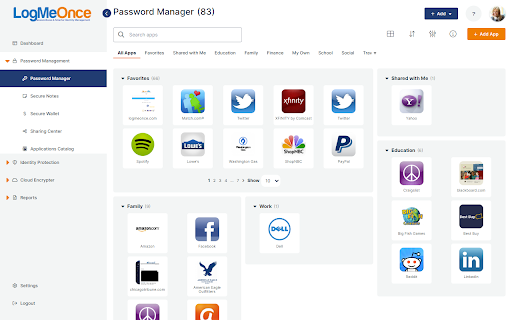


Securely Single Sign-On to all of your Apps with one click The Problem With too many accounts and log-ins, users mostly tend to choose weak, easy to guess passwords, and rarely change passwords, hence placing themselves at risk from fraud and identity theft. Most consumers may have dozens of password-protected accounts. Users with multiple accounts needing passwords often give up and use the same password, or a derivative of the same password for every account which makes them easy targets for hackers. When consumers are required to follow existing security policies and use various log-ins or passwords, they usually end up writing down their passwords making them easy targets. LogMeOnce dashboard offers simple user friendly access for each user to their unique web site which entails a list of all of their applications, with security protection behind each Application icon. Simply click the icon of your desired Application, and you are logged in without the need to enter a username and password each time. Your security credentials for each Application are individually secured and encrypted with your unique encryption key, that only you are aware of.

Avira Password Manager
Avira Password Manager saves, manages, and syncs all your passwords across all your devices. Say goodbye to handwritten notes creating chaos on your desktop. This password organizer makes it a breeze to bring order to your work and personal life. Avira Password Manager can now also check the security status of your user accounts directly via your Avira Password Manager dashboard. This ensures you enjoy maximum protection, as we want you to be as well-protected as possible. Avira Password Manager synchronizes every change you make, and can be used on a wide range of devices and operating systems as well as with popular browsers via an extension. ◆ ONE PASSWORD FOR ALL DEVICES ◆ With Avira Password Manager you only need to remember one single password – the master password. It's like the key to an uncrackable password vault, in which your logins are safely stored. ◆ AUTO-FILL LOGIN FORMS ◆ Easy, convenient, time-saving: The Avira Password Manager browser extension auto-fills your logins across all your favorite websites, making it the best password manager available. Password Manager also recognizes when you enter a new password on a website and asks if you want to save it. ◆ INSTANT PASSWORD GENERATOR ◆ Do you use weak, common passwords for all your accounts? Not anymore! Avira Password Manager makes it effortless to generate strong, unique passwords to give you the best protection against identity theft. ◆ DIGITAL WALLET ◆ You can securely manage all your credit cards in your digital wallet. You can add them manually in the web or conveniently scan them on your mobile app. Your saved cards will be available on all your devices. ◆ AVAILABLE OPTIONS ◆ Avira Password Manager is available as a web dashboard and as a mobile app. The web dashboard is complemented by a browser extension for easy automatic creation and storage of your passwords. ◆ SECURITY◆ The new security status shows you at a glance how secure your passwords, accounts, and websites are, and whether any of your credentials have already been compromised. You can then take immediate action to improve your online security. Avira Password Manager protects your passwords, credit cards, and notes using 256-bit AES encryption – the most secure standard out there. Think of it as your own personal armored password safe. Thanks to your master password only you and you alone have access to them – not even Avira can access your data. ◆ WHAT'S NEW? ◆ Now save all your credit cards in your secure digital wallet, where the magnetic stripe will never wear off.

TweakPass: Free Password Manager
Manage your passwords on a single click TweakPass is a robust browser extension for Chrome that saves your passwords securely and allows you to auto login to sites, fill forms and generate secure passwords. No need to remember multiple passwords as a single, Master Password will simplify your digital life. Save websites, usernames and passwords in the Vault and auto login to your sites. Not only this, all the imported and saved data is synced between the TweakPass app and Browser Extension, for easy access of data. - Save usernames and passwords to make login easy - Secure notes and store encrypted data - An easy way to save all your secure and confidential data - Store all important data in one place - Add, modify, view, delete, and manage passwords for all accounts - TweakPass can be used on any computer and laptop with Chrome/Firefox/Opera/Edge - Use same login to access TweakPass account anywhere - Instant data syncing to make data available across all the devices - Generate strong and complicated passwords to protect against cyber threats - Create new random passwords for each site you visit and sign up - Add an additional layer of security with Required Password Prompt option - Encrypt data both at device level and server end - Single Master Password for all accounts - Generate strong passwords without much ado - Automatically login to sites with saved passwords - Secure all your passwords in the Vault Learn more about features and get TweakPass for Firefox, Opera and Edge by visiting: www.tweakpass.com

Sticky Password manager & safe
Web form and password filling companion for Sticky Password manager & safe No more forgotten, weak or reused passwords! Sticky Password is the award-winning password manager and form-filler that has been protecting millions of passwords around the world for more than 17 years. Sticky Password is a powerful yet simple free password manager and secure digital vault for your desktop and mobile device browsers. It remembers your passwords and enters them automatically whenever and wherever you need them. Sticky Password extension makes your online life easier by typing your data for you in online forms and login pages. You won’t have to worry about typos and entering data on all those sites you visit. With Sticky Password, your sensitive data is securely stored and encrypted using AES-256 – the world’s leading encryption standard. From now on, you’ll only need to remember just one password - your Master Password - that is the only key that unlocks your encrypted data. It’s created solely by you and it’s not stored anywhere - only you know it. Sticky Password extension features: PASSWORD MANAGER - Remembers all your passwords and types them for you as you browse. - Saves new passwords and logins as you browse. Automatically. - Unlimited storage for all your passwords and logins. - World's leading security—AES-256 encryption CONTACTLESS CONNECT Use your smartphone as an authentication tool to access websites securely and effortlessly on any platform and web browser. Just scan, connect, and go for secure password management. DIGITAL WALLET - Keep your credit card numbers in the super secured vault that only you can access. - Pay with one click. Sticky Password enters your credit cards for you on shopping sites. SYNCHRONIZATION & BACKUP - Sync all your passwords and credentials to all your devices. Access them anywhere. - Select from industry-leading sync options—cloud or local WiFi sync. - Secure cloud backup of all your encrypted data. Only if you want it. Sticky Password is always free for one device. You can get even more with Premium features and manage your passwords and data across all your devices: - Cloud sync & backup - Local Wi-Fi sync - Priority support For more info, please have a look at our Terms and Conditions (https://www.stickypassword.com/terms-and-conditions) and Privacy Policy (https://www.stickypassword.com/privacy-policy).

Zoho Vault - Password Manager
Online password manager for teams to securely store, share and manage passwords and other sensitive data. Zoho Vault is a robust password manager designed to help you securely store, autofill, generate, share, and manage sensitive information—all from a single, encrypted vault. Access your confidential data anytime, anywhere, whether you're using an Android, iOS, Apple Watch, MacBook, or Windows. Built entirely on the cloud, Zoho Vault seamlessly integrates with your existing apps for a smooth, secure experience. IT teams gain centralized visibility and control, preventing data breaches, ensuring compliance, and implementing zero-trust security effortlessly. For over a decade, tens of thousands of businesses have trusted Zoho Vault as their password management solution for its simplicity, strong encryption, and affordability, making it a truly dependable choice for modern workplaces. Zoho Vault for personal and business use cases ----------------------------------------------- 1. Securely store and manage passwords, passkeys, and other sensitive information like bank details, documents, and more in an encrypted vault. 2. Embrace passwordless authentication with advanced passkey compatibility. 3. Generate strong, unique passwords instantly across all of your devices with the password and passphrase generator. 4. Autofill usernames, passwords, addresses, payment details, and TOTP codes for quick logins. 5. Seamlessly autofill and auto login to websites. 7. Skip the master password and access your vault using biometrics, Zoho OneAuth, Windows Hello, TouchID, Passkey, and YubiKey. 8. Ensure regulatory compliance with tamper-proof audit trails and detailed security reports. 9. Keep your data safe with encrypted backups to email and cloud services like Google Drive, Dropbox, and OneDrive. 10. Benefit from enhanced integrations with Zoho and third-party applications. 1. Implement the principle of least privilege with granular role-based access controls for secure sharing. 2. Enforce strong password complexity and expiration rules through built-in password policies, ensuring continuous regulatory compliance. 3. Gain real-time insights into your security posture with a security dashboard and proactive dark web monitoring to detect compromised credentials. 4. Enhance security by restricting access based on IP address and geographical location. 5. Empower developers with robust API and Command Line Interface (CLI) tools for custom integrations. Security and compliance ------------------------ - Data is encrypted with AES-256 on your device before transmission—your master password is never stored, even by Zoho. - Secured through regular third-party audits, white-hat testing, and internal security assessments. - Built on our own tech stack and data centers to ensure your data remains private and exclusively yours. - Fully aligned with GDPR, HIPAA, CCPA, and other global data protection standards. Plans and pricing ----------------- Free: Sign up for our powerful free password manager app and enjoy unlimited storage and device access at no cost. Standard: $1 USD/user/month and $10.80 USD/user/year Professional: $5 USD/user/month and $54 USD/user/year Enterprise: $8 USD/user/month and $86 USD/user/year Secure your business the way tens of thousands already do with Zoho Vault. Download now! For questions or feedback, email us at support@zohovault.com or support@eu.zohovault.com (for EU users).
