
bnfdmghkeppfadphbnkjcicejfepnbfe
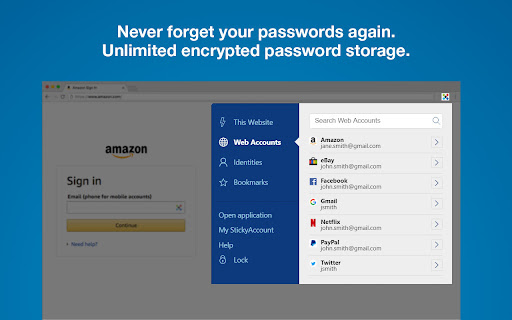

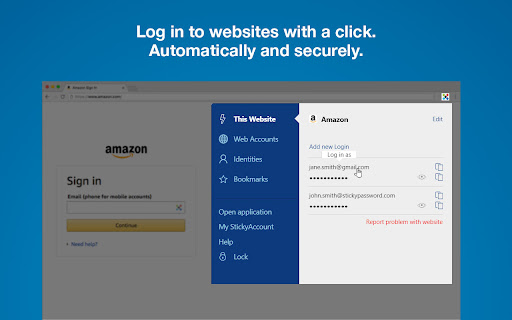
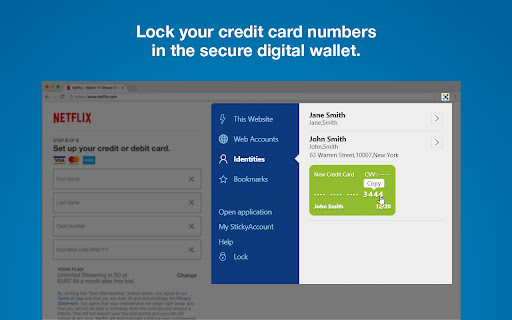
Web form and password filling companion for Sticky Password manager & safe No more forgotten, weak or reused passwords! Sticky Password is the award-winning password manager and form-filler that has been protecting millions of passwords around the world for more than 17 years. Sticky Password is a powerful yet simple free password manager and secure digital vault for your desktop and mobile device browsers. It remembers your passwords and enters them automatically whenever and wherever you need them. Sticky Password extension makes your online life easier by typing your data for you in online forms and login pages. You won’t have to worry about typos and entering data on all those sites you visit. With Sticky Password, your sensitive data is securely stored and encrypted using AES-256 – the world’s leading encryption standard. From now on, you’ll only need to remember just one password - your Master Password - that is the only key that unlocks your encrypted data. It’s created solely by you and it’s not stored anywhere - only you know it. Sticky Password extension features: PASSWORD MANAGER - Remembers all your passwords and types them for you as you browse. - Saves new passwords and logins as you browse. Automatically. - Unlimited storage for all your passwords and logins. - World's leading security—AES-256 encryption CONTACTLESS CONNECT Use your smartphone as an authentication tool to access websites securely and effortlessly on any platform and web browser. Just scan, connect, and go for secure password management. DIGITAL WALLET - Keep your credit card numbers in the super secured vault that only you can access. - Pay with one click. Sticky Password enters your credit cards for you on shopping sites. SYNCHRONIZATION & BACKUP - Sync all your passwords and credentials to all your devices. Access them anywhere. - Select from industry-leading sync options—cloud or local WiFi sync. - Secure cloud backup of all your encrypted data. Only if you want it. Sticky Password is always free for one device. You can get even more with Premium features and manage your passwords and data across all your devices: - Cloud sync & backup - Local Wi-Fi sync - Priority support For more info, please have a look at our Terms and Conditions (https://www.stickypassword.com/terms-and-conditions) and Privacy Policy (https://www.stickypassword.com/privacy-policy).

RoboForm Password Manager
RoboForm Password Manager makes your life easier by remembering passwords and logging you into websites automatically Generate strong passwords for new accounts, manage your passkeys, and enjoy seamless autofill for all your credentials—all in one lightweight extension. 🌎 Works on every device RoboForm works in all major browsers and on all devices, including Windows, Mac, iOS, and Android. ⬆️ Easy import Bring your passwords from your browser or any other password manager in seconds. 🧩 All-in-one management Manage passwords, passkeys, and authenticator codes directly from the extension. ⚡ One-click logins Open a Login, and RoboForm takes you to the site, fills your credentials, then signs you in automatically. 🛡️ Monitor weak, reused, or compromised passwords RoboForm scans your vault for weak, reused, or compromised passwords and alerts you so you can fix them quickly. 🔍 Know immediately if your data is exposed Get alerts for breaches affecting up to 5 email addresses, along with recommended steps to mitigate the threat. 🔒 Zero-knowledge security Your data is encrypted locally with your Master Password—never transmitted to our servers. Uses AES-256 encryption, PBKDF2-SHA256, and full end-to-end encryption. 🔓 Passwordless unlock Skip typing your Master Password. Unlock RoboForm using Windows Hello, Touch ID, passkeys, hardware security keys (e.g., YubiKey), or a trusted device like your smartphone. 🔐 Built-in authenticator & advanced 2FA Use RoboForm as your TOTP authenticator for any website. Secure your account with passkeys, security keys, authenticator apps, or a trusted device. 🔗 Secure sharing Share individual items or entire folders with end-to-end encryption, and assign permissions to each recipient for complete control. 🆘 Emergency Access to trusted contacts Grant trusted contacts secure, controlled access to your RoboForm data in case of an emergency. ⏱️ Real human support Chat, phone, and 24/7 email support whenever you need help.

LessPass
chrome and firefox web extension for lesspass password manager This add-on allows you to build LessPass passwords directly in your browser. LessPass is a password manager that guarantees you to generate the same password on the basis of unique information you provide. You can use LessPass to create passwords for various internet services (social networks , email, server passwords , ...). You can use this extension to generate complex password for your sites without the need to store them. You are the only one to know the information needed to generate a password. You can regenerate your passwords anywhere. No database, no sync needed. Tip: Use the keyboard shortcut Ctrl + Shift + L to launch LessPass

MultiPassword — Password manager
Secure password storage with the MultiPassword.com password manager featuring syncing across devices and web browsers. MultiPassword is a secure, reliable password and login manager. All data is stored in encrypted form and synced across devices. Cybersecurity is an important, relevant issue because websites, apps, and web browsers are often attacked. This sometimes results in user passwords being stolen. The problem worsens if a user uses the same logins and passwords for different websites. Doing so allows attackers to gain access to e-mail addresses, social media accounts, banking apps, and more. Cybersecurity experts advise using strong and — extremely important — different passwords for each account. The best option is to create random passwords using dedicated password generators. MultiPassword stores all your logins and passwords in an encrypted vault synced across all your devices. We use the latest end-to-end encryption technologies AES-256, RSA, HKDF, PBKDF2, etc., to protect your personal data.

ESET Password Manager
Never forget a password again! ESET Password Manager will make your life easier and passwords safer. To install ESET Password Manager, you either need to receive the invitation to use it or have an ESET HOME Security Premium or ESET HOME Security Ultimate subscription. ESET Password Manager allows you to manage your passwords, credit card numbers and other sensitive information, and access them from anywhere. All content in the application is encrypted, protected by a master password, and ONLY YOU have access to it. The ESET Password Manager app allows you to: ✔ Take advantage of Password Generator to create random and secure passwords ✔ Increase the security of stored passwords with Two-Factor Authentication ✔ Manage access to your passwords with the Secure Me feature that: - provides a complete overview and detailed information about active sessions on all of your devices and browsers - allows you to log out of all your sessions remotely - provides actions to improve your security (delete cookies, download history and bookmarks, close tabs, log out from all Password Manager’s sessions), either on a device or remotely, depending on platform or browser. ✔ Use ESET Password Manager for Two-Factor Authentication to your accounts for even stronger security ✔Check a Security report to see if your passwords are among breached passwords and data leaks ✔ Add multiple identities for easier completion of online forms ✔ Prioritize favorite accounts to move their passwords to the top of the list ✔Access your passwords on the go from your Windows PC and Android, iOS and macOS devices Find out more about the ESET Password Manager Chrome extension for ESET HOME Security Premium or ESET HOME Security Ultimate: https://www.eset.com/int/home/protection-plans/ For more info about the privacy policy, visit: https://help.eset.com/password_manager/3/en-US/privacy_policy.html For EULA visit: https://help.eset.com/password_manager/3/en-US/terms-of-use.html
