
foicngnfgjoobicakmgedfomghgdkljg
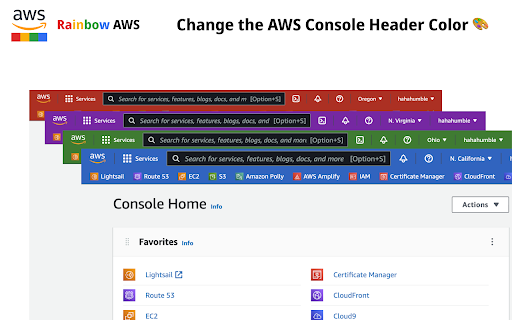


Change the color of the AWS console's headers based on the region you select. ✨ Features * 🔥 Support the latest AWS console UI * 🌈 Easy to use popup menu to quickly change the color * 🎨 Use the palette to quickly choose the color you need 🚀 Quick Links - This extension is open source, click the link below to check it out * https://github.com/hahahumble/Rainbow-AWS ❗️ Notice * This extension required the "storage" privilege to store the color you choose. It won't collect, read or transmit any data of any kind

rainbow-button
ブラウザ上のボタンが虹色に光ります アプリの概要 『押せるボタンを光らせる』Chrome拡張。 Webサイトを見ていて、押せそうにない見た目をしているのに実はボタンだった。そんな不便な体験を無くす事の出来るアプリです。 また追加機能として、色をゲーミングカラーにしたり、光らせるタグを選べます。 アプリの特徴 1. 押せるボタンが分かりやすくなる 「ボタンを光らせる」をONにすると、aタグ、buttonタグが光ります。 2. 好きな色で光らせることが出来る 好きな色を選んで、光らせることができます。 ゲーミングカラーも可能。 3. グラデーションのRGBをカスタムで指定可能。

AWS Colorize
Color codes your AWS header based on what account you are logged into. AWS Colorize allows you to choose a name and color to represent the AWS accounts you log into. This is useful when you have different environments deployed to different AWS accounts. When logging into these accounts directly, as one does when using SSO, it's often hard to tell what environment you are logged into. Mistaking `prod` for `test` is not desireable ;) When using AWS Colorize you can choose a nickname and color to be displayed in the header of the AWS console next to the loggd in user's name. If using AWS Organizations and sub accounts and using AWS switch role to switch between them, You'd probably be better served by the `AWS Extend Swtich Roles` extension.

AWS SSO Colourise
Change the AWS navbar colour based on account (and a few other little niceties) Version 1.3.0 - Adds support for AWS GovCloud and AWS China. Fixes some issues experienced with the script. This extension gives you the ability to customise the AWS Console navigation bar, to indicate what account you are currently signed in as. In addition, it will make the name of the AWS Region you are using, and the Account Name visible by default on the Navigation bar Previously when you used "Switch Roles" you could set a colour when changing from one account to another. However, when switching to AWS SSO (or now know as IAM Identity Center), you do not have this ability with the Console. A Simple dialog lets you configure each account/account alias and the relevant colour you want to have, and this will be auto applied on the console page loading. See screenshots for some examples!

AWS Account Identifier
Adds a description with a specific color to the AWS's navigation bar depending on the account you are connected to. Adds a header to the Navigation Bar of AWS with a description and color based on the account you are connected to. In a multi account environment this is a very useful tool to help you to quickly identify the current account. A new feature has been added so you can import the accounts from the AWS SSO start page. This makes maintaining the accounts in this extension a lot easier. As from version 1.1.0 we stopped using an extra row on the navbar for the description as certain console feature were designed with a fixed position what would make it impossible to access certain functionalities of the AWS Console. Instead, we moved the description to the lower bar where enough space is available to add the description. version 1.2.1: Fix Account detection and improve style.
