
mdbbjjffailicnmbohffnjflngmpinco
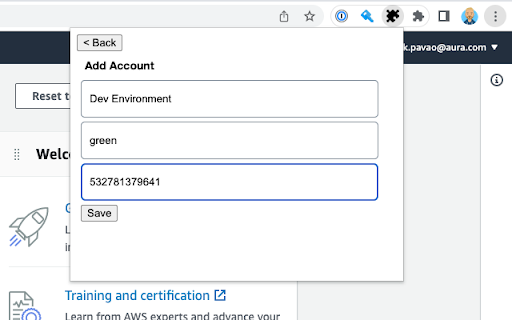
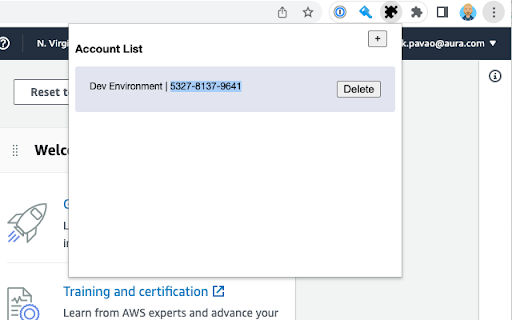
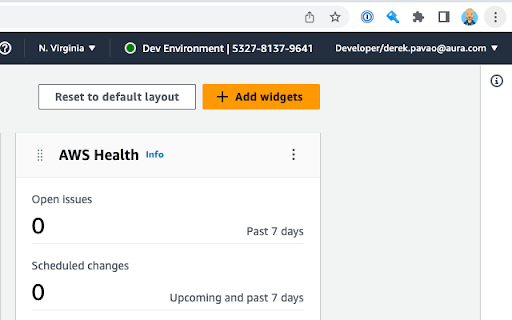
Color codes your AWS header based on what account you are logged into. AWS Colorize allows you to choose a name and color to represent the AWS accounts you log into. This is useful when you have different environments deployed to different AWS accounts. When logging into these accounts directly, as one does when using SSO, it's often hard to tell what environment you are logged into. Mistaking `prod` for `test` is not desireable ;) When using AWS Colorize you can choose a nickname and color to be displayed in the header of the AWS console next to the loggd in user's name. If using AWS Organizations and sub accounts and using AWS switch role to switch between them, You'd probably be better served by the `AWS Extend Swtich Roles` extension.

AWS Account Name Finder
For SSO-based AWS accounts, display the Account Name in your profile menu! If you find yourself switching between different AWS accounts through your organization's AWS SSO start page, then the current profile menu on the Management Console doesn't show the name of the account you are in. It only shows the Account ID, which is not user-friendly. This extension will add the AWS Account Name on to your Management Console's profile menu so that you do not have to wonder which account you have open! If you wish to contribute and make this extension better, please feel free to create a pull request at https://github.com/aravindparappil46/aws-account-name-finder

AWS Console Bar
Increase your productivity in AWS Console with aws-console-bar Chrome Extension The single purpose of your Google Chrome extension is to enhance the AWS (Amazon Web Services) Console by adding a UI element that displays account names. Here's a more detailed description: Extension Name: AWS Console Bar Purpose: The AWS Console Bar Chrome extension provides a seamless way for AWS users to quickly identify and distinguish between different AWS accounts when working in the AWS Management Console. By overlaying a user-friendly UI element on top of the AWS Console, this extension enhances the user experience and reduces the risk of accidental operations in the wrong account. Account Identification: The extension identifies the AWS account currently in use within the AWS Console. UI Overlay: It adds a non-intrusive UI overlay at the top of the AWS Console's interface, displaying the account's friendly name. Customizable Labels: Users have the option to assign custom labels or nicknames to their AWS accounts for easier recognition. Color Coding: Accounts can be color-coded, allowing users to quickly associate colors with specific accounts. Multiple Account Support: The extension supports multiple AWS accounts, making it ideal for users who manage multiple AWS environments simultaneously. Intuitive Interface: The UI element is designed to be minimalistic and intuitive, ensuring it doesn't clutter the AWS Console. Enhanced Productivity: Users can work more efficiently by reducing the risk of mistakenly performing actions in the wrong AWS account. User-Friendly: The extension's user interface is designed to be user-friendly and unobtrusive, ensuring a seamless experience. Customization: Users have the flexibility to customize labels and colors according to their preferences. Multi-Account Management: Ideal for developers, administrators, or teams managing multiple AWS accounts concurrently. Compatibility: The AWS Account Identifier Chrome extension is compatible with all AWS Console services, ensuring a consistent and improved experience across the AWS ecosystem. Security: The extension does not compromise AWS security. It only adds a UI overlay for user convenience and does not access, store, or transmit sensitive AWS credentials or data. Privacy: The extension respects user privacy and does not collect any personal or usage data. In summary, the AWS Account Identifier Chrome extension is designed to simplify and improve the AWS Console experience by adding a non-intrusive UI element that helps users easily identify and manage their AWS accounts. It enhances productivity, reduces the risk of errors, and is customizable to suit individual preferences.

AWS Account Identifier
Adds a description with a specific color to the AWS's navigation bar depending on the account you are connected to. Adds a header to the Navigation Bar of AWS with a description and color based on the account you are connected to. In a multi account environment this is a very useful tool to help you to quickly identify the current account. A new feature has been added so you can import the accounts from the AWS SSO start page. This makes maintaining the accounts in this extension a lot easier. As from version 1.1.0 we stopped using an extra row on the navbar for the description as certain console feature were designed with a fixed position what would make it impossible to access certain functionalities of the AWS Console. Instead, we moved the description to the lower bar where enough space is available to add the description. version 1.2.1: Fix Account detection and improve style.

AWS SSO Colourise
Change the AWS navbar colour based on account (and a few other little niceties) Version 1.3.0 - Adds support for AWS GovCloud and AWS China. Fixes some issues experienced with the script. This extension gives you the ability to customise the AWS Console navigation bar, to indicate what account you are currently signed in as. In addition, it will make the name of the AWS Region you are using, and the Account Name visible by default on the Navigation bar Previously when you used "Switch Roles" you could set a colour when changing from one account to another. However, when switching to AWS SSO (or now know as IAM Identity Center), you do not have this ability with the Console. A Simple dialog lets you configure each account/account alias and the relevant colour you want to have, and this will be auto applied on the console page loading. See screenshots for some examples!
