
niehkegjpcojffbkkanieombbpibahjf
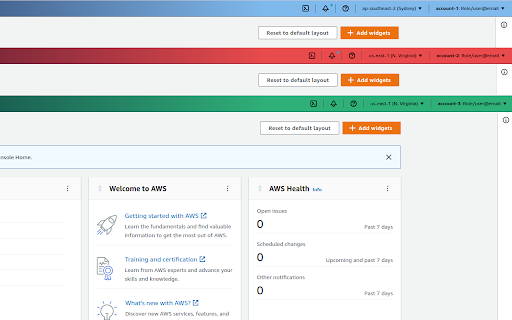
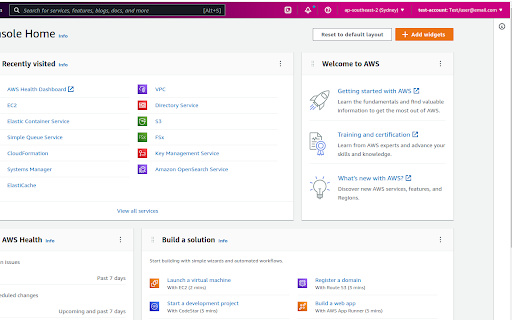
Change the AWS navbar colour based on account (and a few other little niceties) Version 1.3.0 - Adds support for AWS GovCloud and AWS China. Fixes some issues experienced with the script. This extension gives you the ability to customise the AWS Console navigation bar, to indicate what account you are currently signed in as. In addition, it will make the name of the AWS Region you are using, and the Account Name visible by default on the Navigation bar Previously when you used "Switch Roles" you could set a colour when changing from one account to another. However, when switching to AWS SSO (or now know as IAM Identity Center), you do not have this ability with the Console. A Simple dialog lets you configure each account/account alias and the relevant colour you want to have, and this will be auto applied on the console page loading. See screenshots for some examples!

AWS SSO Auto-Expand Accounts
Tired of clicking to expand an AWS SSO account to then open the account's console? This add-on solves the problem by automatically… Tired of clicking to expand an AWS SSO account to then open the account's console? This add-on solves the problem by automatically expanding every accounts on the AWS SSO page.

Miro Tab Closer
Automatically close the Miro Shared Link tab when you open it in Miro Desktop. Shared links contain the "share_link_id" key in the URL. Left click on the icon to disable the extension, right click to go to the timer options.

SharePrompts: Share your ChatGPT,Bard Prompts
SharePrompts is a Chrome extension that allows you to share your prompts with one click from ChatGPT and Bard Introducing the SharePrompts Extension - the ultimate tool for all ChatGPT enthusiasts! This Chrome extension allows you to save and easily access your ChatGPT or other LLMs conversations with just one click. With this Extension, you no longer have to worry about losing your favorite conversations. Simply click the extension icon to save the conversation, and it will be stored for future reference. You can even categorize and organize your saved conversations for easy retrieval later on. But that's not all! The Extension also lets you share permanent links to your ChatGPT conversations with your friends. No more copying and pasting long URLs or screenshots to show off your conversations. With just a few clicks, you can share your most hilarious or insightful ChatGPT conversations with your friends and family. You can keep it private or share with public. It's is the perfect way to keep track of your most entertaining or insightful conversations with ChatGPT. Whether you want to revisit a heated debate, remember a funny joke, or review an important piece of advice, this extension makes it easy to access all of your past conversations with just a few clicks. The Extension is perfect for those who love using ChatGPT for brainstorming, learning, or just having fun. Install it today and never lose your favorite ChatGPT conversations again!

AWS Account Identifier
Adds a description with a specific color to the AWS's navigation bar depending on the account you are connected to. Adds a header to the Navigation Bar of AWS with a description and color based on the account you are connected to. In a multi account environment this is a very useful tool to help you to quickly identify the current account. A new feature has been added so you can import the accounts from the AWS SSO start page. This makes maintaining the accounts in this extension a lot easier. As from version 1.1.0 we stopped using an extra row on the navbar for the description as certain console feature were designed with a fixed position what would make it impossible to access certain functionalities of the AWS Console. Instead, we moved the description to the lower bar where enough space is available to add the description. version 1.2.1: Fix Account detection and improve style.
