
mckoebmagmohnakollpkpnlbgoclchdb
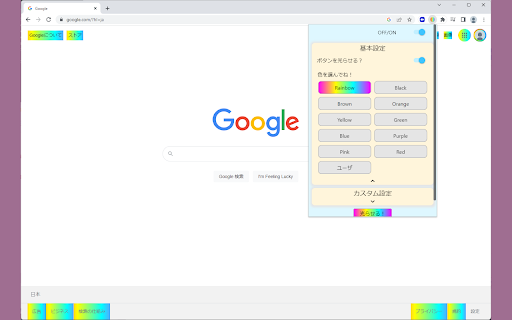


ブラウザ上のボタンが虹色に光ります アプリの概要 『押せるボタンを光らせる』Chrome拡張。 Webサイトを見ていて、押せそうにない見た目をしているのに実はボタンだった。そんな不便な体験を無くす事の出来るアプリです。 また追加機能として、色をゲーミングカラーにしたり、光らせるタグを選べます。 アプリの特徴 1. 押せるボタンが分かりやすくなる 「ボタンを光らせる」をONにすると、aタグ、buttonタグが光ります。 2. 好きな色で光らせることが出来る 好きな色を選んで、光らせることができます。 ゲーミングカラーも可能。 3. グラデーションのRGBをカスタムで指定可能。

Colorful YouTube
Add a splash of color to your YouTube experience with Colorful YouTube! Transform the text on YouTube into vibrant, random RGB colors, making your browsing more visually stimulating and fun. Whether it's video titles, comments, or descriptions, every piece of text on YouTube will be dynamically colored in a spectrum of hues. - Random RGB Text Colors: Automatically apply random RGB colors to all text elements on YouTube, creating a unique and colorful viewing experience. - Color Button: Not satisfied with the current color scheme? Simply click the "Color" button by the search bar to instantly shuffle the colors and enjoy a fresh new look. - User-Friendly Interface: Easy to use with a straightforward design, perfect for users of all ages. - Seamless Integration: Works smoothly with YouTube’s interface without interfering with video playback or other functionalities. Enjoy a more colorful YouTube and brighten up your browsing with Colorful YouTube!

Custom Colors
Give color to your favourite websites! [ 💬 This extension is still in development. It has a notable performance impact on complex sites like YouTube or Twitch, specially when using the color cycle mode. Besides, colors are applied in a flashy way that can be quite annoying. At this point, this extension’s main purpose is to provide a bit of fun when trying and exploring new colors on your favourite websites. It needs a few issues to be solved to be able to be considered an accessibility improvement too. 💬] Custom Colors allows you to change the colors of the websites you visit. You can choose, for every specific site, the colors you want for all backgrounds and texts. These settings can be saved so every time you open these sites the colors you have chosen will be applied. Pick the colors you want for a specific site using the extension’s pop-up from a tab where that site is opened. To open the pop-up, you need to click on the extension’s icon. You can find all your active extensions at the top right corner of Chrome windows, clicking on the puzzle’s piece icon (🧩) [Here is where extensions are located in June 2021]. Once you have opened the pop-up, you will be able to see the list of sites with custom settings. Initially, there will not be any of them. Also, you will see one or two plus icons (➕). Use them to add the site of the current tab you are seeing the pop-up from to your list of customized sites. You can add a domain (e.g. youtube.com) or an specific URL (e.g. youtube.com/watch?v=BBSqiqqt_7E). Custom colors can be defined for backgrounds, texts that contain visited links (recently clicked), texts that contain unvisited links and texts that do not contain any links 😊. Customized sites are displayed in a table, and four of its columns correspond with these four possible selections. You can choose the colors you want for any of your saved sites by clicking on the table’s cells that belong to these four columns. When one of these cells is clicked, a little window with a color palette is opened. Here you can select any color you want from it for your site! There are a few options more: a random color can be generated every time you load the page (❔), colors can change continuously along the RGB spectrum (🔄) and you can also keep original colors (🚫), for instance, if you want to change backgrounds’ colors but not links’ ones. Don’t forget to save your settings clicking on the tick icon (✔). There are also settings defined for ‘all sites’: if these are enabled, they will be applied on every site you visit except on those you have defined custom settings for, because they will be prioritized on them. Custom settings can be removed or deactivated anytime, and even if ‘all sites’ settings are enabled, they won’t have an effect on saved sites that are not activated. Settings are applied automatically on sites that are opened, so you can have a preview of the colors you choose (if you discard your choice, colors are removed too). If at some time these automatic changes don’t work properly, they will function as they’re supposed to if you reload the page. FYI: Extensions are not activated automatically when they are installed. This extension, like many others you have tried probably, starts working on all the corresponding tabs at the right moment it is installed, but this is not the default behaviour. Take in mind that if you install an extension sometime and it doesn't work on the tabs you have already open, you may need to refresh those tabs with F5 key or by clicking on the reload button located in the browser's top left corner.

Kite Cursor
A kite that follows your cursor! Reminiscent of an older internet, this extension brings kites to follow your mouse cursor around, adding a little fun to your internet use. The kite is yellow, red, blue, and green, and has a few little bows attached to the string. On every website, the kite will follow your mouse. The kite follows gravity, but if you move quick enough, you can do a few fun flips! To disable the kite, click on its icon in the toolbar.

Rainbow Scrollbar
Do you love the rainbow? Do you want to spice up your everyday chrome experience? Then you should use Rainbow Scrollbar. Rainbow Scrollbar is a simple extension that changes all of your scrollbars to a rainbow background.
