
fofmdlokibpecpdcgdomnnhdacicepag
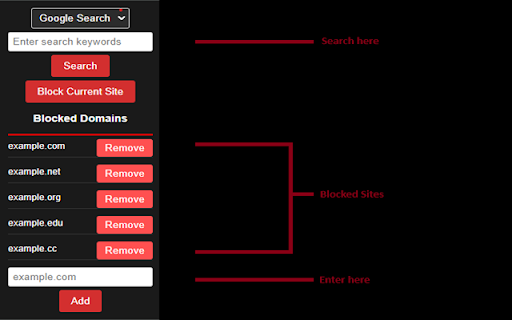
Search Engine Website Excluder is a powerful, lightweight Chrome extension designed to enhance your online search experience. It allows you to customize search results by excluding specific domains that you prefer not to see. Whether you're looking for more relevant information, avoiding distractions, or filtering out unwanted AI content, Search Engine Website Excluder puts you in control of what appears in your search results. Domain Exclusion: Easily add or remove domains from your exclusion list to tailor search results to your needs. Real-Time Filtering: Apply changes immediately, so your search results reflect your preferences without delay. User-Friendly Interface: Intuitive and simple to use, making the customization of search results accessible to everyone. Privacy-Focused: Operates with minimal permissions and ensures your settings are private and secure. This extension appends the "-site:" argument to your search results from a population of websites from a user-defined list to filter unwanted sites and AI content.

Google Search Filter
Filters certain URLs when searching in Google page Filter for Google search. Register your Keywords, then the extension will detect them in the search-results. You can Highlight / Delete the results from the result page. -Added Donation Button to the extension, your support is much appreciated.

Refined Search Results
Remove unwanted search results from Google for a better search experience. I never click on any `quora.com` links when doing a Google search, and I'm sure many of you have a few websites that you also avoid as much as possible when they show up on your search results. Maybe you don't like the quality of their content, or they are known for paywalled content, or maybe they just have a terrible user experience. This extension allows you to remove these sites from your search results, to give you more space for the results that actually matter to you. How to use: 1. Install the extension 2. Configure the list of domains you don't want to see on Google 3. Enjoy a cleaner search experience ✨

Highlight or Hide Search Engine Results
Filter search engine results. Block unwanted results and highlight the favorite ones. For Google and other popular search engines. This is a blocker and a highlighter for your favorite search engine. It allows you to filter (mark, highlight, hide or block) results in popular search engines. For example, you can highlight all results from Wikipedia and hide those form Facebook.

uBlacklist
Blocks sites you specify from appearing in Google search results This extension prevents the sites you specify from appearing in Google search results. You can add rules on search result pages, or on sites to be blocked by clicking the toolbar icon. Rules can be specified either by match patterns (e.g. *://*.example.com/*) or by regular expressions (e.g. /example\.(net|org)/). You can use this extension in several search engines other than Google. The list of supported search engines is available at: https://github.com/iorate/ublacklist#supported-search-engines You can synchronize rulesets across devices via cloud storage. At the moment, Google Drive and Dropbox are supported. You can also subscribe to public rulesets. Some subscriptions are listed on the website: https://ublacklist.github.io/subscriptions
