
kmhlpeknclnafdbjdbbbhelolcfnfabi
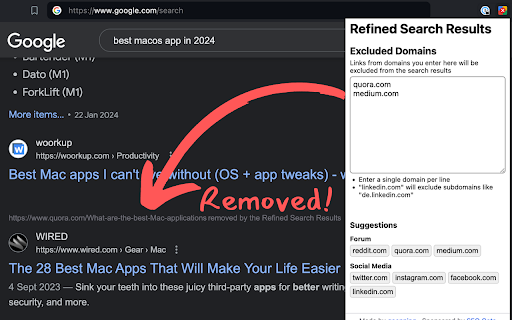
Remove unwanted search results from Google for a better search experience. I never click on any `quora.com` links when doing a Google search, and I'm sure many of you have a few websites that you also avoid as much as possible when they show up on your search results. Maybe you don't like the quality of their content, or they are known for paywalled content, or maybe they just have a terrible user experience. This extension allows you to remove these sites from your search results, to give you more space for the results that actually matter to you. How to use: 1. Install the extension 2. Configure the list of domains you don't want to see on Google 3. Enjoy a cleaner search experience ✨

Search Engine Website Excluder
Search Engine Website Excluder is a powerful, lightweight Chrome extension designed to enhance your online search experience. It allows you to customize search results by excluding specific domains that you prefer not to see. Whether you're looking for more relevant information, avoiding distractions, or filtering out unwanted AI content, Search Engine Website Excluder puts you in control of what appears in your search results. Domain Exclusion: Easily add or remove domains from your exclusion list to tailor search results to your needs. Real-Time Filtering: Apply changes immediately, so your search results reflect your preferences without delay. User-Friendly Interface: Intuitive and simple to use, making the customization of search results accessible to everyone. Privacy-Focused: Operates with minimal permissions and ensures your settings are private and secure. This extension appends the "-site:" argument to your search results from a population of websites from a user-defined list to filter unwanted sites and AI content.

Websites ranks and Google search options
Popularity ratings and search options in Google search results Sometimes it's hard to find what you are looking for. This extension adds a rating beside each Google result. A rating of (10) means highly popular website, (0) means not so popular. The number is given by google-independent rankings (myip.ms service). When choosing to open a Google result, it's usually a good idea to choose the higher number. This extension also provides an option menu to clean intrusive search results from Google! No more ads, related searches, people also ask, multiple links, video previews, thumbnail images, snippets, widgets, etc. Thanks to the Google search options, you can hide something (for example only ads) and keep everything else, or you can hide all the intrusive contents and get just the text-based search results! This extension is not supported by Google. It's a safe beta and requires no special permissions. Kindly report any problem or suggestion and please, if you don't like something, please send me an email and do not leave a negative review. I will do my best to help you!

Search Sanitizer
Tired of seeing the same AI-generated blogs, SEO-optimized sites, and spamming marketing webshops? Search Sanitizer blocks unwanted URLs from showing up in your Google Search results. Just enter the URLs you want to block, and they’ll be filtered out of your search results, including images, videos, ads, recipes and news articles.

Highlight or Hide Search Engine Results
Filter search engine results. Block unwanted results and highlight the favorite ones. For Google and other popular search engines. This is a blocker and a highlighter for your favorite search engine. It allows you to filter (mark, highlight, hide or block) results in popular search engines. For example, you can highlight all results from Wikipedia and hide those form Facebook.
