
ilopipickdimglkalhckioobifbiinbk
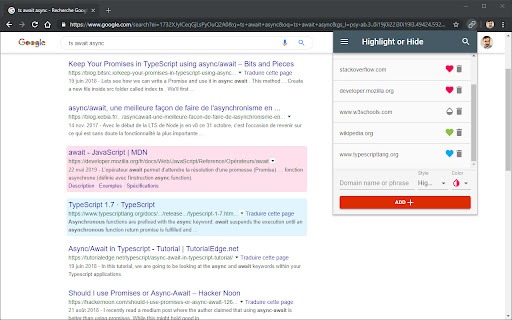

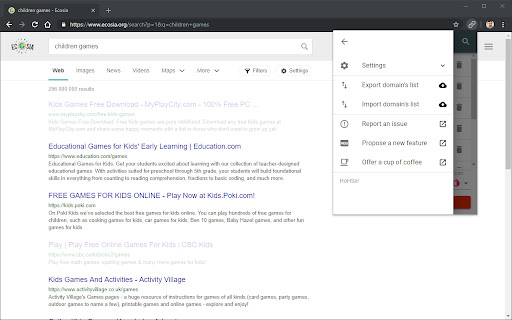
Filter search engine results. Block unwanted results and highlight the favorite ones. For Google and other popular search engines. This is a blocker and a highlighter for your favorite search engine. It allows you to filter (mark, highlight, hide or block) results in popular search engines. For example, you can highlight all results from Wikipedia and hide those form Facebook.

Search Engine Website Excluder
Search Engine Website Excluder is a powerful, lightweight Chrome extension designed to enhance your online search experience. It allows you to customize search results by excluding specific domains that you prefer not to see. Whether you're looking for more relevant information, avoiding distractions, or filtering out unwanted AI content, Search Engine Website Excluder puts you in control of what appears in your search results. Domain Exclusion: Easily add or remove domains from your exclusion list to tailor search results to your needs. Real-Time Filtering: Apply changes immediately, so your search results reflect your preferences without delay. User-Friendly Interface: Intuitive and simple to use, making the customization of search results accessible to everyone. Privacy-Focused: Operates with minimal permissions and ensures your settings are private and secure. This extension appends the "-site:" argument to your search results from a population of websites from a user-defined list to filter unwanted sites and AI content.

Scroll Preview
Scroll Preview integrates a whole-page preview with scrollbar that inspired by Sublime Text's mini map. HOW IT WORKS • Alt + A — get a new scrollbar with rough preview • drag/click the scrollbar — just like how you used to • Alt + Shift + A — get a refined preview (please wait patiently) • tired of key pressing? — turn on Automatic or Conditional mode in option page UPDATES • Floating handle • Conditional mode for articles • Setting synchronization FEATURES • Captures whole-page snapshot (Alt+A) • Adds an additional easy-to-drag scrollbar which works nicely with the native one • Integrates snapshot with scrollbar for better previewing • Refreshes snapshot while window is resized • Allows hide/show toggling (Alt+A again) • If you found blank areas shown in snapshot, let the browser re-scan the page to refine it. (Shift+Alt+A) • Applies anti-aliasing on snapshot. • Jumps to where you click on the snapshot. • Magnifier on snapshot (works great with click-to-jump). • Always-on mode (Options > Basics > Automatically) • Option page (chrome://extensions/ > Scroll Preview > Options) • Auto-hide • Blacklist / Whitelist

uBlacklist
Blocks sites you specify from appearing in Google search results This extension prevents the sites you specify from appearing in Google search results. You can add rules on search result pages, or on sites to be blocked by clicking the toolbar icon. Rules can be specified either by match patterns (e.g. *://*.example.com/*) or by regular expressions (e.g. /example\.(net|org)/). You can use this extension in several search engines other than Google. The list of supported search engines is available at: https://github.com/iorate/ublacklist#supported-search-engines You can synchronize rulesets across devices via cloud storage. At the moment, Google Drive and Dropbox are supported. You can also subscribe to public rulesets. Some subscriptions are listed on the website: https://ublacklist.github.io/subscriptions

Overload Search - Advanced Google Search
🔍 Fast Advanced Google Search. Find the results you need fast! 🚀 Improve productivity & find what you're looking for on Google quickly by filtering search results with advanced Google search operators. Optimize your search query effortlessly with advanced Google search operators using this convenient Google search assistant tool. Say goodbye to the hassle of cheat sheets! ⭐ Site search - Search by the current site or domain - autofill feature ⭐ Find Keywords within the Page title, Body and URL of websites ⭐ Shortcut Alt + G to open the search tool ⭐ Order search parameters by Dragging to best suit your use case ⭐ Enable & Disable cards to show only the relevant search parameters ⭐ Open a new tab or use the current tab option ⭐ Remove query parameters you don't need quickly by clicking the bin icon and removing multiple search cards, so you can focus on the filters that matter most to you. Supported query operators/parameters ▸ Exclude - multiple exclude using space separator ▸ Site search - search current site or search domain - includes use current domain button that will populate the field for you ▸ File type - filter by any file type e.g. pdf, docx, txt, xls, ppt etc ▸ Search type - websites, images, video etc ▸ Keywords within - Any, Page title, Body and URL ▸ Date Range - Before/After ▸ Date Range quick (Max Age of result) ▸ View Google's cache of a website ▸ Turn off Google personalised search results ▸ Sites that contain link specified ▸ Related site search ▸ Turn off safe search ▸ Country support - see search results based on country ▸ Search by Language Customise your Advanced Google search experience and improve the quality of your search results. Perform SEO research techniques quickly using this Google advanced search power tool with the available search utilities. ⭐ Find when google last indexed a website with the cache parameter ⭐ Discover hidden opportunities for internal linking by searching for phrases in your domain or website. ⭐ Conduct competitor SEO research, just use the "related sites" search operator followed by a website URL. Permissions: The tabs permission is necessary for the populate domain and page buttons. 🚀 Release Notes 2.1.0 ▸further performance improvements 2.0.9 ▸performance improvements 2.0.7 ▸align radio & ok buttons 1.9.4 ▸update style framework 1.9.1 ▸Shortcut fix 1.9.0 ▸Chrome v3 manifest support 1.8.0 ▸ Search the current website quickly with the autofill domain option 1.6.0 ▸ Clear query on close option added ▸ The search form will now open with the previous values by default. This can be disabled with the clear on close option 1.5.3 ▸ Search by Language. Autocomplete with filter enabled ▸ Start typing in the new language input to quickly select a language from a list of supported languages in Google search 1.4.1 ▸ Reduced permissions, previously the tabs permission was needed for domain/url retrieval 1.0 ▸ Country support - filter search results based on country! ▸ keep search tool open & use current tab for query option ▸ Tweak your search parameters after submitting! 0.4 ▸ Turn off safe search ▸ Related site search ▸ Sites that contain link specified 0.3: ▸ Turn off Google personalised search results
