
fjdhgajbjkmbnjckgecmdegclijcgnkj

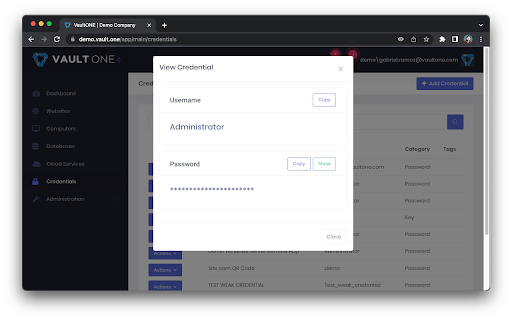
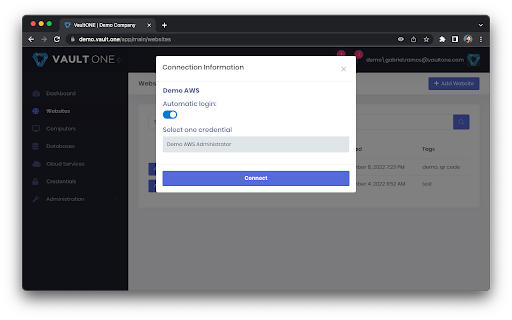
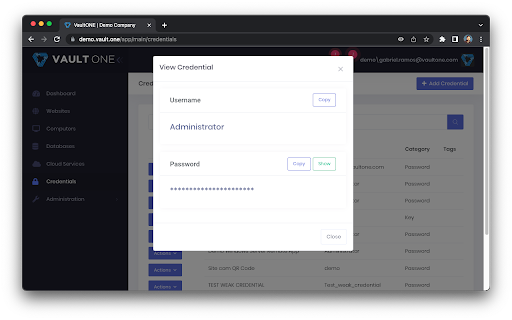
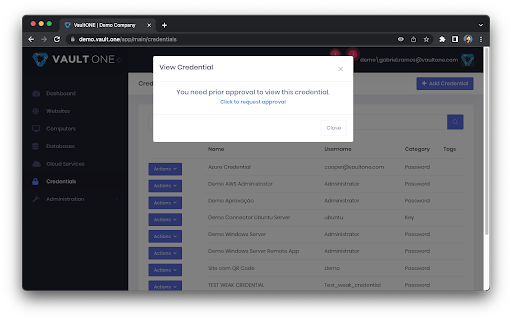
VaultOne makes your IT safer & smarter. Autofill passwords from VaultOne and log in instantly to your favorite websites. Access VaultOne managed credentials directly from your browser. The VaultOne extension has a new modern look and feel and provides secure access to your web based secrets. This extension requires use and integration with VaultOne Service. The extension automatically identifies the existence of credential fields and will automatically populate them based on existing secrets in VaultOne Service.

RoboForm Password Manager
RoboForm Password Manager makes your life easier by remembering passwords and logging you into websites automatically Generate strong passwords for new accounts, manage your passkeys, and enjoy seamless autofill for all your credentials—all in one lightweight extension. 🌎 Works on every device RoboForm works in all major browsers and on all devices, including Windows, Mac, iOS, and Android. ⬆️ Easy import Bring your passwords from your browser or any other password manager in seconds. 🧩 All-in-one management Manage passwords, passkeys, and authenticator codes directly from the extension. ⚡ One-click logins Open a Login, and RoboForm takes you to the site, fills your credentials, then signs you in automatically. 🛡️ Monitor weak, reused, or compromised passwords RoboForm scans your vault for weak, reused, or compromised passwords and alerts you so you can fix them quickly. 🔍 Know immediately if your data is exposed Get alerts for breaches affecting up to 5 email addresses, along with recommended steps to mitigate the threat. 🔒 Zero-knowledge security Your data is encrypted locally with your Master Password—never transmitted to our servers. Uses AES-256 encryption, PBKDF2-SHA256, and full end-to-end encryption. 🔓 Passwordless unlock Skip typing your Master Password. Unlock RoboForm using Windows Hello, Touch ID, passkeys, hardware security keys (e.g., YubiKey), or a trusted device like your smartphone. 🔐 Built-in authenticator & advanced 2FA Use RoboForm as your TOTP authenticator for any website. Secure your account with passkeys, security keys, authenticator apps, or a trusted device. 🔗 Secure sharing Share individual items or entire folders with end-to-end encryption, and assign permissions to each recipient for complete control. 🆘 Emergency Access to trusted contacts Grant trusted contacts secure, controlled access to your RoboForm data in case of an emergency. ⏱️ Real human support Chat, phone, and 24/7 email support whenever you need help.

DualSafe Password Manager & Digital Vault
DualSafe Password Manager extension lets you safely manage passwords in one place to autosave, autofill & access them anytime. Keep secure and productive with this password management tool. DualSafe Password Manager extension enables you to manage passwords securely & simply in just one place. You only need to remember one single password. The DualSafe Password Manager plugin can autosave your login credentials in a secure digital vault with your grant. Then the saved passwords will be auto-filled on the sites whenever you need to log into. With the best password manager browser addon, you don’t need to install a password manager application on your computer anymore. Password management has never been easier with the DualSafe Password Manager extension. Add it to your browser now! What makes DualSafe the best password manager? All your data is completely locally encrypted using AES256. Nobody, including us (DualSafe), can access your personal information but yourself. When it comes to data synchronization, we use HTTPS to transfer the already encrypted data to our cloud server. The whole process is 100% safe because of SSL. We are not here to just help you remember something but to help you secure everything. We monitor the dark web day and night to make sure you will be informed immediately if your account and password were leaked. We help you check the strength of your password each time you add it to our extension, and give you suggestions to fix it. ✔️Intuitive and Easy to Use✔️ DualSafe Password Manager extension allows you to save your credentials with just one click. The next time you need to log in, we will auto-fill your username and password. The only thing you need to do is to remember one single password to access our plugin. Each time you update your account name or password of a site, we will automatically update it for you. We order your saved account information according to your last update time to make sure you can easily find sites that you visit regularly. A search function is also provided for you to find your favorite ones. DualSafe is not just a password manager, but your one-stop digital vault. You can also save your Secure Notes, Payment Info, or Personal Info with us. Once again, everything is safe with us. DualSafe is so proud of providing users with 4 extra free tools: Password Generator, Dark Web Monitor, Password Health, Import & Export. Password Generator can help you generate a strong and secure password that no one can guess. Don't worry about it being too complex. You don't need to remember it, we help you remember. Dark Web Monitor can help you monitor sensitive data leaks on Dark Web. We will let you know and give you suggestions once upon we find the leaking sites containing your information. Password Health is able to check if a password is vulnerable. We will give a low score for weak, reused, or compromised passwords to prevent your passwords from being cracked. Import & Export allows you to import data from your browsers or other password tools, and export your saved data to a CSV file with just 1 click. ❤️Forget about forgetting passwords from today on. Have your important information at your fingertips with DualSafe Password Manager.❤️

WOT: Website Security & Safety Checker
Stay safe online with WOT, the ultimate website security and safety check extension Check website security easily with the WOT Chrome Extension. Just like how we take steps to protect ourselves in the physical world, it's important to protect ourselves in the digital world as well. This is why we’ve developed features such as our website safety checker, anti-phishing alerts, identity theft protection, and more. Block malicious sites with the click of a button. WOT is the #1 solution for website security, website safety, and online safety. 🌐 Website Safety Checker Get alerted if a website you’re about to visit is harmful or suspicious with our website safety and website security checker. See real-time website safety ratings on any site. 🎣 Anti-Phishing Get instant protection against phishing attacks. Receive warnings if you get an email that contains suspicious or harmful links. 💻 Data Breach Monitoring See if any of your passwords have been leaked so you can update your login credentials before your other accounts are impacted 🔞 Adult Content Protection Block adult content from appearing on your device(s) 💳 Safe Shopping Secure online shopping with WOT. Instantly be alerted if the website you are shopping on is not secure or not safe. With our dashboard, you’ll be able to increase your website security by: ★ Seeing in real time harmful sites that were blocked ★ Knowing the number of suspicious emails you’ve received ★ Instantly knowing if your personal information was leaked. Have you ever wondered how to check if a website is safe? How to do a safe search? Our community of over 2 million people has your back. Download WOT the website safety check extension for Chrome to feel secure and protected while you search, shop, and surf the web 🏄♂️. The WOT Community is unlike any other. We are powered by a global community of 2M+ happy and safe customers. Enjoy community features like: ★ Requesting a review If you come across a site without a rating, you can ask the community to review it ★ Ratings & Reviews We use smart algorithms and human verification to root out false testimonials We respect your privacy and work very hard to preserve it. To enable real-time protection and allow us to fully understand website reputations, we require the collection of browsing data, as described in our Privacy Policy: We are able to provide our service by accessing the following permissions: tabs, broad hosts, context Menus, web Navigation, web Request, declarative Net Request, scripting, alarms and storage. Ready for website security across all your devices? Download our apps! Android: https://play.google.com/store/apps/details?id=com.wot.security&hl=en_US iPhone: https://apps.apple.com/us/app/wot-mobile-security-protection/id1451498125

NordPass® Password Manager & Digital Vault
NordPass is your freedom from password stress. Generate and securely store strong passwords and autofill them with a single click. Designed by the security experts behind NordVPN, the NordPass password manager offers a refined yet user-friendly approach to password management. Effortlessly generate strong passwords, identify weak passwords, discover whether your data has appeared in a data breach, and benefit from the convenience of our autosave and autofill features. But there’s more to NordPass than meets the eye. Beyond passwords, trust NordPass to store your passkeys, credit cards, personal notes, and even files with 3GB of storage reserved just for that. Never compromise on security. Keep your passwords safe with NordPass. Here’s more of what you get when you choose NordPass: ➡️ Autofill and Autosave Log into your favorite website without manually typing your password every time, and autosave new passwords with a click. ➡️ Documents Securely store and organize PDFs and scans of passports, IDs, and any important paperwork. Add expiry dates and get automatic reminders before anything runs out. ➡️ Password Generator Generate strong passwords for your online accounts with a single click. ➡️ Password Health Identify weak, old, and reused passwords with the dedicated Password Health tool. ➡️ Data Breach Scanner Check if any of your sensitive data has been compromised and take immediate action. ➡️ Breach Monitoring Receive real-time alerts about your breached data and stay ahead of potential threats. ➡️ Emergency access and password sharing Share passwords securely with trusted individuals and provide emergency access to close contacts. ➡️ Credit card and personal info storage Have direct, instant access to payment details when online shopping or personal details when booking trips without the need to remember or manually type them out. ➡️ Device sync Save a password on your laptop and access it on your mobile while on the go. ➡️ Unlimited storage and devices Store countless passwords and access them on all of your devices, even when you’re offline. ➡️ MFA and biometrics Enhance security with Multi-Factor Authentication, OTP generators, and biometric access. ➡️ File Attachments Securely attach, store, and retrieve files with 3GB of storage. ➡️ Password Import and Export Switch from another password manager to NordPass without losing any data. ➡️ XChaCha20 encryption All your data in NordPass is encrypted with the cutting-edge XChaCha20 encryption algorithm, ensuring unparalleled password security. ➡️ Zero-Knowledge architecture With NordPass's zero-knowledge architecture, only you have access to your data. Download NordPass and forget your password stress. Forever. ℹ️ For more information, visit: https://nordpass.com/ 🔒 For Privacy Policy, visit: https://nordpass.com/privacy-policy ✉️ Feel free to contact our Customer Support team with any questions you may have: support@nordpass.com
