
lgbjhdkjmpgjgcbcdlhkokkckpjmedgc

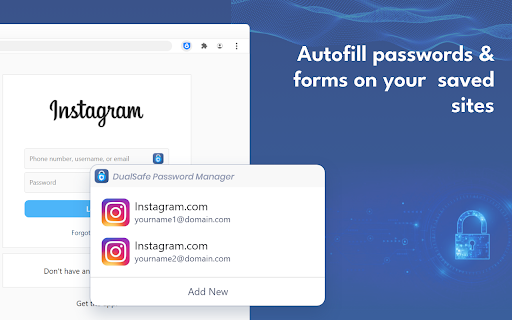


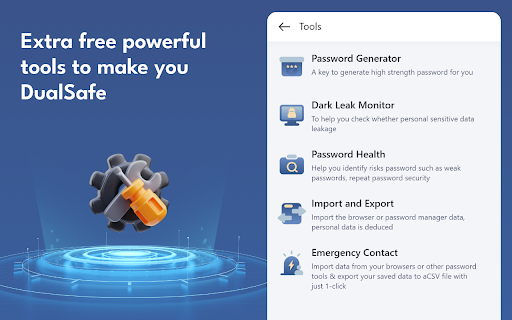
DualSafe Password Manager extension lets you safely manage passwords in one place to autosave, autofill & access them anytime. Keep secure and productive with this password management tool. DualSafe Password Manager extension enables you to manage passwords securely & simply in just one place. You only need to remember one single password. The DualSafe Password Manager plugin can autosave your login credentials in a secure digital vault with your grant. Then the saved passwords will be auto-filled on the sites whenever you need to log into. With the best password manager browser addon, you don’t need to install a password manager application on your computer anymore. Password management has never been easier with the DualSafe Password Manager extension. Add it to your browser now! What makes DualSafe the best password manager? All your data is completely locally encrypted using AES256. Nobody, including us (DualSafe), can access your personal information but yourself. When it comes to data synchronization, we use HTTPS to transfer the already encrypted data to our cloud server. The whole process is 100% safe because of SSL. We are not here to just help you remember something but to help you secure everything. We monitor the dark web day and night to make sure you will be informed immediately if your account and password were leaked. We help you check the strength of your password each time you add it to our extension, and give you suggestions to fix it. ✔️Intuitive and Easy to Use✔️ DualSafe Password Manager extension allows you to save your credentials with just one click. The next time you need to log in, we will auto-fill your username and password. The only thing you need to do is to remember one single password to access our plugin. Each time you update your account name or password of a site, we will automatically update it for you. We order your saved account information according to your last update time to make sure you can easily find sites that you visit regularly. A search function is also provided for you to find your favorite ones. DualSafe is not just a password manager, but your one-stop digital vault. You can also save your Secure Notes, Payment Info, or Personal Info with us. Once again, everything is safe with us. DualSafe is so proud of providing users with 4 extra free tools: Password Generator, Dark Web Monitor, Password Health, Import & Export. Password Generator can help you generate a strong and secure password that no one can guess. Don't worry about it being too complex. You don't need to remember it, we help you remember. Dark Web Monitor can help you monitor sensitive data leaks on Dark Web. We will let you know and give you suggestions once upon we find the leaking sites containing your information. Password Health is able to check if a password is vulnerable. We will give a low score for weak, reused, or compromised passwords to prevent your passwords from being cracked. Import & Export allows you to import data from your browsers or other password tools, and export your saved data to a CSV file with just 1 click. ❤️Forget about forgetting passwords from today on. Have your important information at your fingertips with DualSafe Password Manager.❤️

Passwarden by KeepSolid – Password Manager
Passwarden is your best assistant to store and secure your passwords & any other sensitive information right in Chrome. Safeguard all your data and auto-fill passwords to all accounts that you use in your browser! No more worries about remembering infinite amounts of passwords or any other information as Passwarden will do it for you. Choosing our Chrome extension, you have to remember only the password from your Passwarden account. Passwarden is a part of our brand new security bundle MonoDefense. Apart from Passwarden, MonoDefense includes a reliable solution for unrestricted and secure internet access VPN Unlimited. And the range of MonoDefense solutions will be extended. So stay tuned for updates! Our extension for Chrome becomes your own secure storage where you can securely keep all the following data: - Passwords (the ones you use in all the apps and browsers) - Credentials (email and social media accounts, WiFi passwords, etc.) - Personal data (ID, Driver’s License, SSN, etc.) - Payments data (credit/debit cards, bank account) Why use Passwarden by KeepSolid? With our extension, you can: - Keep all your passwords in one place - Create secure notes - Store credentials and payments data - Generate unique strong passwords - Encrypt your sensitive information - Access all that data in a few taps - Benefit from unlimited devices per account - Securely share your data with others - Hide your data in case of an emergency - Use biometric unlock - Ensure protection of your data with two-factor authentication - Entrust your online security to cyber-security experts Features of Passwarden by KeepSolid available in the Chrome browser: * Rock-solid encryption Striving to provide you with the complete security of all data you store in our app, we’ve implemented client-side data encryption via AES-256 and ЕС р-384 protocols. As a result, all your information remains unreadable and uncrackable for any unauthorized third party. * Duress mode This is a super-cool feature for emergencies when you are required to show the data in our extension under duress. All you have to do is to define the data you can show in advance and then create your Duress password. In case of an emergency, you can just use the aforementioned password and the extension will show only that data you’ve prepared. * Unlimited devices per account You can easily access your sensitive data stored in Passwarden with any device you’ve previously added to your list. It’s extremely convenient: you store your data on one device and use them on another. * Password generator Tired of creating new various unique passwords for all your accounts? Our password manager is at your disposal. With this helpful feature, you can generate an unlimited number of uncrackable passwords in a matter of seconds. Passwarden helps you to stop suffering about creating and remembering new strong passwords. * Two-factor authentication Thanks to such an extra layer of security, you will be the only one to access your Vaults in our extension. Enable two-factor authentication, select the needed type (authenticator app and email one-time passcode), and enjoy complete security of your data. * 24/7 friendly customer support In case you have any questions about our password manager, feel free to drop an email to support@keepsolid.com

Password Depot
Secure password manager - Fill forms, manage passkeys, and protect your credentials with Password Depot. **🔒 Your data. Your choice. Your control.** Unlike cloud-only password managers, Password Depot never requires you to store passwords on third-party servers. You decide where your encrypted database lives: - On your local PC or USB drive - In your own cloud (Dropbox, Google Drive, OneDrive, Box, HiDrive, or any WebDAV service) - On a Password Depot Enterprise Server within your organization Your passwords never leave the infrastructure you trust — ideal for privacy-conscious users and organizations that require full data sovereignty and GDPR compliance. **⚡ Completely rebuilt for v19** This is a brand-new extension, written from the ground up with a modern Manifest V3 architecture and a new client API. Key capabilities: - **Credential auto-fill** — Detects login forms and fills usernames and passwords automatically - **Passkey support** — Register and authenticate with WebAuthn/FIDO2 passkeys stored in Password Depot - **TOTP/2FA auto-fill** — Fills one-time codes automatically, even across multi-page login flows - **Password generator** — Create strong passwords directly in the browser with configurable options and strength indicator - **Breach checker** — Verify whether a password has been exposed in known data breaches (via HaveIBeenPwned) - **Credential capture** — Detects new logins and offers to save them to Password Depot - **Secure clipboard** — Automatically clears copied passwords after a configurable timeout **🌐 Built for the modern web** - Works with login forms inside iframes and cross-origin frames - Full Shadow DOM support for web components - Compatible with React, Vue, Angular, and other modern frameworks - Handles multi-step login flows across page navigations - Works seamlessly with modal dialogs (Radix UI, HeadlessUI, etc.) **🎨 Designed for comfort** - Light, Dark, and System themes - Available in English, German, French, Spanish, and Dutch - Quick-access popup with search, one-click copy, and password generator - Configurable settings for security and behavior This extension requires **Password Depot v19.0.4 or newer**. The native client must be installed before the extension can function.

Locker - Password Manager
A browser extension makes your online presence secure and seamless. Locker is a cross-platform vault that help users secure sensitive digital assets such as logins and passwords, secret notes, payment cards, online identities, and crypto wallets. It also offers additional features to enhance browsing experience like password autofill, item sharing, and more. 1. Security - Locker uses military-grade encryption to secure your data. AES-256bit encryption combined with PBKDF2 and RSA algorithm makes your data is un-crackable. - Your vault is encrypted with a Master Password, which is the only key to decrypt your data. 2. Privacy & Transparency - Your Master Password is only yours. No body, even us, can see your Master Password thanks to Zero-knowledge development model. - Locker is an open-source product. Everyone can inspect its source code. We believe transparency is the key to better security. 3. Unlimited Sync - Once you add, edit, remove items in your Locker on a device, the data will be sync-ed across all other devices*. 4. Bring Your Passwords with You - With Offline Mode, you can use Locker anywhere, anytime, even when your phone is not connected to the internet**. No more password hassle. Free Your Mind. Install Locker. *Data is encrypted before they left the current device. **Offline Mode is only available on Locker mobile application (Android & iOS).

Intuitive Password®: Password Manager
Intuitive Password® streamlines your web login experience, allowing you to access any website with just a single click. Intuitive Password is a high-security, military-grade password manager designed to simplify your online experience while protecting your confidential data. By securely managing your logins, passwords, and other sensitive information, Intuitive Password helps you maintain unique, strong passwords for every account, enhancing your overall online security. == Built for families and teams == Intuitive Password is built with flexibility and security in mind, making it perfect for personal use, family sharing, and business environments. Whether you're an individual seeking better password management or a company looking for secure team access, Intuitive Password meets your needs. ◆ Add all your online accounts and select the vaults you wish to view ◆ Easily move password items between vaults ◆ Use shared vaults to securely share sensitive information with family or team members Intuitive Password is built with a robust, multi-layered security design to ensure your data remains protected at all times. Utilizing military-grade encryption, it safeguards your passwords and sensitive information both at rest and in transit. Advanced features like two-factor authentication (2FA), single-use codes, and anti-phishing protection add extra layers of defense, making unauthorized access nearly impossible. The Security Dashboard provides real-time monitoring of your password health, highlighting weak or reused passwords for immediate action. With options like country-based restrictions, offline access, and secure account inheritance, Intuitive Password gives you complete control over who accesses your data. Additionally, automatic logout and email/SMS notifications provide continuous security, ensuring you're always informed of any potential threats. ◆ Unlimited access to passwords: Access your passwords securely from any device, including smartphones, tablets, and desktops, with no limits. Your data is always available, whether you’re on the go or at home. ◆ Single-use codes: Intuitive Password offers single-use codes as an added layer of security. These one-time codes can replace your password during login, particularly useful when logging in on public or shared computers. Each code expires after use, ensuring your account remains secure. ◆ Security dashboard: Monitor the health of your passwords with the Security Dashboard. It highlights weak, reused, or compromised passwords, allowing you to make necessary changes to maintain strong security across all your accounts. ◆ Advanced search: Quickly locate passwords or sensitive notes using the built-in search function. You can search by keywords or tags, making it easy to find exactly what you need in seconds. ◆ Geo-location restriction: Intuitive Password gives you the ability to restrict login access based on geographic location. You can block login attempts from specific countries, enhancing your security by preventing unauthorized access from unfamiliar regions. ◆ Offline mode: Access all your stored passwords without requiring an internet connection. This feature is available on all devices, including smartphones, tablets, laptops, and desktops, ensuring you can manage your passwords anytime, anywhere. ◆ Data importing and exporting: Easily import passwords from other password managers into Intuitive Password, and export your data when needed. Our simple process ensures smooth transitions and easy data management without compromising security. == Get started for free == Intuitive Password's Basic edition is completely free, with no time limitations, and can be used on as many devices as you need, including apps for Android and iOS.
