
hlcjpjebakkiaolkpceofenleehjgeca
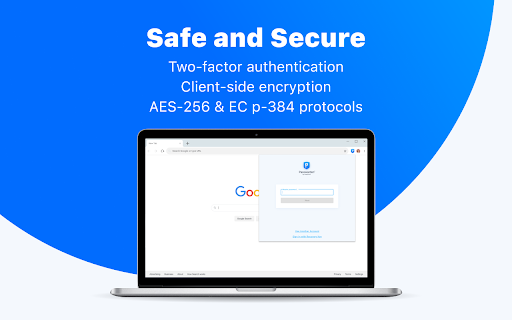
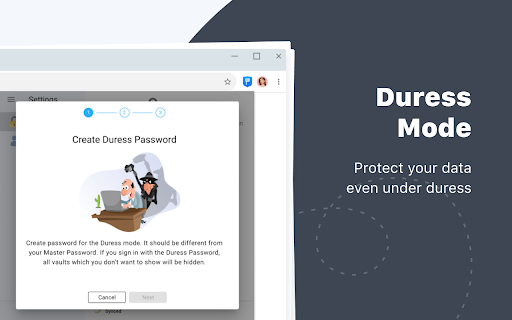
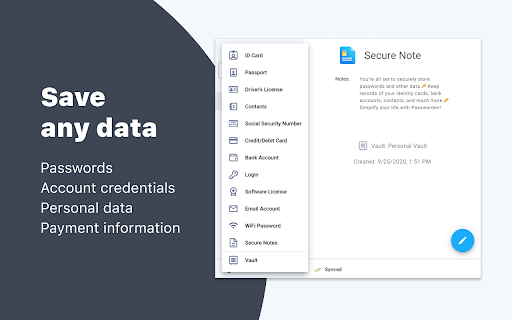
Passwarden is your best assistant to store and secure your passwords & any other sensitive information right in Chrome. Safeguard all your data and auto-fill passwords to all accounts that you use in your browser! No more worries about remembering infinite amounts of passwords or any other information as Passwarden will do it for you. Choosing our Chrome extension, you have to remember only the password from your Passwarden account. Passwarden is a part of our brand new security bundle MonoDefense. Apart from Passwarden, MonoDefense includes a reliable solution for unrestricted and secure internet access VPN Unlimited. And the range of MonoDefense solutions will be extended. So stay tuned for updates! Our extension for Chrome becomes your own secure storage where you can securely keep all the following data: - Passwords (the ones you use in all the apps and browsers) - Credentials (email and social media accounts, WiFi passwords, etc.) - Personal data (ID, Driver’s License, SSN, etc.) - Payments data (credit/debit cards, bank account) Why use Passwarden by KeepSolid? With our extension, you can: - Keep all your passwords in one place - Create secure notes - Store credentials and payments data - Generate unique strong passwords - Encrypt your sensitive information - Access all that data in a few taps - Benefit from unlimited devices per account - Securely share your data with others - Hide your data in case of an emergency - Use biometric unlock - Ensure protection of your data with two-factor authentication - Entrust your online security to cyber-security experts Features of Passwarden by KeepSolid available in the Chrome browser: * Rock-solid encryption Striving to provide you with the complete security of all data you store in our app, we’ve implemented client-side data encryption via AES-256 and ЕС р-384 protocols. As a result, all your information remains unreadable and uncrackable for any unauthorized third party. * Duress mode This is a super-cool feature for emergencies when you are required to show the data in our extension under duress. All you have to do is to define the data you can show in advance and then create your Duress password. In case of an emergency, you can just use the aforementioned password and the extension will show only that data you’ve prepared. * Unlimited devices per account You can easily access your sensitive data stored in Passwarden with any device you’ve previously added to your list. It’s extremely convenient: you store your data on one device and use them on another. * Password generator Tired of creating new various unique passwords for all your accounts? Our password manager is at your disposal. With this helpful feature, you can generate an unlimited number of uncrackable passwords in a matter of seconds. Passwarden helps you to stop suffering about creating and remembering new strong passwords. * Two-factor authentication Thanks to such an extra layer of security, you will be the only one to access your Vaults in our extension. Enable two-factor authentication, select the needed type (authenticator app and email one-time passcode), and enjoy complete security of your data. * 24/7 friendly customer support In case you have any questions about our password manager, feel free to drop an email to support@keepsolid.com

pCloud Pass - Password manager
Easily log in to websites, autofill online forms and use suggested passwords without leaving your browser. pCloud Pass is the secure password manager for your passwords and personal data. The extension will make it easy to keep important information safe and secure without interrupting your browsing experience. ✔ Automatically save your passwords, usernames and your credit card details as you browse ✔ Autofill passwords and easily log in to the websites you use every day ✔ Instantly fill payment forms with your credit card details ✔ Generate strong & unique passwords ✔ Store unlimited passwords, credit card details or encrypted notes ✔ Access your passwords and personal data across all your devices, anywhere you go pCloud Pass was built with your privacy in mind. With our zero-knowledge privacy approach, the data you save is encrypted and only you can decrypt it with your Master Password. We do not have access to your data and we do not use, share or sell it to anyone. pCloud Pass uses client-side encryption to secure your data. Everything you save gets encrypted on your device, before it's uploaded to our servers. We use 256 AES encryption, PBKDF2 key strengthening and more to ensure your passwords and personal data are protected from all kinds of attacks. Over 16 million people worldwide have chosen pCloud as their service provider. Never remember a password again! Let pCloud Pass become your go-to password manager.

Password Generator
Save your time and thinking efforts with this secure random password generator. Save your time and thinking efforts with this secure random password generator. Looking for a free and secure password generator? Here it is! Make your password as complex as you need: specify the type of characters, the length of the pass and press Generate. Our password maker will generate a new password in a fraction of a second! Your new secure password will be saved under History. You may clear the History with just one click. Many online services require you to come up with a password that should meet a whole range of requirements (uppercase and lowercase letters, specific length). If you often sign up for such services or create multiple accounts, its easier to generate a secure password with our software. Please rest assured we do NOT have any access to your password, so only you'll know the password which was generated

Steganos Password Manager
Steganos Password Manager Extension. Saves and fills your passwords automatically. Steganos Password Manager stores, manages and synchronizes your credentials on all your devices. Remember only one password: your keychain password. Manage all your logins, credit cards and bank accounts absolutely secure and comfortable in Steganos Password Manager. Have highly secure passwords created and conveniently filled in automatically. With Private Favorites, manage your confidential bookmarks securely in the Password Manager instead of in your browser. Your Steganos Password Manager is always at your side, warning you of insecure passwords or reminding you to renew passwords regularly, if you wish. Steganos Password Manager also syncs your 256-bit AES encrypted keychain to the cloud, if you want. And with our apps for iOS and Android, and plugins for Chrome, Firefox and Edge, you always have access from anywhere. Cloud sync supports Dropbox, Google Drive, Microsoft OneDrive and Telekom MagentaCLOUD. You need Steganos Password Manager 22 or Steganos Privacy Suite 22 to use this extension.

Free Password Manager & Authenticator & SSO
The free password manager extension comes with autofill & autologin including websites that support the Authenticator format. SAASPASS is a free Password Manager & Authenticator 2FA code generator with autofill & autologin capabilities. It is built with Security & Usability in mind. The SAASPASS password manager extension can autofill both your passwords AND authenticator codes enabling a smooth seamless experience and single sign-on SSO. There is NO need for a separate desktop password manager application with the SAASPASS browser extension. The password manager browser extension plugin is protected by two-factor authentication by default and includes passwordless 2FA like scanning an encrypted barcode and push login approval. The password keeper browser extension plugin is both phishing-proof and prevents man-in-the-middle attacks. The SAASPASS mobile app is available on the Apple App Store and Google Play. The iPhone and iPad version is available here: https://apps.apple.com/us/app/saaspass-authenticator-2fa-mfa/id849132027 The Android version is available here: https://play.google.com/store/apps/details?id=com.solidpass.saaspass&hl=en&gl=US You can access everything with copy/paste capabilities also from the SAASPASS web portal at: https://www.saaspass.com/sd/#/login The web portal is protected by multi-factor authentication by default, and includes passwordless MFA like scanning an encrypted barcode and push login approval. The SAASPASS Password Manager comes with over 100 thousand pre-configured websites and mobile apps There is the Authenticator 2FA code generator for websites and mobile apps The SAASPASS Security Scan identifies websites and apps that have Authenticator 2FA support, and also identifies Duplicate and Weak passwords The password manager and authenticator code generator has user initiated AutoFill & AutoLogin (prevents hijacking) The password manager addon is secured with passwordless 2FA There is SSL Detection and the browser extension only Autofills HTTPS sites The password manager add-on comes with SSO & Copy to clipboard The Web Portal Access comes with SSO & Copy to clipboard The Web Portal is secured with passwordless 2FA The 2FA on the browser extension is pinned and mitigates against Phishing and Man-in-the-Middle attacks Secure Notes - in this notes and password keeper you can store and vault all sorts of details both offline and optionally synced online with multiple devices There is a Strong Password Generator in the browser extension and mobile app SAASPASS comes with Multiple Device support and Device Management (including device removal) Tablet support (including landscape view and split screen on the iPad) Secure Backup & Restore options with SIM Swap prevention Universal Search is available for both the password manager and authenticator codes in the mobile app, web portal and browser extension Works on all platforms (Microsoft Windows, Apple Mac, Linux, iPhone, iPad, iOS and Android etc.) There is no need for a desktop application to be installed Sharing of Authenticator (TOTP & HOTP) codes supported (available for teams and enterprises) Mobile AutoFill with App Lock protection Password Manager, Authenticator & Secure Notes work with offline and online options Phishing proof logins logins from the password manager browser extension HOTP/TOTP support is adjustable and comes with support of 6,7 and 8 digit codes You can integrate the password manager with 2FA products twilio authy, google authenticator, microsoft authenticator, 1password, dashlane and duo security The mobile app is available in over 30 languages In addition to personal use, companies can also use SAASPASS for: Multi-factor authentication (MFA), Enterprise Password Manager, Single Sign-on (SSO) Shared Access Manager Share passwords Share Authenticator codes (TOTP & HOTP) with teams Share emails & applications Access Control Policies Adaptive Authentication Privileged Access Manager (PAM) Directory Services (including Microsoft Active Directory and LDAP) Endpoint Access Protection (enforce MFA on computers) Reporting & Audit Trail (internal SIEM & export to external SIEMs) Companies can sign up from the www.saaspass.com website. The Identity & Access Management (IAM) of SAASPASS can be used to integrate many business and productivity applications including email and collaboration suites There is pre-built out-of-the box integration to over 100 THOUSAND applications to services like Amazon, Facebook, Dropbox, Gmail, Twitter and Linkedin. Developers can integrate passwordless multi-factor authentication (MFA) services with RESTful API, ready code snippets in multiple languages and SDKs. More details on building two-factor authentication 2FA is available at: For enterprise customers there is support for hard tokens with TOTP, HOTP & FIDO U2F format and USB based Yubico Yubikey OTP. The mobile password manager and authenticator app has app protection that includes: Biometric Authentication TouchID FaceID Pattern Invisible Pattern Scrambled Keypad Fingerprint Authentication and Verification Facial Authentication and Verification You can import services as a CSV file from your Chrome browser or other formats from the SAASPASS web portal for services like Dashlane, Lastpass and 1Password. The 2FA (always required) to unlock your browser extension is phishing-proof and keylogger attacks are mitigated against. There are no static credentials, like a master password to unlock the browser extension, that can be used in a replay attack. Man-in-the-middle attacks are not possible as the 2fa is pinned to the browser. This makes the SAASPASS browser extension arguably have the highest level of security possible with extreme usability. Integrations of the Single Sign-on SSO solution include SAML, OIDC, RDP, VPN, okta, cyberark, onelogin, sailpoint, saviynt, simeio solutions, pingone, beyondtrust, avatier, roboform, avira, my1login, zoho vault, password boss, bitwarden, one identity, enpass, myki, nordpass, passwordstate, logmeonce, zenmate, blur, abine, lastpass, password depot, dropbox passwords, it glue, true key, x beta, norton security, microfocus, silverfort, kee, thycotic, avg, passbolt, total av, passwork, netiq, 1clickvpn, safeincloud, devolutions, steganos, remembear, keepasshelper, commonkey, aws iam, axiad, keepassxc, apple keychain, ping one, duo security, expressvpn, rapidIdentity, touch vpn, identity automation, ambius, kaseya, passly, directory services, metadata directories, Azure AD, Active Directory, LDAP and secure web based form-filling. You can even add passwordless MFA to Identity Providers (IdP) and Identity Governance solutions like idaptive, okta browser plugin, onelogin, ibm tivoli isam esso and oracle. You can set up the team password manager and team single sign-on by signing up in the company sign up. The team password manager can be used for all password sharing needs including making the passwords visible and invisible. The admin can share both the password manager and the authenticator codes (TOTP & HOTP) as well. The password manager & authenticator codes generated can be shared on mobile devices, the web portal and the browser extension. We have a limit of 500 login items in the personal use case for the free password manager and authenticator code generator. This is how we can offer the password manager for free for personal use while we charge companies. The secure notes keeper is stored in an encrypted vault and works offline by default. You can turn it online and have it synced with multiple devices as well. Keep us posted with your suggestions, feedback and ideas for improvements for the password manager and authenticator code generator. We look forward to it and always appreciate it! If you enjoy the service feel free to rate us. This helps us improve the password manager, secure notes keeper, password vault, and the authenticator code generator and our service to you. You can learn about more features about the password safe, encrypted vault, notes keeper and you can get the SAASPASS Free Password Manager & Authenticator for Mozilla Firefox, Google Chrome, Apple Safari, Microsoft Edge and Opera from www.saaspass.com
