
eiaeiblijfjekdanodkjadfinkhbfgcd
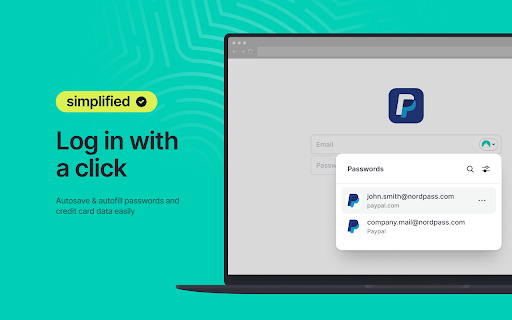
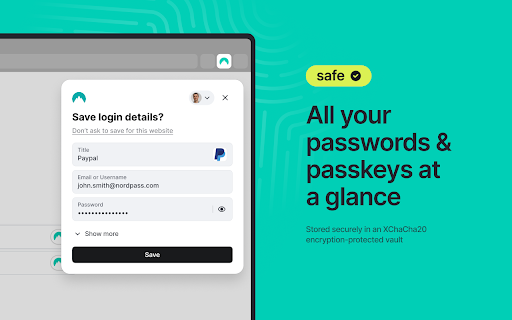


NordPass is your freedom from password stress. Generate and securely store strong passwords and autofill them with a single click. Designed by the security experts behind NordVPN, the NordPass password manager offers a refined yet user-friendly approach to password management. Effortlessly generate strong passwords, identify weak passwords, discover whether your data has appeared in a data breach, and benefit from the convenience of our autosave and autofill features. But there’s more to NordPass than meets the eye. Beyond passwords, trust NordPass to store your passkeys, credit cards, personal notes, and even files with 3GB of storage reserved just for that. Never compromise on security. Keep your passwords safe with NordPass. Here’s more of what you get when you choose NordPass: ➡️ Autofill and Autosave Log into your favorite website without manually typing your password every time, and autosave new passwords with a click. ➡️ Documents Securely store and organize PDFs and scans of passports, IDs, and any important paperwork. Add expiry dates and get automatic reminders before anything runs out. ➡️ Password Generator Generate strong passwords for your online accounts with a single click. ➡️ Password Health Identify weak, old, and reused passwords with the dedicated Password Health tool. ➡️ Data Breach Scanner Check if any of your sensitive data has been compromised and take immediate action. ➡️ Breach Monitoring Receive real-time alerts about your breached data and stay ahead of potential threats. ➡️ Emergency access and password sharing Share passwords securely with trusted individuals and provide emergency access to close contacts. ➡️ Credit card and personal info storage Have direct, instant access to payment details when online shopping or personal details when booking trips without the need to remember or manually type them out. ➡️ Device sync Save a password on your laptop and access it on your mobile while on the go. ➡️ Unlimited storage and devices Store countless passwords and access them on all of your devices, even when you’re offline. ➡️ MFA and biometrics Enhance security with Multi-Factor Authentication, OTP generators, and biometric access. ➡️ File Attachments Securely attach, store, and retrieve files with 3GB of storage. ➡️ Password Import and Export Switch from another password manager to NordPass without losing any data. ➡️ XChaCha20 encryption All your data in NordPass is encrypted with the cutting-edge XChaCha20 encryption algorithm, ensuring unparalleled password security. ➡️ Zero-Knowledge architecture With NordPass's zero-knowledge architecture, only you have access to your data. Download NordPass and forget your password stress. Forever. ℹ️ For more information, visit: https://nordpass.com/ 🔒 For Privacy Policy, visit: https://nordpass.com/privacy-policy ✉️ Feel free to contact our Customer Support team with any questions you may have: support@nordpass.com

pCloud Pass - Password manager
Easily log in to websites, autofill online forms and use suggested passwords without leaving your browser. pCloud Pass is the secure password manager for your passwords and personal data. The extension will make it easy to keep important information safe and secure without interrupting your browsing experience. ✔ Automatically save your passwords, usernames and your credit card details as you browse ✔ Autofill passwords and easily log in to the websites you use every day ✔ Instantly fill payment forms with your credit card details ✔ Generate strong & unique passwords ✔ Store unlimited passwords, credit card details or encrypted notes ✔ Access your passwords and personal data across all your devices, anywhere you go pCloud Pass was built with your privacy in mind. With our zero-knowledge privacy approach, the data you save is encrypted and only you can decrypt it with your Master Password. We do not have access to your data and we do not use, share or sell it to anyone. pCloud Pass uses client-side encryption to secure your data. Everything you save gets encrypted on your device, before it's uploaded to our servers. We use 256 AES encryption, PBKDF2 key strengthening and more to ensure your passwords and personal data are protected from all kinds of attacks. Over 16 million people worldwide have chosen pCloud as their service provider. Never remember a password again! Let pCloud Pass become your go-to password manager.

Keeper® Password Manager & Digital Vault
Generate strong passwords, autofill and protect your confidential info with zero-knowledge encryption. Keeper Password Manager keeps your passwords and data secure. Utilize our secure password generator, store passkeys and 2FA codes, and autofill your passwords. Keeper is the proven cybersecurity leader that protects millions of people and over 100,000 companies globally. Keeper Password Manager lets you create strong, random passwords and passphrases with its built-in password generator, secure them in an encrypted digital vault you can open on any device, and instantly autofill or securely share credentials across all your sites and apps. Save and sync passkeys and 2FA codes right inside Keeper for one-tap login anywhere. Zero-knowledge, AES-256 encryption shields every password and piece of sensitive data from breaches, ransomware, and other cyber-attacks. Keeper Password Manager stores unlimited passwords, passkeys, 2FA codes, files, and payment cards in a zero-knowledge, AES-256–encrypted digital vault that syncs to every phone, tablet, and computer you use. Unlock your password vault instantly with fingerprint or face ID, then autofill or securely share records with fellow Keeper users—or send a “One-Time Share” link to family, friends, or colleagues who don’t have the app. The Keeper app supports two-factor authentication (2FA) into your Vault, along with storing and protecting TOTP codes for autofilling two-factor codes into other websites and apps. Use security keys like YubiKey NFC to secure your Vault using the highest level of MFA and 2FA protection. Keeper is built on a zero-knowledge and zero-trust security architecture, so all of your data is fully encrypted and only accessible by you. The World’s Most Secure Password Manager • Keeper’s patented zero-knowledge security ensures that your Keeper Vault and all of the data in it is fully encrypted. • Supports two-factor authentication methods such as Google Authenticator, Microsoft Authenticator, Duo, RSA, YubiKey and more. • Utilizes AES-256-bit encryption, Elliptic Curve and PBKDF2 technology. • SOC-2, ISO 27001, ISO 27017 and ISO 20718 certified. • FedRAMP and StateRAMP Authorized. Keeper Password Manager Supports the following Record Types: • Login & password credentials • Payment and credit cards • Address • Bank account • Secure files and notes • Photo • Driver's license and identity cards • Birth certificate • Database credentials • Server • Membership • Passport • Software license • SSH Key

Dashlane — Password Manager
Dashlane makes the internet easier. Save all your passwords, fill forms fast, and keep your data accessible and safe. 20,000+ businesses and 15+ million people worldwide trust Dashlane to protect their logins. Dashlane has never been breached, never sees or sells your data, and provides simple and effective tools to manage and safeguard it at all times. With the Dashlane extension, you can view, copy, and generate passwords and save and autofill logins and forms as you browse the internet. Open the web app to access the full power of Dashlane: Securely share passwords, keep track of your Password Health score, and take action when we identify your at-risk passwords. Log in to all your accounts on all your devices - Store an unlimited number of logins in your vault - Access your passwords and usernames wherever and whenever you need them - Autofill the right logins on every site, every time - Sync your Dashlane data to every device automatically, even if your phone and computer run on different systems Create and save new, strong passwords as you browse - Create strong, unique passwords for each of your accounts with our built-in Password Generator - Automatically save logins as you browse - Easily update and replace logins whenever you reset them Autofill payments and personal info - Autofill personal info like your name, address, email, and phone number - Complete checkout fields and other important forms with a click - Keep important personal data, like IDs and your Social Security number, at your fingertips - Securely store credit card numbers, bank account info, and other payments with bank-grade encryption Get instant alerts when a breach affects your data - Sign up for our Dark Web Monitoring tool, and we’ll continuously scan 20+ billion records to determine if your passwords have been compromised - Receive real-time alerts to change your compromised logins as soon as they’re discovered on the dark web - Check your Password Health score to see if any of your logins are weak, reused, or compromised Keep your information private - Dashlane protects your passwords with bank-grade encryption—the strongest method there is. - We believe you should control your data. That’s why we designed Dashlane’s zero-knowledge security architecture so that we can't see the information you store—and we never sell it. With Dashlane, your logins are safe, private, and easy for you - and only you - to access. For more information, see our Privacy Policy (https://www.dashlane.com/privacy) and Terms of Service (https://www.dashlane.com/terms).

Bitdefender SecurePass
Vault-like protection for passwords and sensitive data across all your devices. Stay safe online with Bitdefender SecurePass, the top-tier password manager built for those who take security seriously. Powered by advanced end-to-end encryption technology, SecurePass protects your passwords, credit card details, and sensitive information across all your devices. Whether you manage hundreds of accounts or just a few, SecurePass takes the hassle out of remembering passwords and gives you vault-like security. 🔐Complete Protection : Secure your passwords and sensitive data with end-to-end encryption, keeping your online accounts and personal information completely private. 🛡️Password Generator & Strength Advisor: Create strong, complex passwords with just one click. Use the built-in advisor to check if any of your existing passwords are weak or require attention. 📲Multi-platform Synchronization: Save and sync your passwords across multiple platforms, including , iOS, Windows, macOS, and all major browsers like Chrome, Firefox, Safari, and Edge. Access your password manager vault anytime, anywhere. 🔑Master Password Convenience: Manage all your accounts with just one Master Password. SecurePass eliminates the need to remember dozens of login details by centralizing everything in one secure password manager. 💳Secure Credit Card Management: Protect your payment details for online shopping. Autofill your credit card information on websites safely, knowing that your sensitive data is encrypted and stored locally on your device. 🖥️Easy Import/Export: Transitioning from another password manager? SecurePass makes it easy to import your data from 1Password, Dashlane, LastPass, Chrome, Firefox, and more. Supported file formats include JSON, CSV, and XML. 👥Share Passwords Safely: Need to share passwords with family or colleagues? Use SecurePass to share credentials securely, thanks to encrypted password sharing. 🔔Password Leak Alerts: SecurePass constantly monitors data breaches to alert you if any of your credentials are exposed, giving you a chance to update your passwords before it’s too late. • Two-Factor Authentication: Add an extra layer of security to your password vault. • Secure Notes: Store sensitive information like documents, personal notes, or PIN codes with color-coded organization. • Identities Management: Manage multiple online identities with ease, autofilling your details for fast form completion. • Auto-Lock & Secure Me Feature: Automatically log out or lock your vault after inactivity or on shared devices. • Face & Fingerprint Unlock: Quickly access your vault with biometric authentication on supported devices. Why Choose Bitdefender SecurePass? Bitdefender SecurePass is designed for users who value privacy and need top-tier protection for their online identities. As a powerful and intuitive password manager, SecurePass offers a seamless way to manage your digital life without compromising on security. Whether you’re shopping online, managing work accounts, or simply keeping track of personal passwords, SecurePass has your back!
