
fjampemfhdfmangifafmianhokmpjbcj


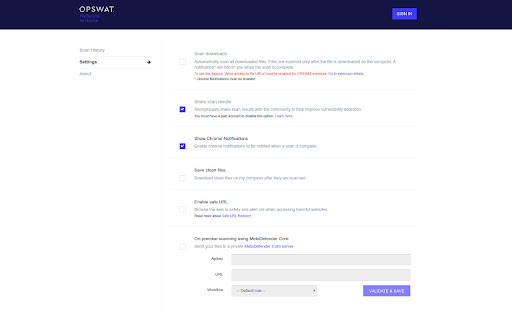


Scan files and downloads with OPSWAT File Security for Browser Scan every download from your Chrome browser with over 30 anti-malware engines and industry-leading vulnerability scanning technology. OPSWAT File Security for Chrome is an easy-to-use tool that examines every download via MetaDefender Cloud. Leverage the file hash database, fast multi-scanning, patented vulnerability scanning and effective data sanitization (CDR) to detect and block threats in files and applications before you download them. You can also try out MetaDefender Cloud by visiting https://metadefender.opswat.com

Microsoft Defender Browser Protection
Protect yourself against online threats, like phishing and malicious websites, with real-time protection from Microsoft. The Microsoft Defender Browser Protection extension helps protect you against online threats, such as links in phishing emails and websites designed to trick you into downloading and installing malicious software that can harm your computer. If you click a malicious link in an email or navigate to a site designed to trick you into disclosing financial, personal or other sensitive information, or a website that hosts malware, Microsoft Defender Browser Protection will check it against a constantly updated list of malicious URLs known to Microsoft. If the malicious link matches one on the list, Microsoft Defender Browser Protection will show a red warning screen letting you know that the web page you are about to visit is known to be harmful, giving you a clear path back to safety with one click. • Continuously updated list of reported harmful sites • Protects against phishing sites and socially engineered malware sites • Real-time indicator of harmful sites and website status • V1.62 – Initial Release • V1.63 – Fixed Chromebook issue • V1.65 – Added “Report Suspicious Site” feature, and ability to demonstrate the extension’s protection • V1.66 – Improve protection and performance. Add Group Policy controls.

Emsisoft Browser Security
Blocks dangerous websites that distribute malware and prevents phishing attacks. Emsisoft Browser Security protects you from bad websites and prevents phishing attacks without tracking your activity. This privacy-conscious browser extension is lightweight and lightning-fast. It blocks access to websites that distribute malware and prevents phishing attacks that try to steal your passwords, while still giving you the flexibility to visit the sites you trust. Emsisoft Browser Security uses privacy-conscious security technology, so it does not collect your browsing activity data. Your browsing history is your business. Keeping you safe online is ours.

Criminal IP: AI-based Phishing Link Checker
Criminal IP: AI-based Phishing Link Checker, Your Ultimate Web Protection and Malicious URL Checker Criminal IP: AI-based Phishing Link Checker is a powerful Chrome extension designed to enhance your online security and protect you from malicious URLs, malware, and phishing attacks. This solution leverages the data collected from Criminal IP, a cyber threat intelligence (CTI) search engine, to respond to threats more accurately and quickly. With its advanced features and real-time scanning capabilities, Criminal IP: AI-based Phishing Link Checker serves as your reliable web protection companion. • Real-time URL Scanner: Criminal IP: AI-based Phishing Link Checker's cutting-edge AI technology scans URLs in real-time, swiftly identifying and flagging any suspicious or malicious links. This proactive urlscan feature keeps you safe from phishing attempts and malware infections, providing you with robust security. • Website Risk Rating: Website Risk Rating: Criminal IP: AI-based Phishing Link Checker provides 5 levels of website risk rating: Safe, Low, Moderate, Dangerous, and Critical. This visual indicator helps you assess the safety level of websites and make informed decisions while browsing, ensuring a secure online experience. Additionally, it also provides detailed IP information such as vulnerabilities, open ports, and WHOIS applications if you want. • Comprehensive Security Tools: With built-in IP checking and OSINT (Open-Source Intelligence) capabilities, Criminal IP: AI-based Phishing Link Checker performs thorough scans to detect any potential threats. Its powerful scanner acts like an antivirus for your browsing experience, ensuring a safe and secure environment. It additionally comes with a “Scam Block” feature, which blocks access to phishing sites even if accidentally accessed. • Blacklist and Phish Detection: Criminal IP: AI-based Phishing Link Checker maintains an up-to-date blacklist of known malicious URLs, preventing you from accessing dangerous websites. Additionally, it employs advanced phishing detection techniques to identify and block phishing attempts in real time, safeguarding your privacy and sensitive information. • Advanced Mode: The Advanced Mode provides detailed data on IP addresses connected to domains. With access to WHOIS applications, vulnerability information, open ports, and more, you can delve deeper into the security aspects of websites, empowering you to make informed decisions and stay vigilant. • Security Issue Updates: Stay ahead of the evolving online threats with Criminal IP: AI-based Phishing Link Checker’s feature that provides and updates you with the latest information on security issues. By staying informed, you can take necessary precautions and keep your browsing experience secure. • Privacy Protection: Criminal IP: AI-based Phishing Link Checker prioritizes your privacy and confidentiality. It ensures that your personal information remains secure while you surf the web, providing a safe browsing experience. • Enhanced Web Safety: As a comprehensive web protection solution, Criminal IP: AI-based Phishing Link Checker acts as a reliable link checker, constantly monitoring the safety of URLs and alerting you to potential threats. It offers peace of mind and a worry-free browsing experience. • User-Friendly Interface: Criminal IP: AI-based Phishing Link Checker's intuitive interface makes it easy to use, allowing you to navigate through its powerful features and customize your security preferences effortlessly. • Stay protected with Criminal IP: AI-based Phishing Link Checker, the ultimate URL scanner and web protection extension, and browse the internet with confidence. This is a free Chrome extension from the cyber threat intelligence search engine Criminal IP, managed by AI SPERA. More information is available at https://www.criminalip.io/en/resource/chrome-extension

Sophos Chrome Security
This is the Sophos Mobile client for Chrome devices. NOTE: Use of this extension is subject to the Sophos End User License Agreement (License Agreement) accessible at https://www.sophos.com/en-us/legal/sophos-end-user-license-agreement.aspx. By installing or using this extension, you agree to the terms and conditions of the License Agreement. You also acknowledge that Sophos processes personal data in accordance with the Sophos Privacy Policy accessible at https://www.sophos.com/en-us/legal/sophos-group-privacy-policy.aspx. Sophos Mobile is a Unified Endpoint Management (UEM) solution that allows companies to easily manage, control and secure Android, iOS, macOS, Windows 10 and Chrome devices (like Chromebooks) from a single web console. The Sophos Chrome Security extension allows you to enroll your Chrome device with Sophos Mobile. FEATURES Your organization can do the following: • Use Web Filtering to block web pages with malicious, undesirable or illegal content. • Find the device. • Send a message to the device. Web Filtering uses up-to-the-minute intelligence from SophosLabs. Your device is secured even when you’re not connected to your organization’s network. Sophos Chrome Security requires a Mobile Advanced or an Intercept X for Mobile license. For more information, visit https://www.sophos.com/mobile MANUAL ENROLLMENT 1. Sign in to Chrome with your corporate Google account. 2. Open Sophos Chrome Security in the Chrome Web Store and add it to Chrome. 3. Select the Sophos button in the Chrome toolbar. 4. Select “Enroll” and then enter the enrollment token. AUTO-ENROLLMENT If your organization uses G Suite, they can configure Sophos Chrome Security to automatically enroll with Sophos Mobile.
