
lkffbjbdklhachngaoeelmcgijmlicph

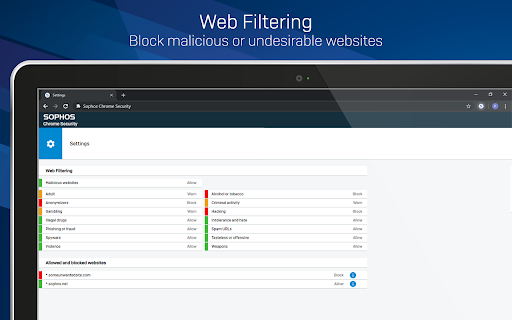


This is the Sophos Mobile client for Chrome devices. NOTE: Use of this extension is subject to the Sophos End User License Agreement (License Agreement) accessible at https://www.sophos.com/en-us/legal/sophos-end-user-license-agreement.aspx. By installing or using this extension, you agree to the terms and conditions of the License Agreement. You also acknowledge that Sophos processes personal data in accordance with the Sophos Privacy Policy accessible at https://www.sophos.com/en-us/legal/sophos-group-privacy-policy.aspx. Sophos Mobile is a Unified Endpoint Management (UEM) solution that allows companies to easily manage, control and secure Android, iOS, macOS, Windows 10 and Chrome devices (like Chromebooks) from a single web console. The Sophos Chrome Security extension allows you to enroll your Chrome device with Sophos Mobile. FEATURES Your organization can do the following: • Use Web Filtering to block web pages with malicious, undesirable or illegal content. • Find the device. • Send a message to the device. Web Filtering uses up-to-the-minute intelligence from SophosLabs. Your device is secured even when you’re not connected to your organization’s network. Sophos Chrome Security requires a Mobile Advanced or an Intercept X for Mobile license. For more information, visit https://www.sophos.com/mobile MANUAL ENROLLMENT 1. Sign in to Chrome with your corporate Google account. 2. Open Sophos Chrome Security in the Chrome Web Store and add it to Chrome. 3. Select the Sophos button in the Chrome toolbar. 4. Select “Enroll” and then enter the enrollment token. AUTO-ENROLLMENT If your organization uses G Suite, they can configure Sophos Chrome Security to automatically enroll with Sophos Mobile.

Trellix Endpoint Security Web Control
This extension is intended for use with Trellix Endpoint Security Web Control software to provide color-coded URL safety ratings and blocking of malicious web-page navigation and suspicious file downloads. The extension is able to be used with all currently supported versions of Trellix Endpoint Security Web Control, which must be installed in order for the extension to function.

SafeToOpen Browser Security and Privacy
SafeToOpen browser security and privacy extension. Stop phishing attacks before they reach you. SafeToOpen is a real-time browser security and privacy extension that protects you from phishing websites, online scams, malicious downloads, and hidden trackers — automatically, as you browse. No security expertise required. Install it once and stay protected on every site you visit. Most antivirus software reacts after a threat is already on your device. SafeToOpen works earlier: it analyzes the page you're actually looking at, in real time, and warns you the moment something looks like a phishing or scam site — even if that site is brand new and not yet on any blocklist. ━━━━━━━━━━━━━━━━━━━━━━━━━━━━━━━━━━━━━━ WHAT SAFETOOPEN PROTECTS YOU FROM ━━━━━━━━━━━━━━━━━━━━━━━━━━━━━━━━━━━━━━ ✓ Phishing & fake login pages Detects sites built to steal your passwords, banking details, and personal information — including newly created phishing pages that traditional blocklists miss. ✓ Online scams & fraudulent websites Flags deceptive and impersonation sites before you hand over money or data. ✓ Malicious downloads Warns you before you download dangerous files (like disguised .exe installers) that could carry malware or ransomware. ✓ Hidden trackers Blocks third-party trackers that follow you across the web, so you browse faster and more privately. ━━━━━━━━━━━━━━━━━━━━━━━━━━━━━━━━━━━━━━ HOW IT WORKS — TWO LAYERS OF PROTECTION ━━━━━━━━━━━━━━━━━━━━━━━━━━━━━━━━━━━━━━ SafeToOpen doesn't just check a website against a list of known bad URLs. It inspects every page on two levels at once — which is how it catches the newest scams that blocklists haven't seen yet. ❶ Visual element analysis SafeToOpen looks at a page the way you do. It examines the visual elements — logos, branding, layout, and login forms — to recognize when a site is impersonating a bank, brand, or service you trust. If a page is dressed up to look like something it isn't, you're warned BEFORE you enter your password, card number, or any sensitive information. ❷ Deep structural analysis Like an X-ray, SafeToOpen sees beneath the surface. It inspects the underlying layers and structure of the website that your eyes can't. ➤ Together: one fast, accurate verdict By combining what a page LOOKS like with what it's actually MADE of, SafeToOpen identifies the latest phishing and scam websites in real time — including brand-new pages launched minutes ago that no traditional blocklist has caught up to. ✓ Catches brand-new threats — Phishing kits launch and vanish within hours. SafeToOpen analyzes the page itself, so it flags zero-day phishing sites that lists haven't caught up to yet. ✓ Lightweight & fast — Runs quietly in the background and won't slow down your browsing. ✓ Privacy by design — Your browsing is your business. SafeToOpen protects you without harvesting your personal data. ✓ Works everywhere you browse — Protection applies across the sites and pages you visit, automatically. ━━━━━━━━━━━━━━━━━━━━━━━━━━━━━━━━━━━━━━ GETTING STARTED IS EFFORTLESS ━━━━━━━━━━━━━━━━━━━━━━━━━━━━━━━━━━━━━━ ➊ Install SafeToOpen and pin it to your toolbar. ➋ Browse normally. SafeToOpen checks each page in real time. ➌ If a site looks like phishing, a scam, or a malicious download, you get a clear, immediate warning — with a simple way to stay safe. That's it. There's nothing to configure. Protection starts the moment you install. ━━━━━━━━━━━━━━━━━━━━━━━━━━━━━━━━━━━━━━ FREE TO START — UPGRADE FOR COMPLETE PROTECTION ━━━━━━━━━━━━━━━━━━━━━━━━━━━━━━━━━━━━━━ Install SafeToOpen free and get real-time phishing detection right away. The free plan blocks known phishing, scam, and malware sites, warns you before you open known unsafe links, and blocks third-party trackers. Upgrade to SafeToOpen Personal Plus — with a 14-day free trial — to unlock our most advanced protection: ✦ Zero-day phishing detection (VisionAI) — catches brand-new phishing and scam pages the moment they appear, before any blocklist. ✦ Deeper Analysis (X-Ray) — full structural inspection of suspicious pages for a faster, more accurate verdict. ✦ Paste Guard — stops passwords, card numbers, and personal data from being pasted into untrustworthy sites. ✦ Email-attachment scanning — checks risky attachments in your webmail. Protecting the whole household? SafeToOpen Family Plus — covers up to 5 people, with full Personal Plus protection for everyone. ━━━━━━━━━━━━━━━━━━━━━━━━━━━━━━━━━━━━━━ TRUSTED, PRIVATE & COMPLIANT ━━━━━━━━━━━━━━━━━━━━━━━━━━━━━━━━━━━━━━ Security software should be held to the highest standard — so SafeToOpen is. ✓ GDPR compliant — built to respect your privacy and your rights over your data. ✓ ISO/IEC 27001:2022 certified — our information security is independently certified to the leading international standard. ✓ Privacy by design — SafeToOpen protects you without harvesting or selling your personal data. ━━━━━━━━━━━━━━━━━━━━━━━━━━━━━━━━━━━━━━ FOR TEAMS & ORGANIZATIONS ━━━━━━━━━━━━━━━━━━━━━━━━━━━━━━━━━━━━━━ SafeToOpen also protects businesses, schools, and enterprises. It supports centrally managed deployment and policy configuration, so administrators can roll out consistent phishing and download protection across every device. ➤ Learn more and talk to our team: https://safetoopen.com/en/for/business/ ━━━━━━━━━━━━━━━━━━━━━━━━━━━━━━━━━━━━━━ ⚠ PROTECT YOURSELF FROM THE #1 CAUSE OF ONLINE BREACHES ━━━━━━━━━━━━━━━━━━━━━━━━━━━━━━━━━━━━━━ The vast majority of cyberattacks start with phishing. Antivirus alone isn't enough — phishing happens in your browser, in real time, on pages your antivirus never sees. SafeToOpen is built for exactly that moment.

Browser Security Plus
Manage Google Chrome using Browser Security Plus extension One stop solution to secure and manage enterprise browsers. Browser Security Plus extension along with our software, is a tool that helps IT admins secure their browser network from web-based threats. Browser Security Plus allows IT admins to: 1) Detect the vulnerable browser add-ons like extensions and plugins present in your network. 2) Control access to browser-add-ons and sites. 3) Deploy security policies to protect your enterprise data and network. 4) Improve security by keeping track of compliance of your network with recommended security configurations. 5) Reduce help desk calls by ensuring compatibility between web-applications and browsers. Download ManageEngine's Browser Security Plus to enjoy the above functionalities at https://www.manageengine.com/secure-browser/download.html

Symantec Browser Protection
Symantec Browser Protection offers an in-browser security solution for keeping you safe online. Now available for early preview. Symantec Threat Intelligence teams around the world provide unparalleled analysis and commentary on the cyberthreats affecting businesses today. Symantec Browser Protection brings this intelligence into your browser to detect and block various web-borne threats such as: Your use of Symantec Browser Protection is governed by Broadcom's End User License Agreement (https://www.broadcom.com/company/legal/licensing)
