
mhkgegcmcapcgmnnloigolapjkajgfmd
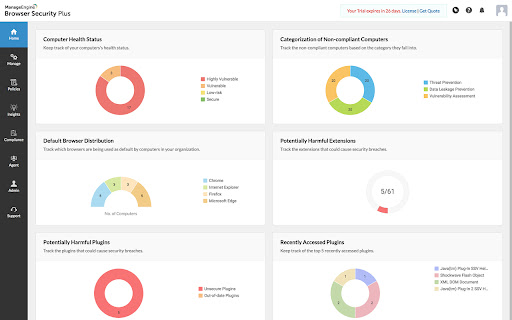


Manage Google Chrome using Browser Security Plus extension One stop solution to secure and manage enterprise browsers. Browser Security Plus extension along with our software, is a tool that helps IT admins secure their browser network from web-based threats. Browser Security Plus allows IT admins to: 1) Detect the vulnerable browser add-ons like extensions and plugins present in your network. 2) Control access to browser-add-ons and sites. 3) Deploy security policies to protect your enterprise data and network. 4) Improve security by keeping track of compliance of your network with recommended security configurations. 5) Reduce help desk calls by ensuring compatibility between web-applications and browsers. Download ManageEngine's Browser Security Plus to enjoy the above functionalities at https://www.manageengine.com/secure-browser/download.html

Free Adblocker for Chrome by Open Adblocker
Free Adblocker for Chrome by Open Adblocker Block ads across the web with Open Adblocker, the best free open source adblocker for Chrome. We keep our goal simple: Blocking all types of ads on all pages in one click for enjoy an easy, clean ad free browsing experience. 🍪Automatically block annoying cookie consent pop-ups across the internet for a smoother browsing experience. ⚙️A completely redesigned settings page with quick access to filters, feedback, and bug reporting. Add Open Adblocker to your browser access these features: 🧩Lightweight, memory efficient adblocker extension for Chrome - Easily block banners, popup, pop under and video ads. 🎥 Block YouTube Ads - Skip distractions and enjoy uninterrupted viewing experience. 🌐 Choose the domains you want to block - Control which sites have ad blocking on or off. 🧱 Block malware and adware - Stop unwanted and misleading content across the web. 📊 Tracking protection filters – Block trackers, analytics scripts, and tracking parameters in URLs. ⚙️ Transparent and Open Source - Our entire codebase is open source and available on GitHub. 🍪 Hide and block Cookie banners - Automatically remove cookie pop up banners across the internet. 🔌 Social media filters – Remove Like/Share widgets and embedded social elements. 🆕 The ability to report a bug - Report issues directly from the settings page to help improve Open Adblocker. Why Open Adblocker? - Lightweight hustle free experience, just one click and you are set. - Built in free cookie consent popup blocker - Optimized memory consumption. - True open source transparency. - Block cookie banners. How to get started? 1. Click “Add to Chrome” and confirm installation. 2. Pin it to your taskbar for quicker access. 3. Open the open adblocker extension and turn Ad blocking on or off. What’s New 🛡️ Advanced security filters enhancement – Block malicious sites, phishing URLs, scams, malware, badware risks, and extensive anti-malware lists. 🔌 Social media filters – Remove Like/Share widgets and embedded social elements.

BrowserGrow
BrowserGrow Chrome Extension Connect BrowserGrow to Your Browser and Get Real Work Done The BrowserGrow Chrome Extension connects the AI agent directly to your browser, allowing it to complete everyday tasks using your own browsing context. BrowserGrow works securely within the tab you choose, helping you automate tasks that require access to your logged-in accounts and personal workspace — without ever sharing your passwords. What You Can Do with BrowserGrow Work Inside Your Accounts Let your agent handle tasks in Gmail, Google Calendar, Notion, and other web apps you’re already signed into — safely and seamlessly. Use Your Real Browsing Context BrowserGrow allows the agent to interact with websites exactly as you would, accessing information and taking action within your live browser session. Stay Fully in Control You explicitly approve each session. The agent only operates in the tab you assign, and you can stop it at any time by simply closing the tab. Install the BrowserGrow Chrome Extension to unlock AI assistance that works directly inside your real online environment — securely, transparently, and under your control. Let your browser do more.

Extensity
Tired of having too many extensions in your toolbar? Try Extensity, the ultimate tool for lightning fast enabling and disabling all your extensions for Google Chrome. Just enable the extension when you want to use it, and disable when you want to get rid of it for a little while. You can also launch Chrome Apps right from the list. * Keep your browser lean and fast - disable extensions that you won't use right away. * Keep your toolbar clean. * Turn all extensions off (and back on) with a single click. * Quick switch between several extensions groups using the Profiles feature. * Allow your most important extensions to be always enabled. * Keep computers in sync with Chrome Cloud Storage support. * Ideal companion for extensions collectors.

Elevate by GrowthX
Elevate Chrome Extension by GrowthX Elevate by GrowthX offers two companion Chrome extensions that focus on a single goal each—either keeping you inspired every time you open a new tab *or* helping you finish job applications faster. Install whichever version matches your workflow. Elevate — New-Tab - Shows one concise, practical insight from proven business builders every time you open a tab. - Clean, distraction-free layout; optimized for all screen sizes. - Works offline; no ads and no tracking scripts. Elevate — Job Assistant - Detects standard form fields on leading career sites and fills them with details from your GrowthX profile when you click Start Autofill. - Lets you save interesting roles and track application status in one place. - Runs only on supported job pages or when you invoke it. The extension never submits an application without your review. How to get started 1. Install the extension that meets your need. 2. (Job Assistant only) Sign in once with your GrowthX credentials to sync profile data. 3. Begin using the feature—no extra setup for the New-Tab version; on job pages click Start Autofill to complete forms in seconds. Data & privacy - Personal data (quotes cache, saved jobs, profile fields, settings) is stored locally or in your GrowthX account and is never sold or shared with third parties. - The extensions do not read your browsing history, inject ads, or collect analytics unrelated to their core features. - Full policy: https://growthx.club/privacy-policy
