
hielpjjagjimpgppnopiibaefhfpbpfn
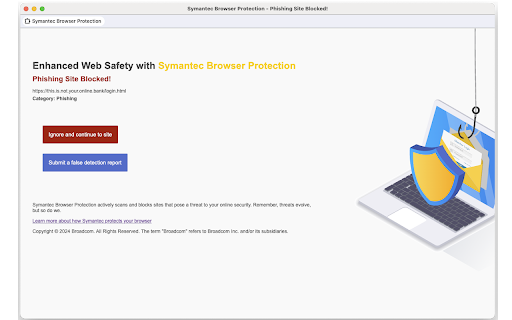
Symantec Browser Protection offers an in-browser security solution for keeping you safe online. Now available for early preview. Symantec Threat Intelligence teams around the world provide unparalleled analysis and commentary on the cyberthreats affecting businesses today. Symantec Browser Protection brings this intelligence into your browser to detect and block various web-borne threats such as: Your use of Symantec Browser Protection is governed by Broadcom's End User License Agreement (https://www.broadcom.com/company/legal/licensing)

Sophos Chrome Security
This is the Sophos Mobile client for Chrome devices. NOTE: Use of this extension is subject to the Sophos End User License Agreement (License Agreement) accessible at https://www.sophos.com/en-us/legal/sophos-end-user-license-agreement.aspx. By installing or using this extension, you agree to the terms and conditions of the License Agreement. You also acknowledge that Sophos processes personal data in accordance with the Sophos Privacy Policy accessible at https://www.sophos.com/en-us/legal/sophos-group-privacy-policy.aspx. Sophos Mobile is a Unified Endpoint Management (UEM) solution that allows companies to easily manage, control and secure Android, iOS, macOS, Windows 10 and Chrome devices (like Chromebooks) from a single web console. The Sophos Chrome Security extension allows you to enroll your Chrome device with Sophos Mobile. FEATURES Your organization can do the following: • Use Web Filtering to block web pages with malicious, undesirable or illegal content. • Find the device. • Send a message to the device. Web Filtering uses up-to-the-minute intelligence from SophosLabs. Your device is secured even when you’re not connected to your organization’s network. Sophos Chrome Security requires a Mobile Advanced or an Intercept X for Mobile license. For more information, visit https://www.sophos.com/mobile MANUAL ENROLLMENT 1. Sign in to Chrome with your corporate Google account. 2. Open Sophos Chrome Security in the Chrome Web Store and add it to Chrome. 3. Select the Sophos button in the Chrome toolbar. 4. Select “Enroll” and then enter the enrollment token. AUTO-ENROLLMENT If your organization uses G Suite, they can configure Sophos Chrome Security to automatically enroll with Sophos Mobile.

Web3 Vigilance - Browser security
The extension will help you be safe when interacting with web3 DApps. The extension crowdsources active scammers information and alerts you if you open one. Additionally, you can also report fraudulent domains to warn rewards in crypto. The team behind this extension is a blockchain based decentralised autonomous organisation (DAO). The community aims to maintain active information about legitimacy about domains and open source this information for the good of web users.

Defendera Browser Protection
Premium security, without compromises. The browser extensions offering enterprise-grade protection, for fraction of the price. Premium security, without compromises. The browser extensions offering enterprise-grade protection, for fraction of the price. Its unique 4-layer active protection ensures the highest safety against online scams and warns users about other suspicious activities, stopping all kinds of online scam techniques. Active protection lets Defendera detect new fraud techniques within a minute of its creation, allowing for unprecedented safety when browsing online. Free features: • Review your browsing history for suspicious or dangerous visits (no sign up needed) • Passive scam protection • Passive potential threat warnings • Fraudulent e-commerce warnings Paid features: • Active realtime protection scam protection • Active realtime potential threat warnings • Child accounts - blocking of sexual content and websites used by sexual predators • Unlimited browsers (Business plan) • Advanced user management (Business plan) • Priority email support (Business plan)

FDev Security
You are protected absolutely with our awesome features: Realtime protection, block seen and typing indicator, blur messenger! # INTRODUCTION You are often afraid about "malicious" websites on the internet. It seems that you cannot know when your sensitive data was stolen by attackers. And when your information, data is hacked by someone (such as banks account, Facebook, ...), you just realized that your data is very importance and you begin to care about the security when you browsing in the Internet. Let's CoderDocs Security protect you with real-time protection feature. And we also has another awesome features like: Facebook (+Zalo) privacy, Privacy Web Experience, Blur Messenger, Malware URL scanning, .... # FEATURE 1: REAL-TIME PROTECTION When you install CoderDocs Security extension successfully, this feature will enable real-time immediately. This feature is the most important, so you cannot disable it. When you visit a malware site, the warning popup will be displayed to warning you about this malicious site. # FEATURE 2: FACEBOOK (+ZALO) PRIVACY You can easily enable / disable this feature by check or uncheck the checkbox of every small functions. This feature includes: - Block "Seen" indicator: When you receive a Facebook message, you click to view this message, the sender will see the status "seen" in their message space. But if you enable this function, the sender can not see the status "seen" any more. They never know whether you saw the message or not. - Block "Typing" indicator: Similar with block "seen", the sender can not see the "typing" indicator when you compose the message in Facebook message space (the three dots indicator "..."). - Block "Seen" status in Story: When you click to view the Story of someone, they will know that you have seen their Story. But with this function, nobody can know that you saw their Story. You can click and see your ex-girlfriend any time. - Block "Typing" indicator in Comments space: When you are typing the comment in any post. People can see the indicator "Someone are typing ...". But if you enable this function, this indicator will be disappear forever. - NOW, it support block seen and typing indicators in Zalo web version. Note: Block "Seen" status in Story and block "Typing" indicator in Comments are disable now because some technical problems. # FEATURE 3: PRIVACY WEB EXPERIENCE You can also easily enable / disable this feature by check or uncheck the checkbox of every small functions. This feature includes: - Block important sites when you absent: When you go out, you forgot to lock your computer, someone can open you browser, they can open some important site such as Facebook, Gmail and see your sensitive information. If you don't want that thing happen. Let enable this function. It allow you to block some importance sites that you don't want anyone access to if you have to lend your computer or you go out. - Block tracking Ads Scripts: This function allow you to block the tracking scripts like Facebook, Google. For example, you go to an e-commerce website, when you comeback to Facebook, the previous items in e-commerce website will be display. You can enable this function to block them. - Browser for kids: This function allow you to block almost porn sites in the world. If your kids uses your computer, let enable this function. # FEATURE 4: URL MALWARE SCANNING This is a feature that allow you to operate directly on the user interface. Let go to menu path: TOOLS / SECURITY / MALWARE SCAN and explore this feature. This feature allow you to analyze any URL and inform for you if the URL will be redirected to the website that contains any malware/virus. # FEATURE 5: BLUR MESSENGER This feature allow you to hidden all information when you chat with someone in the Messenger (messenger.com). Just don't care anyone who often peek at your messages. It only work with Messenger - Open Messenger (messenger.com) - Click Settings Icon in the left side bar. - Enjoy the new Messenger feature. More information about CoderDocs Extension: https://lenhatthanh.com/en/coderdocs-security/
