
mapnejckiifgnmkokfpfbelpajdhcifo
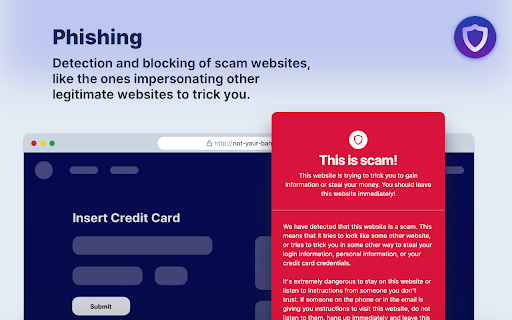


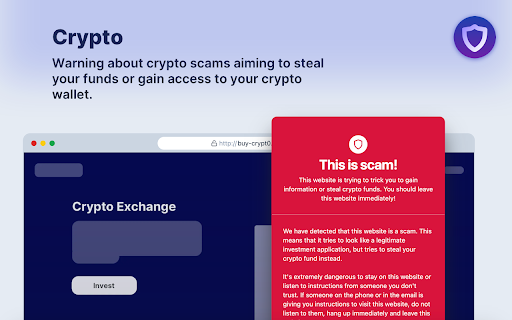
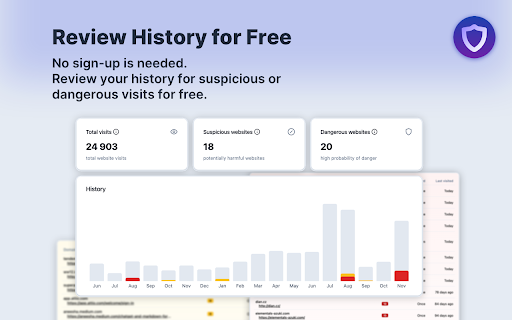
Premium security, without compromises. The browser extensions offering enterprise-grade protection, for fraction of the price. Premium security, without compromises. The browser extensions offering enterprise-grade protection, for fraction of the price. Its unique 4-layer active protection ensures the highest safety against online scams and warns users about other suspicious activities, stopping all kinds of online scam techniques. Active protection lets Defendera detect new fraud techniques within a minute of its creation, allowing for unprecedented safety when browsing online. Free features: • Review your browsing history for suspicious or dangerous visits (no sign up needed) • Passive scam protection • Passive potential threat warnings • Fraudulent e-commerce warnings Paid features: • Active realtime protection scam protection • Active realtime potential threat warnings • Child accounts - blocking of sexual content and websites used by sexual predators • Unlimited browsers (Business plan) • Advanced user management (Business plan) • Priority email support (Business plan)

Web3 Vigilance - Browser security
The extension will help you be safe when interacting with web3 DApps. The extension crowdsources active scammers information and alerts you if you open one. Additionally, you can also report fraudulent domains to warn rewards in crypto. The team behind this extension is a blockchain based decentralised autonomous organisation (DAO). The community aims to maintain active information about legitimacy about domains and open source this information for the good of web users.

Blocki - Wallet WatchDog
Keeps your crypto wallet safe by changing its paw color on trusted and scam websites. Blocki the Wallet WatchDog, powered by DogeX on Solana, keeps your crypto wallet safe by changing its paw color in your browser's toolbar to let you know if you are on a trusted or possibly harmful crypto website. Its 4 colors are: green 🟢 (Trust List), orange 🟠 (warning), red 🔴 (Block List), and black ⚫️ (unknown security status). Clicking the paw shows helpful security and crypto information about the current website. Blocki works with Chromium-based browsers including: Chrome, Brave, Edge, Yandex, and Opera. The Firefox version will be available soon. 🔜 The first DEX/memecoin charting tool will be available in Version 1.0.0! 🔒 Never spies on which websites you visit. The Trust List and Block List are both automatically downloaded inside the extension every ~6 hours. In fact, Blocki's protection will work exactly the same if your internet is turned off. ⭐️ Premium WatchDog URLs are scanned daily for security issues and show a special star in the paw menu. Visit TryBlocki.com/WatchDog-Websites to learn more, verify a WatchDog URL, or add your website to the WatchDog list. 🐶 DogeX is the "Wallet WatchDog" mascot and powers Blocki with his DOGEX tokens on Solana. You can win prizes and unlock features by simply trying the extension & hodling DOGEX tokens. Paste your DOGEX Solana wallet address into the settings page to automatically be entered into giveaways. Giveaway details: TryBlocki.com/Giveaways

SafeToOpen Browser Security and Privacy
SafeToOpen browser security and privacy extension. Stop phishing attacks before they reach you. SafeToOpen is a real-time browser security and privacy extension that protects you from phishing websites, online scams, malicious downloads, and hidden trackers — automatically, as you browse. No security expertise required. Install it once and stay protected on every site you visit. Most antivirus software reacts after a threat is already on your device. SafeToOpen works earlier: it analyzes the page you're actually looking at, in real time, and warns you the moment something looks like a phishing or scam site — even if that site is brand new and not yet on any blocklist. ━━━━━━━━━━━━━━━━━━━━━━━━━━━━━━━━━━━━━━ WHAT SAFETOOPEN PROTECTS YOU FROM ━━━━━━━━━━━━━━━━━━━━━━━━━━━━━━━━━━━━━━ ✓ Phishing & fake login pages Detects sites built to steal your passwords, banking details, and personal information — including newly created phishing pages that traditional blocklists miss. ✓ Online scams & fraudulent websites Flags deceptive and impersonation sites before you hand over money or data. ✓ Malicious downloads Warns you before you download dangerous files (like disguised .exe installers) that could carry malware or ransomware. ✓ Hidden trackers Blocks third-party trackers that follow you across the web, so you browse faster and more privately. ━━━━━━━━━━━━━━━━━━━━━━━━━━━━━━━━━━━━━━ HOW IT WORKS — TWO LAYERS OF PROTECTION ━━━━━━━━━━━━━━━━━━━━━━━━━━━━━━━━━━━━━━ SafeToOpen doesn't just check a website against a list of known bad URLs. It inspects every page on two levels at once — which is how it catches the newest scams that blocklists haven't seen yet. ❶ Visual element analysis SafeToOpen looks at a page the way you do. It examines the visual elements — logos, branding, layout, and login forms — to recognize when a site is impersonating a bank, brand, or service you trust. If a page is dressed up to look like something it isn't, you're warned BEFORE you enter your password, card number, or any sensitive information. ❷ Deep structural analysis Like an X-ray, SafeToOpen sees beneath the surface. It inspects the underlying layers and structure of the website that your eyes can't. ➤ Together: one fast, accurate verdict By combining what a page LOOKS like with what it's actually MADE of, SafeToOpen identifies the latest phishing and scam websites in real time — including brand-new pages launched minutes ago that no traditional blocklist has caught up to. ✓ Catches brand-new threats — Phishing kits launch and vanish within hours. SafeToOpen analyzes the page itself, so it flags zero-day phishing sites that lists haven't caught up to yet. ✓ Lightweight & fast — Runs quietly in the background and won't slow down your browsing. ✓ Privacy by design — Your browsing is your business. SafeToOpen protects you without harvesting your personal data. ✓ Works everywhere you browse — Protection applies across the sites and pages you visit, automatically. ━━━━━━━━━━━━━━━━━━━━━━━━━━━━━━━━━━━━━━ GETTING STARTED IS EFFORTLESS ━━━━━━━━━━━━━━━━━━━━━━━━━━━━━━━━━━━━━━ ➊ Install SafeToOpen and pin it to your toolbar. ➋ Browse normally. SafeToOpen checks each page in real time. ➌ If a site looks like phishing, a scam, or a malicious download, you get a clear, immediate warning — with a simple way to stay safe. That's it. There's nothing to configure. Protection starts the moment you install. ━━━━━━━━━━━━━━━━━━━━━━━━━━━━━━━━━━━━━━ FREE TO START — UPGRADE FOR COMPLETE PROTECTION ━━━━━━━━━━━━━━━━━━━━━━━━━━━━━━━━━━━━━━ Install SafeToOpen free and get real-time phishing detection right away. The free plan blocks known phishing, scam, and malware sites, warns you before you open known unsafe links, and blocks third-party trackers. Upgrade to SafeToOpen Personal Plus — with a 14-day free trial — to unlock our most advanced protection: ✦ Zero-day phishing detection (VisionAI) — catches brand-new phishing and scam pages the moment they appear, before any blocklist. ✦ Deeper Analysis (X-Ray) — full structural inspection of suspicious pages for a faster, more accurate verdict. ✦ Paste Guard — stops passwords, card numbers, and personal data from being pasted into untrustworthy sites. ✦ Email-attachment scanning — checks risky attachments in your webmail. Protecting the whole household? SafeToOpen Family Plus — covers up to 5 people, with full Personal Plus protection for everyone. ━━━━━━━━━━━━━━━━━━━━━━━━━━━━━━━━━━━━━━ TRUSTED, PRIVATE & COMPLIANT ━━━━━━━━━━━━━━━━━━━━━━━━━━━━━━━━━━━━━━ Security software should be held to the highest standard — so SafeToOpen is. ✓ GDPR compliant — built to respect your privacy and your rights over your data. ✓ ISO/IEC 27001:2022 certified — our information security is independently certified to the leading international standard. ✓ Privacy by design — SafeToOpen protects you without harvesting or selling your personal data. ━━━━━━━━━━━━━━━━━━━━━━━━━━━━━━━━━━━━━━ FOR TEAMS & ORGANIZATIONS ━━━━━━━━━━━━━━━━━━━━━━━━━━━━━━━━━━━━━━ SafeToOpen also protects businesses, schools, and enterprises. It supports centrally managed deployment and policy configuration, so administrators can roll out consistent phishing and download protection across every device. ➤ Learn more and talk to our team: https://safetoopen.com/en/for/business/ ━━━━━━━━━━━━━━━━━━━━━━━━━━━━━━━━━━━━━━ ⚠ PROTECT YOURSELF FROM THE #1 CAUSE OF ONLINE BREACHES ━━━━━━━━━━━━━━━━━━━━━━━━━━━━━━━━━━━━━━ The vast majority of cyberattacks start with phishing. Antivirus alone isn't enough — phishing happens in your browser, in real time, on pages your antivirus never sees. SafeToOpen is built for exactly that moment.

FDev Security
You are protected absolutely with our awesome features: Realtime protection, block seen and typing indicator, blur messenger! # INTRODUCTION You are often afraid about "malicious" websites on the internet. It seems that you cannot know when your sensitive data was stolen by attackers. And when your information, data is hacked by someone (such as banks account, Facebook, ...), you just realized that your data is very importance and you begin to care about the security when you browsing in the Internet. Let's CoderDocs Security protect you with real-time protection feature. And we also has another awesome features like: Facebook (+Zalo) privacy, Privacy Web Experience, Blur Messenger, Malware URL scanning, .... # FEATURE 1: REAL-TIME PROTECTION When you install CoderDocs Security extension successfully, this feature will enable real-time immediately. This feature is the most important, so you cannot disable it. When you visit a malware site, the warning popup will be displayed to warning you about this malicious site. # FEATURE 2: FACEBOOK (+ZALO) PRIVACY You can easily enable / disable this feature by check or uncheck the checkbox of every small functions. This feature includes: - Block "Seen" indicator: When you receive a Facebook message, you click to view this message, the sender will see the status "seen" in their message space. But if you enable this function, the sender can not see the status "seen" any more. They never know whether you saw the message or not. - Block "Typing" indicator: Similar with block "seen", the sender can not see the "typing" indicator when you compose the message in Facebook message space (the three dots indicator "..."). - Block "Seen" status in Story: When you click to view the Story of someone, they will know that you have seen their Story. But with this function, nobody can know that you saw their Story. You can click and see your ex-girlfriend any time. - Block "Typing" indicator in Comments space: When you are typing the comment in any post. People can see the indicator "Someone are typing ...". But if you enable this function, this indicator will be disappear forever. - NOW, it support block seen and typing indicators in Zalo web version. Note: Block "Seen" status in Story and block "Typing" indicator in Comments are disable now because some technical problems. # FEATURE 3: PRIVACY WEB EXPERIENCE You can also easily enable / disable this feature by check or uncheck the checkbox of every small functions. This feature includes: - Block important sites when you absent: When you go out, you forgot to lock your computer, someone can open you browser, they can open some important site such as Facebook, Gmail and see your sensitive information. If you don't want that thing happen. Let enable this function. It allow you to block some importance sites that you don't want anyone access to if you have to lend your computer or you go out. - Block tracking Ads Scripts: This function allow you to block the tracking scripts like Facebook, Google. For example, you go to an e-commerce website, when you comeback to Facebook, the previous items in e-commerce website will be display. You can enable this function to block them. - Browser for kids: This function allow you to block almost porn sites in the world. If your kids uses your computer, let enable this function. # FEATURE 4: URL MALWARE SCANNING This is a feature that allow you to operate directly on the user interface. Let go to menu path: TOOLS / SECURITY / MALWARE SCAN and explore this feature. This feature allow you to analyze any URL and inform for you if the URL will be redirected to the website that contains any malware/virus. # FEATURE 5: BLUR MESSENGER This feature allow you to hidden all information when you chat with someone in the Messenger (messenger.com). Just don't care anyone who often peek at your messages. It only work with Messenger - Open Messenger (messenger.com) - Click Settings Icon in the left side bar. - Enjoy the new Messenger feature. More information about CoderDocs Extension: https://lenhatthanh.com/en/coderdocs-security/
