
bkbeeeffjjeopflfhgeknacdieedcoml
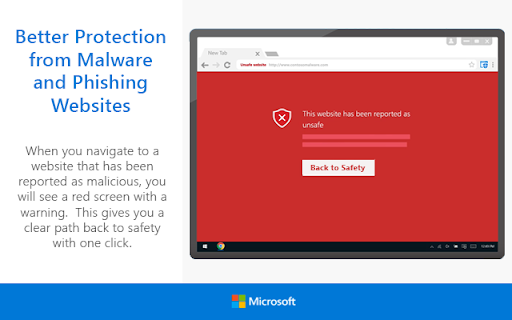

Protect yourself against online threats, like phishing and malicious websites, with real-time protection from Microsoft. The Microsoft Defender Browser Protection extension helps protect you against online threats, such as links in phishing emails and websites designed to trick you into downloading and installing malicious software that can harm your computer. If you click a malicious link in an email or navigate to a site designed to trick you into disclosing financial, personal or other sensitive information, or a website that hosts malware, Microsoft Defender Browser Protection will check it against a constantly updated list of malicious URLs known to Microsoft. If the malicious link matches one on the list, Microsoft Defender Browser Protection will show a red warning screen letting you know that the web page you are about to visit is known to be harmful, giving you a clear path back to safety with one click. • Continuously updated list of reported harmful sites • Protects against phishing sites and socially engineered malware sites • Real-time indicator of harmful sites and website status • V1.62 – Initial Release • V1.63 – Fixed Chromebook issue • V1.65 – Added “Report Suspicious Site” feature, and ability to demonstrate the extension’s protection • V1.66 – Improve protection and performance. Add Group Policy controls.

Urban Browser Guard
Urban Browser Guard safeguards your online privacy and blocks harmful content, including malicious websites and intrusive ads Urban Browser Guard Chrome extension adds a security layer that blocks access to malicious websites while filtering out annoying ads and other unwanted content. Urban Browser Guard protects your digital fingerprints from leaking into the wrong hands and prevents identity theft, malware ads, and phishing attempts, whether you’re in a public place or at home. ⛏️ Mining Site Alerts: Receive alerts about cryptocurrency mining websites that could compromise your device's performance and security. 🧹 Clear Cache and History: Clear your browser cache and history, ensuring your data stays private. 🚫 Block Analytics Requests: Easily block analytics requests that track your online behavior. 🛡️ Advance browser protection: Blocking access to malicious sites and ads, anti phishing, and improving secure browsing and private internet security. 🆕🤖 Chat AI Anonymizer - Personal data protection (Optional Feature): When enabled and approved, Urban Browser Guard warns you before sending AI chat messages that may contain personal information (such as names, phone numbers, ID numbers, passport details, SSN, TIN, or MAC addresses). Detection backend based is analyzed in a de-identified and anonymized manner and is available only to users who opt in. When using the optional Advance browser protection features, you enjoy anti-phishing, anti-malware, blocking access to malicious sites and blocking malicious ads for your browsing. To use these safe browsing and AI chat protection features, subject to your acceptance of the prominent disclosures provided for each, we will process browsing information. We further encourage you to review our privacy policy before installing the Urban browser guard extension, available here: Privacy Policy https://www.urban-vpn.com/about-us/privacy-policy-urban-browser-guard/ This extension is an all-in-one browser protection solution. You don't need to download additional software → click "Add to Chrome" to install the extension, and you're set to browse freely. Urban Browser Guard is a comprehensive Chrome browser extension for securing your connection. It will not slow your browser’s performance and will not affect bandwidth. ⚡Browser protection updates and fixes. ⚙️ UI/UX and settings updates.

SiteArmor - Phishing Protection
Protect yourself from phishing and malicious websites with real-time blocking. Site Armor is a lightweight Chrome extension that shields your browsing with intelligent, real-time site protection. Dangerous domains are blocked instantly — before any content even loads — so you can explore the web with total peace of mind. Every day, thousands of new malicious websites appear on the internet: phishing pages, scam portals, malware distributors, and fake login forms designed to steal your credentials. Traditional security tools are often slow, bloated, or require complex setup. Site Armor takes a different approach — it delivers powerful protection with zero friction. 🛡 REAL-TIME THREAT BLOCKING Site Armor maintains a constantly updated blocklist of known dangerous domains and checks every single site you visit in real time. Malicious, suspicious, and fraudulent websites are stopped dead in their tracks — before any scripts execute, before any content renders, before any damage is done. You see a clear warning page instead of a threat. 🌐 PER-SITE CONTROL Not every blocked domain is a real threat. That's why Site Armor gives you full control. Toggle protection on or off for any individual domain with a single click. If you trust a site, simply add it to your allowlist — no complicated menus, no buried settings. 🔒 ZERO DATA COLLECTION Your privacy isn't just a feature — it's a principle. Site Armor collects absolutely no data. No browsing logs, no analytics, no telemetry, no user accounts. Everything happens locally on your device. Your browsing history stays yours and yours alone. ⚡ INSTANT SETUP There is nothing to configure. Install Site Armor from the Chrome Web Store, and protection begins immediately — from the very first second. No sign-up forms, no onboarding wizards, no permissions to grant. It just works, silently and reliably, in the background of every tab. 📋 SMART ALLOWLIST When you mark a site as trusted, Site Armor remembers that choice across all your browsing sessions. Your allowlist is persistent, so you never have to re-approve the same domain twice. Full control with zero repetition. 🔄 ALWAYS UP TO DATE The threat landscape changes every hour. Site Armor's blocklist is continuously updated so you're always protected against the latest dangers — not just yesterday's threats. 🪶 ULTRA-LIGHTWEIGHT Site Armor is engineered to be invisible. It adds less than 1 millisecond to your page load time and uses minimal memory. No slowdowns, no lag, no battery drain. You won't even notice it's there — until it saves you from a dangerous site. WHY SITE ARMOR? → 100% free — no premium tier, no ads, no upsells. Free forever. → Less than 1 ms response time on every page load. → Zero data collected — ever. → Works silently across every tab, 24 hours a day, 7 days a week. → One-click per-site control for complete flexibility. → No account required — install and go. Whether you're a developer checking unfamiliar links, a parent protecting your family's devices, or simply someone who values a clean and safe browsing experience — Site Armor has you covered. Browse under the shield of Site Armor.

Malware Protection
Malware Protection shields you from dangerous websites automatically Malware Protection shields you from dangerous websites automatically — no configuration needed. Every site you visit is scanned in real time against McAfee SiteAdvisor's threat database. If a domain is flagged as malicious or a phishing site, the page is blocked instantly and replaced with a clear warning — before any harmful content can load. You can still choose to proceed to the site if you believe it was flagged in error. Features: 🛡️ Real-Time Protection — Every website is scanned the moment you navigate to it. Dangerous domains are blocked before the page loads. 🔍 Search Advisor — Safety icons appear directly on Google and Bing search results, so you can see which links are safe before you click them. ⚡ Smart Caching — Scan results are remembered for the duration of your session, so previously checked sites load instantly without repeated lookups. ↩️ False Positive Override — If a safe site gets wrongly blocked, a single click lets you proceed without disabling the extension. Privacy: Domain lookups are sent to McAfee SiteAdvisor for scanning. No personal data or browsing history is collected or stored by this extension. Free. Open source with public license (GPLv3)

Trend Micro ID Protection
Avoid dangerous websites, block ads and trackers, protect your online privacy, keep your social media accounts safe, and more! Trend Micro ID Protection (previously known as Trend Micro Check) is an all-in-one adblocker, password manager, and privacy-enhancing browser extension. It blocks invasive trackers and annoying ads, cleans and secures your browser, keeps you safe from dangerous websites, helps you manage your passwords, resets risky site permissions, alerts you to data breaches, and more. Download today and take control of your online privacy. Additionally, through the ID Protection extension, you can access the ID Protection portal and mobile app, where you can discover lots of extra features to protect against identity theft, fraud, and unauthorized access to your online accounts. ✓ Anti-Tracking & Privacy Protection Clear tracking cookies and block trackers to stop them from collecting your data. Optimize the privacy settings of your social media accounts. Clean up your digital footprint by removing the information stored in your browser. ✓ Ad & Pop-Up Blocker Say goodbye to annoying ads and enjoy a distraction-free browsing experience. Block unwanted ads and popups, including banner ads and pop-ups on Facebook and all other websites. If you see ads that haven’t been blocked automatically, you can block them manually. ✓ Password Manager with Autofill Keep all your passwords safe and organized in your own personal secure vault, eliminating the need to remember an endless number of passwords or compromise your security by reusing the same ones time and time again. Your login info will be autofilled too, which makes signing in to websites a breeze. ✓ Social Media Monitoring Keep your Facebook, Google, and Instagram accounts private and protected from hackers. Receive alerts about suspicious posts and changes made to your accounts. Keep the cybercriminals at bay and reduce your risk of identity theft. ✓ Online Threat Protection Get protection against phishing attacks, dangerous websites, and online scams. ✓ Safer Browsing Receive alerts before you visit websites with poor reputations. Never visit a dangerous website or download a malicious file again. ✓ Identity Theft Protection Block phishing websites that will try to steal your personal information. Trend Micro technology is proven to detect and block up to 99% of phishing sites. ✓ Page Ratings on Search Results Know whether the links in your search results are safe to click. Avoid phishing, scam, and other types of malicious websites with ease.
