
imhhfjfjfhjjjgaedcanngoffjmcblgi

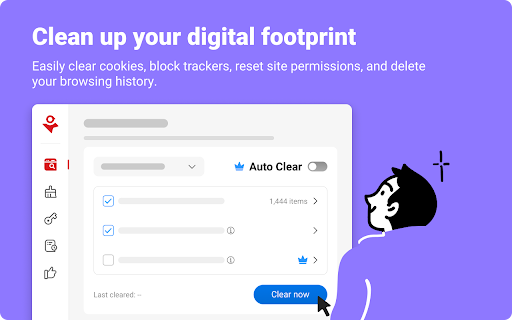


Avoid dangerous websites, block ads and trackers, protect your online privacy, keep your social media accounts safe, and more! Trend Micro ID Protection (previously known as Trend Micro Check) is an all-in-one adblocker, password manager, and privacy-enhancing browser extension. It blocks invasive trackers and annoying ads, cleans and secures your browser, keeps you safe from dangerous websites, helps you manage your passwords, resets risky site permissions, alerts you to data breaches, and more. Download today and take control of your online privacy. Additionally, through the ID Protection extension, you can access the ID Protection portal and mobile app, where you can discover lots of extra features to protect against identity theft, fraud, and unauthorized access to your online accounts. ✓ Anti-Tracking & Privacy Protection Clear tracking cookies and block trackers to stop them from collecting your data. Optimize the privacy settings of your social media accounts. Clean up your digital footprint by removing the information stored in your browser. ✓ Ad & Pop-Up Blocker Say goodbye to annoying ads and enjoy a distraction-free browsing experience. Block unwanted ads and popups, including banner ads and pop-ups on Facebook and all other websites. If you see ads that haven’t been blocked automatically, you can block them manually. ✓ Password Manager with Autofill Keep all your passwords safe and organized in your own personal secure vault, eliminating the need to remember an endless number of passwords or compromise your security by reusing the same ones time and time again. Your login info will be autofilled too, which makes signing in to websites a breeze. ✓ Social Media Monitoring Keep your Facebook, Google, and Instagram accounts private and protected from hackers. Receive alerts about suspicious posts and changes made to your accounts. Keep the cybercriminals at bay and reduce your risk of identity theft. ✓ Online Threat Protection Get protection against phishing attacks, dangerous websites, and online scams. ✓ Safer Browsing Receive alerts before you visit websites with poor reputations. Never visit a dangerous website or download a malicious file again. ✓ Identity Theft Protection Block phishing websites that will try to steal your personal information. Trend Micro technology is proven to detect and block up to 99% of phishing sites. ✓ Page Ratings on Search Results Know whether the links in your search results are safe to click. Avoid phishing, scam, and other types of malicious websites with ease.

SafeToOpen Browser Security and Privacy
SafeToOpen browser security and privacy extension. Stop phishing attacks before they reach you. SafeToOpen is a real-time browser security and privacy extension that protects you from phishing websites, online scams, malicious downloads, and hidden trackers — automatically, as you browse. No security expertise required. Install it once and stay protected on every site you visit. Most antivirus software reacts after a threat is already on your device. SafeToOpen works earlier: it analyzes the page you're actually looking at, in real time, and warns you the moment something looks like a phishing or scam site — even if that site is brand new and not yet on any blocklist. ━━━━━━━━━━━━━━━━━━━━━━━━━━━━━━━━━━━━━━ WHAT SAFETOOPEN PROTECTS YOU FROM ━━━━━━━━━━━━━━━━━━━━━━━━━━━━━━━━━━━━━━ ✓ Phishing & fake login pages Detects sites built to steal your passwords, banking details, and personal information — including newly created phishing pages that traditional blocklists miss. ✓ Online scams & fraudulent websites Flags deceptive and impersonation sites before you hand over money or data. ✓ Malicious downloads Warns you before you download dangerous files (like disguised .exe installers) that could carry malware or ransomware. ✓ Hidden trackers Blocks third-party trackers that follow you across the web, so you browse faster and more privately. ━━━━━━━━━━━━━━━━━━━━━━━━━━━━━━━━━━━━━━ HOW IT WORKS — TWO LAYERS OF PROTECTION ━━━━━━━━━━━━━━━━━━━━━━━━━━━━━━━━━━━━━━ SafeToOpen doesn't just check a website against a list of known bad URLs. It inspects every page on two levels at once — which is how it catches the newest scams that blocklists haven't seen yet. ❶ Visual element analysis SafeToOpen looks at a page the way you do. It examines the visual elements — logos, branding, layout, and login forms — to recognize when a site is impersonating a bank, brand, or service you trust. If a page is dressed up to look like something it isn't, you're warned BEFORE you enter your password, card number, or any sensitive information. ❷ Deep structural analysis Like an X-ray, SafeToOpen sees beneath the surface. It inspects the underlying layers and structure of the website that your eyes can't. ➤ Together: one fast, accurate verdict By combining what a page LOOKS like with what it's actually MADE of, SafeToOpen identifies the latest phishing and scam websites in real time — including brand-new pages launched minutes ago that no traditional blocklist has caught up to. ✓ Catches brand-new threats — Phishing kits launch and vanish within hours. SafeToOpen analyzes the page itself, so it flags zero-day phishing sites that lists haven't caught up to yet. ✓ Lightweight & fast — Runs quietly in the background and won't slow down your browsing. ✓ Privacy by design — Your browsing is your business. SafeToOpen protects you without harvesting your personal data. ✓ Works everywhere you browse — Protection applies across the sites and pages you visit, automatically. ━━━━━━━━━━━━━━━━━━━━━━━━━━━━━━━━━━━━━━ GETTING STARTED IS EFFORTLESS ━━━━━━━━━━━━━━━━━━━━━━━━━━━━━━━━━━━━━━ ➊ Install SafeToOpen and pin it to your toolbar. ➋ Browse normally. SafeToOpen checks each page in real time. ➌ If a site looks like phishing, a scam, or a malicious download, you get a clear, immediate warning — with a simple way to stay safe. That's it. There's nothing to configure. Protection starts the moment you install. ━━━━━━━━━━━━━━━━━━━━━━━━━━━━━━━━━━━━━━ FREE TO START — UPGRADE FOR COMPLETE PROTECTION ━━━━━━━━━━━━━━━━━━━━━━━━━━━━━━━━━━━━━━ Install SafeToOpen free and get real-time phishing detection right away. The free plan blocks known phishing, scam, and malware sites, warns you before you open known unsafe links, and blocks third-party trackers. Upgrade to SafeToOpen Personal Plus — with a 14-day free trial — to unlock our most advanced protection: ✦ Zero-day phishing detection (VisionAI) — catches brand-new phishing and scam pages the moment they appear, before any blocklist. ✦ Deeper Analysis (X-Ray) — full structural inspection of suspicious pages for a faster, more accurate verdict. ✦ Paste Guard — stops passwords, card numbers, and personal data from being pasted into untrustworthy sites. ✦ Email-attachment scanning — checks risky attachments in your webmail. Protecting the whole household? SafeToOpen Family Plus — covers up to 5 people, with full Personal Plus protection for everyone. ━━━━━━━━━━━━━━━━━━━━━━━━━━━━━━━━━━━━━━ TRUSTED, PRIVATE & COMPLIANT ━━━━━━━━━━━━━━━━━━━━━━━━━━━━━━━━━━━━━━ Security software should be held to the highest standard — so SafeToOpen is. ✓ GDPR compliant — built to respect your privacy and your rights over your data. ✓ ISO/IEC 27001:2022 certified — our information security is independently certified to the leading international standard. ✓ Privacy by design — SafeToOpen protects you without harvesting or selling your personal data. ━━━━━━━━━━━━━━━━━━━━━━━━━━━━━━━━━━━━━━ FOR TEAMS & ORGANIZATIONS ━━━━━━━━━━━━━━━━━━━━━━━━━━━━━━━━━━━━━━ SafeToOpen also protects businesses, schools, and enterprises. It supports centrally managed deployment and policy configuration, so administrators can roll out consistent phishing and download protection across every device. ➤ Learn more and talk to our team: https://safetoopen.com/en/for/business/ ━━━━━━━━━━━━━━━━━━━━━━━━━━━━━━━━━━━━━━ ⚠ PROTECT YOURSELF FROM THE #1 CAUSE OF ONLINE BREACHES ━━━━━━━━━━━━━━━━━━━━━━━━━━━━━━━━━━━━━━ The vast majority of cyberattacks start with phishing. Antivirus alone isn't enough — phishing happens in your browser, in real time, on pages your antivirus never sees. SafeToOpen is built for exactly that moment.

Sophos Chrome Security
This is the Sophos Mobile client for Chrome devices. NOTE: Use of this extension is subject to the Sophos End User License Agreement (License Agreement) accessible at https://www.sophos.com/en-us/legal/sophos-end-user-license-agreement.aspx. By installing or using this extension, you agree to the terms and conditions of the License Agreement. You also acknowledge that Sophos processes personal data in accordance with the Sophos Privacy Policy accessible at https://www.sophos.com/en-us/legal/sophos-group-privacy-policy.aspx. Sophos Mobile is a Unified Endpoint Management (UEM) solution that allows companies to easily manage, control and secure Android, iOS, macOS, Windows 10 and Chrome devices (like Chromebooks) from a single web console. The Sophos Chrome Security extension allows you to enroll your Chrome device with Sophos Mobile. FEATURES Your organization can do the following: • Use Web Filtering to block web pages with malicious, undesirable or illegal content. • Find the device. • Send a message to the device. Web Filtering uses up-to-the-minute intelligence from SophosLabs. Your device is secured even when you’re not connected to your organization’s network. Sophos Chrome Security requires a Mobile Advanced or an Intercept X for Mobile license. For more information, visit https://www.sophos.com/mobile MANUAL ENROLLMENT 1. Sign in to Chrome with your corporate Google account. 2. Open Sophos Chrome Security in the Chrome Web Store and add it to Chrome. 3. Select the Sophos button in the Chrome toolbar. 4. Select “Enroll” and then enter the enrollment token. AUTO-ENROLLMENT If your organization uses G Suite, they can configure Sophos Chrome Security to automatically enroll with Sophos Mobile.

BigGo Shopping Assistant
Price comparison and product price history. Smart shopping with BigGo Shopping Assistant. Viewing products on the store page: 1. Show the similar products, one click to slide the list by low to high products. 2. Right-click on the text and select "Search BigGo for..." to view the price comparisons. 3. Find the best promotions. Search products: Show the amount of the products and suggests other related products. Click the products to see more comparison results on the BigGo website. BigGo Shopping Assistant is your guide for shopping, helping you buy more and save more. Compare price automatically and check the discount codes quickly, finding the lowest price. **Affiliate Links and Commission Disclosure** To continue providing our free price comparison service, BigGo has established affiliate partnerships with major e-commerce platforms. When you complete a purchase through BigGo Shopping Helper's recommended links, we may receive a small commission from partner merchants. These commissions do not affect your purchase price. - We do not tamper with cookies or links without users' knowledge - All affiliate recommendations are completed through user confirmation (via cashback reward prompts on e-commerce sites) or by clicking products to redirect from the BigGo website - You are free to choose whether to use our recommended links BigGo Shopping Helper only collects necessary browsing data and cookie information for: - Tracking product price changes to provide accurate price comparisons - Confirming your shopping information with partner merchants For detailed information, please refer to our Privacy Policy. Affiliate commissions are a revenue source that supports BigGo's continued operations, enabling us to keep providing free and convenient price comparison services. Thank you for your understanding and support.

飛比購物幫手:網路購物即時比價工具
飛比購物幫手:歷史價格通通掌握,比價破億商品,網購最佳幫手,讓你花最少,買最好! 即刻享受比價神器帶來的省錢體驗,首次安裝再送 Line Points 10 點! 功能亮點: 【一、即時評價】(新功能!) 即時顯示買家評價與星等,快速了解商品真實口碑,避免踩到評價不佳的雷品。 【二、即時比價】 當你瀏覽商品時,系統會自動比對查詢同款商品,並依價格排序,讓你立即找到最低價,不必一家一家比。 【三、歷史價格】 自動顯示商品的價格走勢,包含近期漲跌與最低價紀錄,幫你判斷現在是不是入手好時機。 【四、一鍵查價】 只要選取商品名稱,點擊右鍵「用飛比價格查詢」,就能立刻跳到飛比網站,查看完整比價結果與更多優惠。 加碼專屬好康: 首次安裝送 飛比點數 90 點,可兌換 Line Points、超商購物金等多項好禮。 涵蓋數百家購物拍賣與精選海外店家,「逛到哪、比到哪」。 電腦網購必備神器 —— 省得快、買得好、買得安心。 ______________________________ 關於導購連結與聯盟計畫 為了維持服務的正常運作,當您使用我們的服務或透過推薦連結購物時,我們可能會從合作夥伴獲取部分佣金。 我們尊重您的隱私,僅收集必要的數據(如瀏覽紀錄與cookie)來提供服務,並不會出售或濫用您的個人資訊。 當您安裝此擴充功能,視為同意飛比價格之服務條款與隱私權政策。 飛比價格:https://feebee.com.tw/ 服務條款:https://feebee.com.tw/terms/ 隱私權政策:https://feebee.com.tw/policy/ 如有任何疑問或建議,歡迎隨時聯繫我們
