
dhkbjdnlhahnffncheehbnoaecncdpdk


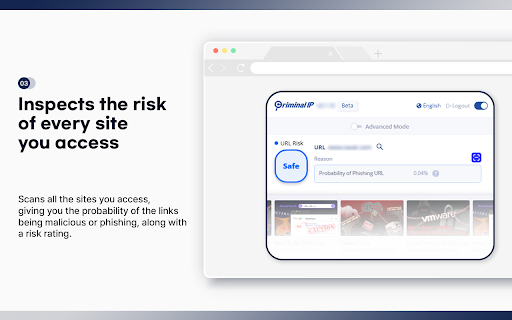

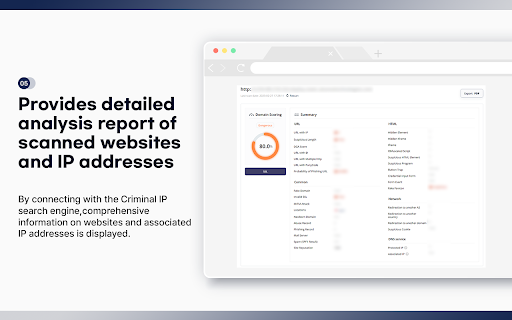
Criminal IP: AI-based Phishing Link Checker, Your Ultimate Web Protection and Malicious URL Checker Criminal IP: AI-based Phishing Link Checker is a powerful Chrome extension designed to enhance your online security and protect you from malicious URLs, malware, and phishing attacks. This solution leverages the data collected from Criminal IP, a cyber threat intelligence (CTI) search engine, to respond to threats more accurately and quickly. With its advanced features and real-time scanning capabilities, Criminal IP: AI-based Phishing Link Checker serves as your reliable web protection companion. • Real-time URL Scanner: Criminal IP: AI-based Phishing Link Checker's cutting-edge AI technology scans URLs in real-time, swiftly identifying and flagging any suspicious or malicious links. This proactive urlscan feature keeps you safe from phishing attempts and malware infections, providing you with robust security. • Website Risk Rating: Website Risk Rating: Criminal IP: AI-based Phishing Link Checker provides 5 levels of website risk rating: Safe, Low, Moderate, Dangerous, and Critical. This visual indicator helps you assess the safety level of websites and make informed decisions while browsing, ensuring a secure online experience. Additionally, it also provides detailed IP information such as vulnerabilities, open ports, and WHOIS applications if you want. • Comprehensive Security Tools: With built-in IP checking and OSINT (Open-Source Intelligence) capabilities, Criminal IP: AI-based Phishing Link Checker performs thorough scans to detect any potential threats. Its powerful scanner acts like an antivirus for your browsing experience, ensuring a safe and secure environment. It additionally comes with a “Scam Block” feature, which blocks access to phishing sites even if accidentally accessed. • Blacklist and Phish Detection: Criminal IP: AI-based Phishing Link Checker maintains an up-to-date blacklist of known malicious URLs, preventing you from accessing dangerous websites. Additionally, it employs advanced phishing detection techniques to identify and block phishing attempts in real time, safeguarding your privacy and sensitive information. • Advanced Mode: The Advanced Mode provides detailed data on IP addresses connected to domains. With access to WHOIS applications, vulnerability information, open ports, and more, you can delve deeper into the security aspects of websites, empowering you to make informed decisions and stay vigilant. • Security Issue Updates: Stay ahead of the evolving online threats with Criminal IP: AI-based Phishing Link Checker’s feature that provides and updates you with the latest information on security issues. By staying informed, you can take necessary precautions and keep your browsing experience secure. • Privacy Protection: Criminal IP: AI-based Phishing Link Checker prioritizes your privacy and confidentiality. It ensures that your personal information remains secure while you surf the web, providing a safe browsing experience. • Enhanced Web Safety: As a comprehensive web protection solution, Criminal IP: AI-based Phishing Link Checker acts as a reliable link checker, constantly monitoring the safety of URLs and alerting you to potential threats. It offers peace of mind and a worry-free browsing experience. • User-Friendly Interface: Criminal IP: AI-based Phishing Link Checker's intuitive interface makes it easy to use, allowing you to navigate through its powerful features and customize your security preferences effortlessly. • Stay protected with Criminal IP: AI-based Phishing Link Checker, the ultimate URL scanner and web protection extension, and browse the internet with confidence. This is a free Chrome extension from the cyber threat intelligence search engine Criminal IP, managed by AI SPERA. More information is available at https://www.criminalip.io/en/resource/chrome-extension

Pulsedive Threat Intelligence
Highlight IPs, domains, and URLs on any website to enrich them using Pulsedive's threat intelligence. Streamline real-time threat research and analysis on any website you visit with Pulsedive’s threat intelligence browser add-on. Highlight IPs, domains, URLs, or threat names in any website text to enrich them using Pulsedive's free Community dataset. Get immediate, up-to-date context when reading cybersecurity news and threat advisories, or exploring threat intelligence collections and research. Create a free account at pulsedive.com for increased limits and additional capabilities. – FEATURES: • Indicator Lookup - highlight text around an IP, URL, or domain to enrich with contextual data from Pulsedive, including associated threats, screenshots, ports, protocols, web technologies, HTTP headers, meta tags, WHOIS data, and much more • On-Demand Scans - perform real-time passive or active scans on IPs, domains, and URLs to fetch live data • Bulk Processing - highlight text containing hundreds or thousands of indicators to parse and refang in bulk, download them as a CSV, and submit to Pulsedive Analyze for bulk enrichment • Threat Research - look up threat names and aliases to retrieve threat summaries, associated indicators, TTPs, latest news, and additional context • Website Enrichment - click the add-on button without highlighting text to retrieve domain information for the website you're visiting • Mute Options - reduce noise by easily muting the auto-popup temporarily or on specific sites • Flexible Controls - adjust the add-on settings to control when, where, and how Pulsedive parses threat intelligence information • Quick Pivoting - convenient one-click pivot to the Pulsedive Community platform at pulsedive.com for further analysis – WHAT'S NEW - VERSION 3: The latest update introduces bulk indicator processing, advanced settings & controls, and an improved user experience and interface. • Dark mode • Free-text parsing for IPs, URLs, and domains • Bulk indicator processing • Muting/unmuting and website exclusions • Usage guide in Settings page • Fixed punycode domain support • Fixed various CSS conflicts with injected popup – Pulsedive offers frictionless threat intelligence solutions for growing teams. The Pulsedive Community platform at pulsedive.com aggregates, enriches, and correlates community threat data to support analyst workflows and time to action. With 50M+ searchable indicators and threats collected from user submissions and feeds, the Pulsedive add-on delivers invaluable context wherever you work.

SafeToOpen Online Security and Privacy
SafeToOpen browser security and privacy extension. Get proactive online security with SafeToOpen — the go-to browser extension for real-time cybersecurity. SafeToOpen makes browsing safer by blocking phishing pages, scams, and malicious websites the moment they appear. With advanced VisionAI and one of the largest live feeds of unsafe domains, SafeToOpen shields you from zero-day threats before they cause damage. Easy to install, lightweight to run, and trusted worldwide, it gives individuals, businesses, and IT teams instant peace of mind with every click. 🔒 Data Protection at the Browser Level Prevents passwords, payments, and private information from being submitted on risky websites. 🤖 VisionAI-Powered Detection Finds hidden threats and reduces false positives with VisionAI and behavioral checks. ⚡ Lightweight Performance Runs quietly in the background without slowing you down — perfect for both personal use and enterprise deployments. 🌐 Privacy by Design Unlike other extensions, SafeToOpen never tracks or sells your browsing data. All analysis happens within your own environment or private cloud. ➛ No sign-up required — just install and start browsing safely right away. ➛ Free for personal use with no ads or hidden costs. ➛ Trusted by over 40,000 brands worldwide. ➛ Verified on VirusTotal as an official cybersecurity vendor. ★ For Businesses Too Protect employees and customers with real-time online security. Get centralized management, visibility, and advanced phishing protection across your workforce. Don’t leave your security to chance. Download SafeToOpen Online Security today and protect your browsing instantly.

Osprey: Browser Protection
The Osprey: Browser Protection extension is designed to keep your browsing safe from phishing and malicious websites. Using advanced protection services from industry-leading threat intelligence providers, Osprey checks each URL you visit to detect and block malware, phishing, fraud, and other online threats. With customizable settings, you can tailor the extension to meet your needs, ensure protection against threats, and even filter out adult content. Key Features: - Multi-layer protection against various online threats - Real-time checks with trusted security providers - Alerts for unsafe websites and warnings for blocked content - Privacy-respecting: no data collection or tracking Your security matters, and Osprey brings peace of mind to every browsing session.

FDev Security
You are protected absolutely with our awesome features: Realtime protection, block seen and typing indicator, blur messenger! # INTRODUCTION You are often afraid about "malicious" websites on the internet. It seems that you cannot know when your sensitive data was stolen by attackers. And when your information, data is hacked by someone (such as banks account, Facebook, ...), you just realized that your data is very importance and you begin to care about the security when you browsing in the Internet. Let's CoderDocs Security protect you with real-time protection feature. And we also has another awesome features like: Facebook (+Zalo) privacy, Privacy Web Experience, Blur Messenger, Malware URL scanning, .... # FEATURE 1: REAL-TIME PROTECTION When you install CoderDocs Security extension successfully, this feature will enable real-time immediately. This feature is the most important, so you cannot disable it. When you visit a malware site, the warning popup will be displayed to warning you about this malicious site. # FEATURE 2: FACEBOOK (+ZALO) PRIVACY You can easily enable / disable this feature by check or uncheck the checkbox of every small functions. This feature includes: - Block "Seen" indicator: When you receive a Facebook message, you click to view this message, the sender will see the status "seen" in their message space. But if you enable this function, the sender can not see the status "seen" any more. They never know whether you saw the message or not. - Block "Typing" indicator: Similar with block "seen", the sender can not see the "typing" indicator when you compose the message in Facebook message space (the three dots indicator "..."). - Block "Seen" status in Story: When you click to view the Story of someone, they will know that you have seen their Story. But with this function, nobody can know that you saw their Story. You can click and see your ex-girlfriend any time. - Block "Typing" indicator in Comments space: When you are typing the comment in any post. People can see the indicator "Someone are typing ...". But if you enable this function, this indicator will be disappear forever. - NOW, it support block seen and typing indicators in Zalo web version. Note: Block "Seen" status in Story and block "Typing" indicator in Comments are disable now because some technical problems. # FEATURE 3: PRIVACY WEB EXPERIENCE You can also easily enable / disable this feature by check or uncheck the checkbox of every small functions. This feature includes: - Block important sites when you absent: When you go out, you forgot to lock your computer, someone can open you browser, they can open some important site such as Facebook, Gmail and see your sensitive information. If you don't want that thing happen. Let enable this function. It allow you to block some importance sites that you don't want anyone access to if you have to lend your computer or you go out. - Block tracking Ads Scripts: This function allow you to block the tracking scripts like Facebook, Google. For example, you go to an e-commerce website, when you comeback to Facebook, the previous items in e-commerce website will be display. You can enable this function to block them. - Browser for kids: This function allow you to block almost porn sites in the world. If your kids uses your computer, let enable this function. # FEATURE 4: URL MALWARE SCANNING This is a feature that allow you to operate directly on the user interface. Let go to menu path: TOOLS / SECURITY / MALWARE SCAN and explore this feature. This feature allow you to analyze any URL and inform for you if the URL will be redirected to the website that contains any malware/virus. # FEATURE 5: BLUR MESSENGER This feature allow you to hidden all information when you chat with someone in the Messenger (messenger.com). Just don't care anyone who often peek at your messages. It only work with Messenger - Open Messenger (messenger.com) - Click Settings Icon in the left side bar. - Enjoy the new Messenger feature. More information about CoderDocs Extension: https://lenhatthanh.com/en/coderdocs-security/
