
ffjnpaoblphhnjjanijbfhiledgcmfnh
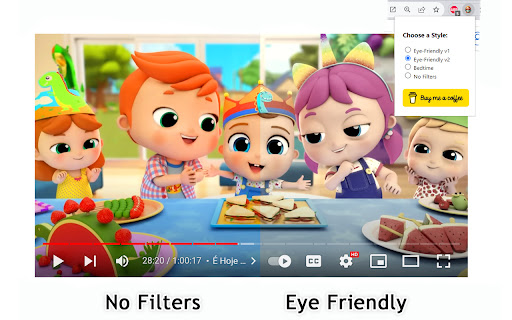
This extension helps prevent overstimulation in children when they are viewing YouTube, Netflix, and other platforms. It's worth noting that intense colors and stimulating visual experiences can impact children's behavior, similar to the effects of drugs on the brain. ZenToons - Online video filter allow for the application of custom filters to online videos, offering a gentler visual experience on popular platforms like YouTube, Netflix, and many others. - Natural Colors: Reduce vibrant colors for a soothing viewing experience. - Low Saturation: Colors less saturated than "natural colors" profile. - Night Mode: Prepare your child for sleep with dimmed and calming colors, while reducing the blue light, which can help promote better sleep. - No Filter: Disable filters when not needed. 1. Install ZenToons - Online video filter from the Chrome Web Store. 2. After installation, click on the extension icon in your browser's toolbar. 3.Pin the filter to the toolbar using the pin icon 4. Select your preferred filter mode from the dropdown menu. Enjoy safer and more child-appropriate video content. The filter may deactivate after refreshing the page or restarting the browser, but this can be advantageous, especially if a child shares the computer with an adult.

KidSecure
Safe browsing for Kids! Filters content in real time using an advance predictive system. KidSecure is your family's digital guardian, ensuring a safe online environment for your children. Harnessing the power of advanced Naive Bayes and Named Entity Recognition algorithms, KidSecure keeps your kids protected while they explore the web. Key Features: • Real-time Content Filtering: KidSecure uses an advance filtering system to instantly identify and block unsafe content, providing real-time protection for your children. • Customizable Settings: Tailor the level of safeguarding to match your family's unique needs. KidSecure offers flexible settings for a personalized browsing experience. • User-Friendly Interface: KidSecure's intuitive interface makes it effortless for parents to set up the extension, ensuring peace of mind. • Privacy and Security: Your family's privacy is of utmost importance. KidSecure collects minimal data necessary for functionality and never shares it with third parties. • Regular Updates: Count on KidSecure for ongoing updates to maintain robust security and keep up with evolving online threats. Stay worry-free with "KidSecure" your child's online safety partner!

Video Filters
Easy access to html5 video filters and shaders Extension enables you to change brightness and more of any video on the web. Includes a button for playing the videos in Picture in Picture mode. Available filters are; Brightness, Contrast, Saturation, Invert, Sepia, Opacity, Grayscale, Hue, Blur and playbackrate. Experimental effect; Sharpness, Vignette, Temperature, Chromatic Aberration and Edge Detection. Tested on; Netflix, Disney+, YouTube and more. Experimental effects unfortunately can not work with DRM protected content.

Web Color Filter
Apply color filters to your web pages. Multiple dark mode themes. Ajust the brightness, contrast, saturation, etc. # Note : After installing the extension, reload any open tabs or restart the chrome browser for the extension to work. ∘Turn any website to dark mode by adjusting the invert option or choose a filter which suits you. ∘Photoshop like effects for your websites. ∘Filter options like Turbulence and X-rays change the look of the web page and make them look unique ∘Use Hue Rotate to change the website color. ∘Easily reset the filters if not satisfied

FilterFred YouTube Age Filter
Browse YouTube safely with FilterFred Visit the Website link to see more 👉 Discover a safer and age-appropriate YouTube experience for your children with Filter Fred! This innovative Chrome extension uses advanced AI technology to provide a kid-friendly browsing experience by filtering content based on your child's age group. Key Features: 🤖 - AI-powered content filtering for age-appropriate videos 💻 - Configurable YouTube access schedules to manage screen time 📜 - Viewing history dashboard to monitor your child's online activity 🔒 - Personalized parental controls for a customized experience Get started with Filter Fred in just 4 simple steps: 1️⃣. Sign up for an account 2️⃣. Add the Filter Fred extension to your Chrome browser 3️⃣. Set your preferred controls and age group settings 4️⃣. Activate Filter Fred on YouTube and let the safer browsing begin! 7-day free trial, to find the perfect fit for your family. Keep your kids safe online and promote a balanced digital lifestyle with Filter Fred - the ultimate age-appropriate YouTube experience powered by AI!
