
kdclbeghjpdoajdpkifhhgehoegidpfg
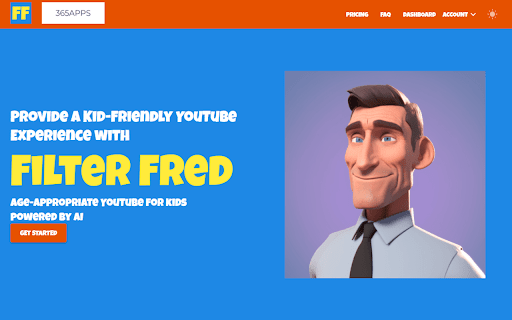
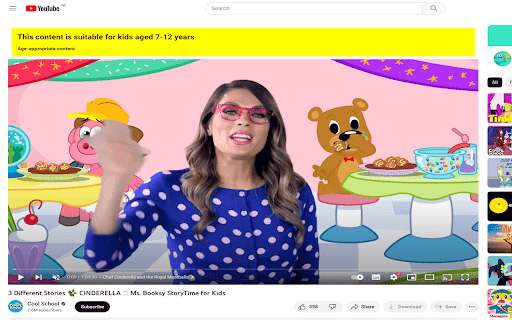

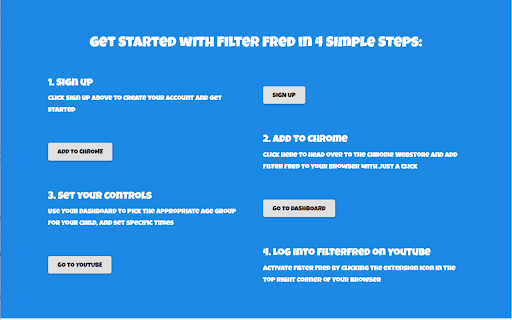
Browse YouTube safely with FilterFred Visit the Website link to see more 👉 Discover a safer and age-appropriate YouTube experience for your children with Filter Fred! This innovative Chrome extension uses advanced AI technology to provide a kid-friendly browsing experience by filtering content based on your child's age group. Key Features: 🤖 - AI-powered content filtering for age-appropriate videos 💻 - Configurable YouTube access schedules to manage screen time 📜 - Viewing history dashboard to monitor your child's online activity 🔒 - Personalized parental controls for a customized experience Get started with Filter Fred in just 4 simple steps: 1️⃣. Sign up for an account 2️⃣. Add the Filter Fred extension to your Chrome browser 3️⃣. Set your preferred controls and age group settings 4️⃣. Activate Filter Fred on YouTube and let the safer browsing begin! 7-day free trial, to find the perfect fit for your family. Keep your kids safe online and promote a balanced digital lifestyle with Filter Fred - the ultimate age-appropriate YouTube experience powered by AI!

Ultrawide Monitor for YouTube
Do you own a ultrawide monitor? Always hated the fact you couldnt use the entire monitor space when you were watching videos on your computer or on Youtube? Thats because most videos are sized 16:9 and our software can help solve this issue. Make the most of your ultrawide monitor when you use our software. Our software helps to stretch the video to be more horizontal and it allows you to use up the entire screen. The downside to this is the resolution would be a bit off, but its a tradeoff most users who have ultrawide monitors are willing to accept. There is also another setting where the video can be cropped to fit your ultrawide monitor Try this software which is designed specifically for ultrawide monitors. Use the entire screen when you watch Youtube videos.

YouTube Parental Controls
Use YouTube Parental Controls. Secure your kids with a parental lock on youtube and advanced parental filters for youtube easily 🛡️ Ensure a safe digital environment for your family by using our advanced solution for kids safety. This extension is designed for those who need reliable youtube parental controls and want to take full control over available content. You no longer have to worry about your children stumbling upon inappropriate videos. Our tool is the definitive answer to how to put parental controls on youtube effectively and simply. 🔒 Many parents wonder exactly how to block youtube shorts so that children cannot bypass the settings. Our extension includes a robust password-protected interface to secure every session. This is a true parental lock on youtube that prevents access to settings and unauthorized content. The block yt channel feature works instantly and accurately to keep your children safe. 📉 A highly requested feature is the ability to completely disable youtube shorts. Short-form videos often contain unpredictable content and can be addictive for children. Our solution shows you how to block youtube shorts with a single click, allowing your child to focus on long-form educational videos. This is a vital step in how to set parental controls on youtube for healthy habits. 📍 If you are unsure how do you put a parental lock on youtube on a standard browser, our plugin does the heavy lifting for you. It integrates directly into the site, creating powerful parental restrictions on youtube. Now, your child’s learning sessions are under your quiet supervision. This is much more effective than the built-in mode, as our parental controls youtube are far more strict. 🖥️ We have brought the best mobile parental control experiences to your desktop browser. Our extension serves as a comprehensive parental control youtube app for your PC, providing an unprecedented level of filtering. You take the wheel and decide which content is worthy of your family’s time. It is the most direct way to block youtube channels that do not fit your goals. 🛠️ Installation and Setup 1️⃣ Install the extension in your Chrome browser. 2️⃣ Import your favorite educational channels to whitelist. 3️⃣ Toggle the switch to permanently disable youtube shorts. 4️⃣ Set a strong parent password in the settings. 5️⃣ Save changes and launch the secure Child mode. 🧐 If you are still contemplating how to block youtube shorts or unauthorized creators, simply try our tool in action. The filtering system works at the code level, making it impossible to bypass restrictions without the master password. These are the ultimate parental filters for youtube that save your time. You no longer need to sit next to your child to monitor every single click. ✨ Why Parents Choose Our Filter ▸ Guaranteed blocking of unwanted creators and specific videos to ensure only high quality content. ▸ Removal of distracting shorts and clickbait thumbnails that lead children toward non-educational videos. ▸ Easy import and export of your approved lists allowing you to share settings across computers. ▸ Regular updates to stay ahead of platform changes ensuring your parental restrictions on youtube remain active. 🤖 We created a product that makes the process of digital safety automatic and stress-free. By utilizing a powerful parental lock on youtube, you can be confident in the safety of the digital space. This is more than just a plugin; it is your peace of mind in a complex online world. Every parent eventually looks for how to set parental controls on youtube to protect their children. ❓ Frequently Asked Questions ❓ Question: How to put parental controls on youtube using this extension? 💡 Answer: Simply install the plugin, add your child’s favorite channels to the list and set a password. ❓ Question: Can my child block yt channel or change the settings? 💡 Answer: No, all settings are protected by a master password that only the parent knows. ❓ Question: How to block videos on youtube that are not in the whitelist? 💡 Answer: The extension automatically blocks any video that does not belong to an approved channel. ❓ Question: Does this extension help to disable youtube shorts? 💡 Answer: Yes, it completely removes the Shorts tab and all short-form videos from the interface. 🎈 Now you finally know how to put parental controls on youtube and can tailor the system to your child's needs. Our extension allows you to quickly add new videos to the approved list. Try the best parental controls youtube today and feel the difference. High-quality youtube parental controls must be flexible to grow with your family.

YuLaF – YouTube Language Filter. Language Immersion & Focus
Filter YouTube videos by language for focus, privacy, and language immersion. YuLaF helps you take control of your YouTube feed by filtering videos and channels based on language. If you are tired of seeing content in languages you don’t understand, YuLaF keeps your homepage, search results, and recommendations clean, relevant, and distraction-free. Perfect for: • Language learners who want true immersion • Users who want a focused YouTube experience • Anyone who values privacy-first tools • Language-Based Filtering Show only videos in the languages you choose and hide all others. • Homepage & Search Cleanup Remove irrelevant foreign-language content from YouTube Home and Search. • Real-Time Detection Detects video language using titles and descriptions instantly, without delays. • Privacy-First & Local No tracking, no analytics, no servers. All processing happens locally on your device. • Lightweight & Fast Runs quietly in the background without slowing down YouTube. • Simple Controls Select your preferred languages and enable or disable filtering with one click. 1. Install YuLaF in Chrome 2. Select the languages you want to keep 3. Refresh YouTube and enjoy a clean, focused feed YuLaF is a Chrome extension designed for clarity, focus, and transparency. Watch YouTube in the language you understand.

YouTube Playlist Filters
Enhance your YouTube Watch Later and other playlists experience with search and filtering capabilities. Perfect for managing large playlists: - Channel Filtering: Easily filter videos by channel name - Smart Search: Search through video titles with instant results - Duration Filter: Find videos based on their length (short/medium/long) - Watch Status Filter: Filter videos by watched, unwatched, or in-progress status - Playlist Management: Create custom playlists from filtered videos - Privacy-Focused: Works entirely client-side with no data collection - Native Look & Feel: Seamlessly integrates with YouTube's interface - Theme Support: Automatically adapts to YouTube's light/dark mode - Performance: Minimal impact on page load time Patch 1.0.2 - Fixed the display of filters that were hiding the native sort button menu. Update 1.1.0 - New layout for denser playlist browsing, - Added watch status filter (watched / unwatched / in-progress), - Added a shortcut action to quickly open your Watch Later playlist.
