
njnaggoebacjnbklkcccmbnpfmeagcmp

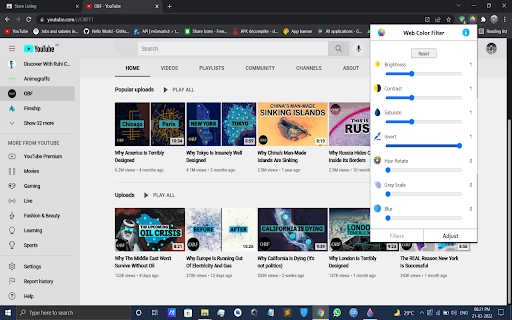
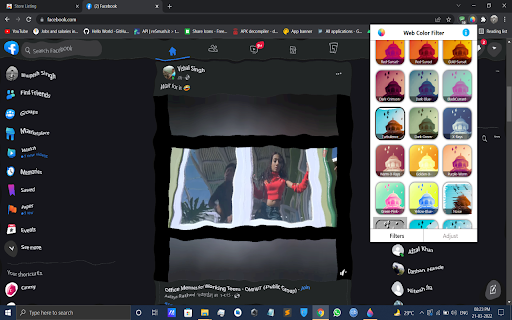


Apply color filters to your web pages. Multiple dark mode themes. Ajust the brightness, contrast, saturation, etc. # Note : After installing the extension, reload any open tabs or restart the chrome browser for the extension to work. ∘Turn any website to dark mode by adjusting the invert option or choose a filter which suits you. ∘Photoshop like effects for your websites. ∘Filter options like Turbulence and X-rays change the look of the web page and make them look unique ∘Use Hue Rotate to change the website color. ∘Easily reset the filters if not satisfied

ColorVeil
Add your own customized color filter (veil) over any website or document to help with dyslexia, visual stress, eye strain, and more. Meet ColorVeil. It's a simple screen filter for your web browser. If you've used our Windows app, you'll love this Chrome extension. It puts a color veil, or filter, on your screen. This helps make reading on the web easier on your eyes. ColorVeil is here to help with eye comfort. It's especially good for people with dyslexia or Scotopic Sensitivity Syndrome. But anyone who wants a more cozy web reading experience can use it. You choose the color and how strong it is to suit your eyes. • Color Filter — Add a color overlay over web pages or documents. Choose the color that's best for you. • Easy Use — Click the ColorVeil icon to turn the filter on or off. Simple! • Your Choice — Pick a color and make it as strong or light as you want. See changes right away. • Helps Reading — Aids people with dyslexia and Scotopic Sensitivity Syndrome. • Works Everywhere — The color veil shows on all web pages when it's turned on. • Private — We don't take or use any of your data. • Free: Use ColorVeil in all places - home, school, or work - without paying a penny. ColorVeil is easy, free, and made to make web reading better for you. We'd love to hear how it's working for you, and if you need help, we're here.

Video filters for YouTube [QVI]
Add filters to any YouTube video! Quickly apply filters like blur, brightness, grayscale and many more with simple sliders. 🎥 **Enhance your YouTube experience with video filters!** 🎥 This extension adds a variety of filters that you can apply to any YouTube video. In just a few clicks, you can adjust the image using the convenient sliders in the pop-up window. 🌀 **Blur**: Soften or blur the image. 🌞 **Brightness**: Brighten or darken the displayed video. 🎨 **Contrast**: Increase or decrease the contrast to bring out details. ⚫ **Grayscale**: Turn the video into black and white. 🌈 **Hue-rotate**: Change the colors of the video by rotating the colors. 🔄 **Invert**: Invert the colors to create a negative effect. ⚪ **Opacity**: Change the level of transparency. 🎨 **Saturation**: Increase the intensity of colors or make them more muted. 🧡 **Sepia**: Add a warm, sepia tint to the video. The operation is very intuitive – you can adjust the filters using sliders directly in the pop-up, allowing you to quickly adjust the appearance of the video to your preferences. ⚡ **Lightweight and fast** real-time filter handling. 🎛️ **Intuitive sliders** to instantly adjust the effects. 🆙 **Restore default settings** with one click. ❌ **Ability to disable** the extension at any time. 🎥 **Full control** over the appearance of any YouTube video! 🎯 **Perfect tool** for people who want to customize their YouTube video viewing experience. This extension is part of the Quality Viewership Initiative, a collaborative effort to enhance the understanding of audience engagement. It collects anonymous, aggregated viewing insights to support creators and studios in improving the quality of their content. You can stop sharing your information at any time by switching the toggle on the options page. ❗**Disclaimer:** All product and company names are trademarks or registered trademarks of their respective holders. This extension holds no association or affiliation with them or any third-party companies.❗

Color Changer
Change a page's text, background, and link colors to your liking. Summary: Some sites have good information, but don't always choose the best colors for text, background, and links. With this extension, you can change a page's colors to make it more readable. This extension isn't meant to be used as a global theme for the web and will not work well on all sites. In cases where it doesn't work, you could try creating a custom theme for that site with the Stylish extension. How to use: When you first install the extension, please refresh any tabs you have open so that the CSS styles from the extension are loaded on the page. 1. Click the Text, Background, or Link Color button. A border will appear around the button letting you know it's active. 2. Choose a color on the color wheel to change the color. You can see your changes live. 3. Now whenever you want to change the colors on a page, just click Change Colors. You can also change colors via a right-click context menu. The extension will remember hosts where you changed colors so you don't have to click it again. The Reset button at the bottom will reset the extension to default settings and resets all pages that were changed. About the color wheel: Colors are less saturated (more gray) near the center and more saturated (less gray) on the edge. There is a separate swatch that says "Gray", meaning 100% gray. This extension doesn't use Google Analytics. To view code: https://github.com/rokit/web-extension-color-changer

Page Filter Effects
Fun filter effect for webpage. Fun effects for same old sites. You can make any site Blur, Greyscale, Sepia, Bright, Invert using this tool. If you want it as normal choose "Reset" If you have heard about UFO on Google map http://bit.ly/UFOinGMAP , you can see that UFO in high contrast image live on Google Map. I have not update it since long, I am planning to update it soon. So if you are using it and want to report bug or want any feature please mail me at tusharvaghela@gmail.com
