
ffbhefmlcoihbjcmibbfkocmnaiacinp
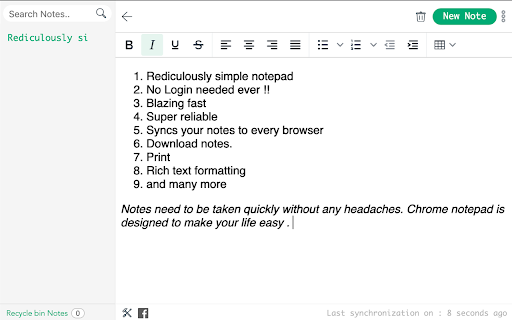
A very simple notepad for Chrome with sync functionality. - New Looks, - Multiple notes features - Search - Deleting - Auto Sync with bookmarks. - Reordering These are the people involved in this project: - Azharuddin @azharuddin31, azhar.mw@gmail.com (Development) - Prashanthi Mendu @MenduPrashanthi (Design and UX) - Rajdeep Barman @gs-rbarman (Development) - Viswadeepthi Rejinthala, vishwadeepthi.r@gmail.com (Development) Chrome Notepad is a very simple notepad extension for Chrome that can sync notes to all your Chrome installations! Features: - Saves notes. - Remembers the last caret position (and scroll offset). - Reports last update. - Syncs notes (and caret position, scroll offsets) to all your computers. On syncing: This extension includes syncing capabilities by utilizing the bookmark syncing mechanism of Google Chrome. In order for the syncing to work, you will have to enable bookmark syncing. Once you do that, a folder named BSync will show up in your "Other bookmarks" folder. Please don't remove it. *** SYNC NOT WORKING? *** In case sync is not working as it should, try to stop syncing for your Google account, restart Chrome and enable it back again. My other extensions: - Chrome Currency Converter: http://bit.ly/7pNM1a - My Extensions: http://bit.ly/5ZQhzW - Page Refresh: http://bit.ly/7EvOud - User ID: http://bit.ly/85ZbMG - My Alerts: http://bit.ly/7iEMXv - Pathfinder Weather: http://bit.ly/87G6RL (For Greeks)

Notepad
A simple yet powerful notepad with HTML5 support and more This extension offers a full-featured WYSIWYG HTML editor with a wide range of formatting options, similar to those found in modern editors. It allows you to create and organize multiple notes in different directories, called notebooks. The extension automatically saves your changes, so you don't have to manually save your notes. It is also integrated into the right-click context menu, allowing you to append the currently selected text to a note without opening the editor. The extension's user interface (UI) can be displayed in a browser tab or as a separate window. To switch between these modes, use the right-click options on the action button. Features: * Automatically save notes * Supports notebooks * Supports exporting text from webpages to all notepads * Uses local storage and works completely offline * Supports common formatting options

My-Notes
My-Notes - Put your story into notes... It is a simple and useful application that saves a quick note right without leaving a browser. This extension can sync with Google Drive and encrypt the data if desired... to keep it safe, and secure. Features - Markdown it! A plain text format editor for writing structured documents. Based on the CodeMirror with markdown-it renderer followed by the CommonMark spec. - WYSIWYG-style editing. A Rich content editor ideally produce clean, semantically meaningful documents while still being easy to understand. Based on the ProseMirror with the bridge the gap between editing explicit, unambiguous content like Markdown, and classical WYSIWYG editor. - Automatically saves notes to Google Drive into data file If Authorized on options page. - Can encrypt all data synced to the cloud, using AES-GCM encryption with the only key that the user carries. - No one can know about sensitive information until decrypted. - Please be noted, if a key is lost, it will be impossible to recover the data. Please remember that key and keep it safe. - Drag & drop to reorder the notes in a desired order. - Dark and Light themes. - No data is collected from a user. - Offline mode.

My Notes
Simple and fast note-taking. – Automatically saved and updated in every open tab – Sync notes between My Notes and Google Drive, edit them from other devices or My Notes – Drag and Drop image with automatic image upload to Google Drive

Notepad
Simple notebook which helps you to save/manage your notes. Features : 1.Lightning fast experience. 2. No login required. 3. Formatting options. 4. Recycle Bin. 5. Manage notes in categories 6. Automatically sync with chrome. 7. Reorder notes. Future roadmap: 1. Search capabilities. 2. Copy to clipboard. 3. Print notes. 4. Themes (dark/light mode). 5. Download notes. 6. Support for multiple language
