
fchghbfimckdiapkacfaljimmkojgfhi
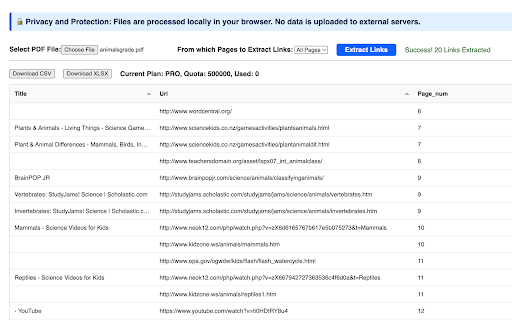

Extract Links and URL from PDF Files and export to CSV/Excel. 📣 Introduction: This extension has been created for the purpose of retrieving Link and URL Information from PDF documents. It provides the ability to extract links from all pages within a PDF file. When extracting, it captures details such as Link URL, Link title, and Page Number. 🚀 Key Features: ✅ Extraction of Link URL, Title, and Page Number available. ✅ Enable OCR to extract links from scanned pdf files or images. ✅ Ability to export extraction results to CSV/XLSX formats. Is it Free? ✔️ Definitely! It is completely free to access basic functions, with an option to upgrade for additional features. 📧 Feedback and Assistance: Should you have any inquiries or require assistance, please reach out to us via the following link: https://forms.gle/8Bogeuz3zW7WJPdx5 🔒 Privacy and Protection: We prioritize your privacy. All extracted data are processed locally and will never be transmitted to our servers. We do not retain your data.

Extract Metadata from PDF
Extract Metadata from PDF Files and Export to CSV/XLSX. 📣 Overview: This browser extension is designed to retrieve Metadata Information from PDF documents. It enables users to extract Metadata such as "Title", "Subject", "Author", "Creator", "Producer", "size", "lastModifiedDate", "CreationDate", "ModDate", "Language", "Keywords", "PDFFormatVersion" from PDF files. Is it Free? ✔️ Absolutely! The basic functions are completely free to use, but users can opt for an upgrade to access additional features. 📧 Feedback and Help: If you have any questions or need assistance, don't hesitate to contact us via the following link: https://forms.gle/Lv1AsneQWGYz4joz8 🔒 Privacy and Security: We give high priority to your privacy. All extracted data are processed locally and will never be shared with our servers. We do not store your data.

Extract Files from PDF
Extract Files and Attachments from PDF Files and Bulk download to local. 📣 Introduction: This browser extension was developed to effortlessly extract files and attachments from PDF documents. You have the option to either download all files or selectively choose specific ones for download. 🚀 Main Features: ✅ Extract all files and attachments from PDFs and display them in a list. ✅ Convenient one-click download for all files. ✅ Flexibility to download specific files as needed. Is it Free? ✔️ Absolutely! You can fully utilize the basic functionality for free, and there is also the option to upgrade for additional features. 📧 Feedback and Support: If you have any questions or need assistance, please don't hesitate to contact us via the following link: https://forms.gle/tBJDfKwicCYX2kNo6 🔒 Privacy and Security: We highly value your privacy. Rest assured that all extracted data are processed locally and never transmitted to our servers. Your data is not retained.

Link Grabber
🚀 Welcome to Link Grabber: Your Ultimate Tool for Effortless Link Extraction! 🚀 Are you tired of manually sifting through web pages to find the urls you need? Say goodbye to tedious tasks and hello to Link Grabber, the ultimate extension grabber designed to make your life easier. You can effortlessly extract all links from a webpage and streamline your online research or data collection process. 🌟 Why Choose it? 🌟 It is not just another url extractor chrome tool; it's a comprehensive solution for anyone looking to download all urls from a website quickly and efficiently. Whether you're a digital marketer, researcher, or just someone who needs to extract urls from page after page, Link Grabber is your go-to extension. 🔹 Key Features 🔹 1️⃣ Extract All Links from a Webpage: With just a click, extract all links from a webpage and save valuable time. 2️⃣ Download All Links from Webpage: Need to download all links from a website? It makes it a breeze. 3️⃣ Video Link Grabber Extension: Easily extract videos from webpage content without hassle. 4️⃣ Image Grabber: Find and download images effortlessly. 5️⃣ User-Friendly Interface: Intuitive design ensures that even beginners can use the link grabber extension with ease. 💡 How Does itWork? 💡 Using it is as simple as 1-2-3: 1. Install the Extension: Add the url extractor extension to your Chrome browser. 2. Navigate to Your Desired Page: Open the webpage from which you want to extract links. 3. Click and Extract: Hit the Grabber icon, and watch as it extracts all urls from a website in seconds. 📈 Benefits of Using 📈 ✔️ Efficiency: Save time by automating the process to extract urls from website pages. ✔️ Accuracy: Ensure you get all the information from a website without missing any crucial URLs. ✔️ Versatility: Whether you need to extract urls, find all links on a site, or grab download lnks from page, it has you covered. 🌐 Who Can Benefit from the extractor? 🌐 It is perfect for: 🔸 Digital Marketers: Quickly extract urls for backlink analysis or competitor research. 🔸 Researchers: Gather data by extracting urls from page sources for academic or professional projects. 🔸 Content Creators: Use the image urls extractor to find visual assets for your content. 🔸 Web Developers: Test and verify data on your site with ease using the linkextractor. 🎯 Advanced Features for Power Users 🎯 For those who need more than just basic extraction, it offers advanced features: ➤ Filter Options: Customize your extraction process by filtering specific types of data. ➤ Batch Processing: Extract all links from a webpage across multiple tabs simultaneously. ➤ Export Functionality: Easily export extracted uris to CSV or other formats for further analysis. 💎 Why URL Extractor Stands Out 💎 Unlike other tools, it is a dedicated link extractor chrome extension that focuses solely on providing the best url extraction experience. Its robust functionality and ease of use make it the preferred choice for professionals and casual users alike. 🔥 Get Started with it Today! 🔥 Don't let manual url extraction slow you down. Download Grabber now and experience the power of efficient url extraction. Whether you need to extract video links from webpage content or find all urls for a domain, it is the tool you need. 📌 Join Thousands of Satisfied Users 📌 Join the growing community of users who have transformed their workflow with this powerful web url extractor. Discover why it's the top choice for anyone needing a reliable url graber. ✨ Conclusion: Your Go-To Extraction Tool ✨ In a digital world where time is money, it is the ultimate solution for anyone looking to get all the URI from a website quickly and efficiently. With its user-friendly interface and powerful features, it's the URI extractor you've been waiting for. Download Grabber today and take the first step towards a more efficient and productive online experience. Whether you're looking to extract URI from website pages or need a reliable grabber URI tool, Grabber is here to help.

Extract links from pages
Extract Links from Pages Discover and Organize All the Links on Any Web Page with Ease Welcome to "Extract Links from Pages," the… Extract Links from Pages Discover and Organize All the Links on Any Web Page with Ease Welcome to "Extract Links from Pages," the ultimate Chrome extension for web enthusiasts, SEO professionals, content creators, and digital marketers. Our tool offers a simple yet powerful solution to extract, analyze, and manage all the hyperlinks on any web page you visit. With just one click, you can unveil a comprehensive list of links along with their anchor texts and determine whether they are dofollow or nofollow links. Key Features: Instant Link Extraction: Extract all the links from any web page with a single click. Our extension scans the entire page and provides you with a detailed list of hyperlinks, saving you time and effort. Comprehensive Data: Get detailed information about each link, including the URL, anchor text, and link type (dofollow or nofollow). This feature is particularly useful for SEO audits, content analysis, and competitor research. Clean and Organized Interface: The extracted data is displayed in a clean, organized table format, making it easy to review and analyze. The interface is designed to be user-friendly and intuitive, ensuring a seamless experience. Professional Design: Enjoy a professionally designed interface with a soothing blue color scheme and an aesthetically pleasing layout. Our design focuses on enhancing usability and visual appeal. Enhanced Privacy Practices: We respect your privacy. Our extension only accesses the current tab to extract links, without storing or sharing your data. We have implemented strict privacy practices to ensure your information remains secure. Use Cases: SEO Professionals: Easily identify and analyze all the links on a web page, including internal and external links. Determine which links are dofollow or nofollow to optimize your link-building strategies. Content Creators: Extract and review all the hyperlinks in your content to ensure they are correctly linked and relevant. This helps in maintaining the quality and credibility of your content. Digital Marketers: Analyze competitor websites to understand their linking strategies. Extract links from landing pages, blog posts, and other content to gain insights into their SEO tactics. Web Developers: Quickly extract and review all the links on a web page to ensure proper linking and functionality. This can be especially useful during website audits and quality assurance checks. How to Use: Install the Extension: Add "Extract Links from Pages" to your Chrome browser from the Chrome Web Store. Open a Web Page: Navigate to any web page from which you want to extract links. Click the Extension Icon: Click on the "Extract Links from Pages" icon in your Chrome toolbar. View the Extracted Links: A popup window will appear, displaying a table with all the extracted links, their anchor texts, and link types. Analyze and Utilize: Review the extracted data for your analysis, SEO audits, content review, or any other purpose. Why Choose Us: User-Friendly: Our extension is designed with simplicity and ease of use in mind. You don’t need any technical expertise to extract and review links. Accurate and Reliable: We provide accurate and reliable data extraction to ensure you get the information you need without any hassle. Privacy-Focused: We prioritize your privacy and data security. Our extension does not store or share your data, ensuring complete confidentiality.
