
bannbpalgicddbfofdfokoahgkaljpde
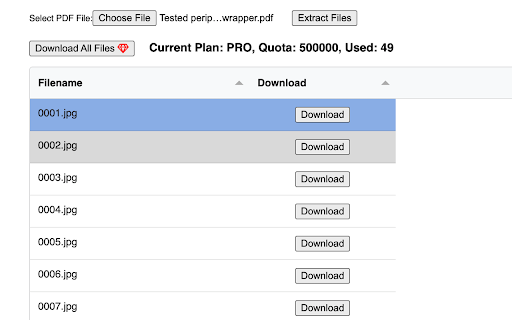
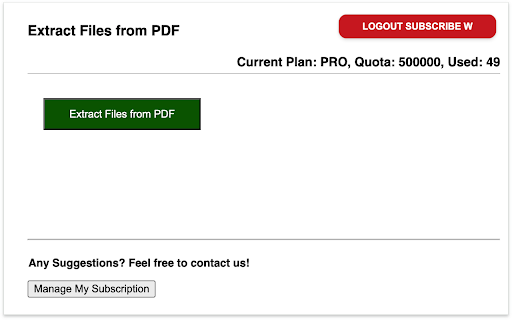
Extract Files and Attachments from PDF Files and Bulk download to local. 📣 Introduction: This browser extension was developed to effortlessly extract files and attachments from PDF documents. You have the option to either download all files or selectively choose specific ones for download. 🚀 Main Features: ✅ Extract all files and attachments from PDFs and display them in a list. ✅ Convenient one-click download for all files. ✅ Flexibility to download specific files as needed. Is it Free? ✔️ Absolutely! You can fully utilize the basic functionality for free, and there is also the option to upgrade for additional features. 📧 Feedback and Support: If you have any questions or need assistance, please don't hesitate to contact us via the following link: https://forms.gle/tBJDfKwicCYX2kNo6 🔒 Privacy and Security: We highly value your privacy. Rest assured that all extracted data are processed locally and never transmitted to our servers. Your data is not retained.

Download Files as PDF by cloudHQ
Convert and download files as PDF documents. Convert any file into a high-quality PDF - no matter the format. Select a single file or an entire folder from your Google Drive™, or upload files directly, and let the conversion happen automatically. Documents, spreadsheets, presentations, and images are all transformed into professional PDFs in seconds. Once ready, your PDFs are easy to save, share, or print. Simplify your file management with fast, effortless PDF conversion. Key features: * Convert and download any file as PDF: One click is all it takes: select your files and instantly download them as a PDF * Full support for all type of files (images, txt, docs, spreadsheets, etc.) * Every file you convert your files, it is instantly stored in your Google Drive™ and / or downloaded straight to your computer. * No complex software required * Batch support: Convert and download large number of files in parallel (or all files in a folder) How to use: * Install the extension * Go to drive.google.com * Select a folder or file and in dropdown select "Download Files as PDF". * You can also click on the "Download Files as PDF" icon in the upper right corner of your browser and upload files to be converted to PDF cloudHQ. Helping your productivity, 1 click at a time. cloudHQ website: https://www.cloudhq.net/ App website: https://www.download-as-pdf.com/ Pricing: https://www.download-as-pdfcom/pricing Support page: https://support.cloudhq.net/category/browser-extensions/download-as-pdf/ Blog: https://blog.cloudhq.net Google Shared Drive, Google Drive, and Google Workspace are trademarks of Google LLC. Use of these trademarks is subject to Google Permissions.

PDF_Tools
Drag and drop files, reorder them, and merge them into a single PDF. Extract pages or ranges from a PDF into multiple files. The fastest and most secure way to merge and split your PDF files, right in your browser. Tired of using potentially unreliable websites that force you to upload your private documents? With PDF_Tools, you are in complete control. Our extension runs in a convenient side panel and processes all your files locally on your computer. Your documents never leave your browser! ✨ What can you do with PDF_Tools? Unlimited PDF Merging: Combine multiple PDF files into a single document. Simply drag and drop, reorder them as you wish, and merge with a single click. Precise Splitting: Extract exactly the pages you need. Define ranges (e.g., 1-5, 8, 10-), single pages, or split an entire document into one-page files. ZIP Compression: Have you split a PDF into many files? Download them all at once in a handy .zip archive. Privacy Guaranteed: Unlike other online tools, PDF_Tools processes everything on your machine. Your files are yours alone, always. Seamless Integration: Access the tools from a modern side panel without interrupting your workflow. Multi-language: Interface available in English, Spanish, and Catalan. Install PDF_Tools and take control of your PDF documents today!

Bulk WebPages & Links to PDF
Scan and select links/pages and export them as individual PDFs or merge into a single PDF. Batch mode, lazy images, ad-link filter. Bulk WebPages & Links to PDF turns any web page into a batch PDF export station. Open the extension, and it instantly auto-scans all visible and embedded links on the current page — just tick what you need and hit Convert. Export each link as its own numbered PDF, or merge everything into a single file with one click. You can also reorder links before converting, so the final merged PDF follows exactly the sequence you want. HOW IT WORKS Before printing, the extension fully prepares each page: it scrolls through lazy-loaded sections, upgrades data-src/srcset images, waits for web fonts to finish loading, and prints with backgrounds enabled — so you get complete, accurate PDFs every time. Ad and tracking URLs (DoubleClick, Google Ads, affiliate networks, and similar) are filtered out automatically, keeping your list clean. KEY FEATURES 🗂 Batch export — save each selected link as its own numbered PDF file. 📄 Merge to one PDF — combine all selected pages into a single PDF in your custom order. ↕️ Reorder links — drag the order up or down before converting; the merged PDF respects it exactly. 🌐 Auto-scan — detects links across iframes and shadow DOM on page open. 📥 Import URLs — paste a list or load a .txt file (one URL per line). ✍️ Manual add — type or paste URLs directly via the Add URLs dialog. ⚙️ PDF settings — control margins, orientation, scale, and background printing. 🔍 Smart warm-up — handles infinite scroll, lazy content, and web fonts for full-length captures. ✅ Selection tools — Select All / Deselect All with a live selected-count badge. 🔒 Privacy-first — everything runs locally in your browser; no URLs or PDFs ever leave your device. 💧 Watermark control — DEMO watermark by default; one-time license code removes it permanently.

FlipToPDF
Extract flipbook and digital magazine content into downloadable PDFs Convert flipbook-style web viewers into downloadable PDF files with a simple, guided capture workflow. FlipToPDF is designed for reliable and repeatable PDF exports from browser-based flipbook and catalog viewers. Guided capture setup Use an on-page wizard to select the cover, page regions, and navigation controls. Page-by-page capture Automatically captures pages in sequence directly from the active browser tab. Single PDF export All captured pages are combined into one PDF file for offline use and archiving. Clear export progress Track capture status with visual progress indicators during the export process. Capture Workflow FlipToPDF follows a structured workflow optimized for viewer-based publications: Set the total page count and cover preferences from the extension popup Select capture areas (cover, left/right pages) and the next-page control Start the capture process and download the generated PDF Supported Content FlipToPDF works with many browser-based flipbook and digital publication viewers where page content is visibly rendered. Compatibility may vary depending on how the website implements its viewer. How to Use Open the target flipbook in your browser Launch FlipToPDF and start a new export Follow the on-screen setup and download your PDF Important Notes Only use this tool for content you have permission to export Some protected or restricted viewers may block capture functionality Output quality depends on how pages are rendered in the browser viewport A valid license may be required for continued use
