
fahkjfnppokdemlfodklgmdklmcllidl


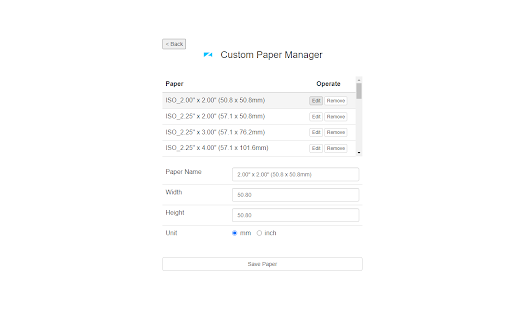
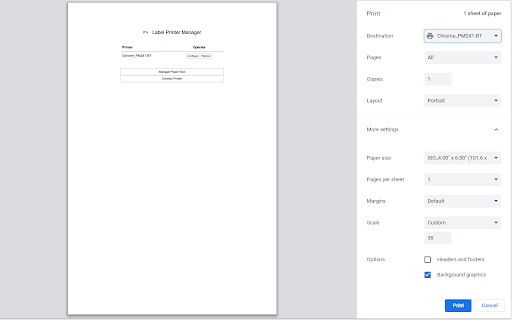
Label Printer Extension This plugin is a subsidiary of Labelife printer, Users can connect to athermal Labelife printer via usb to print. This Extension allows you to print the currently displayed Web Page. Although this function is very simple, I needed to have this ability in Chrome and so l created it. You can press Ctrl+P to open the print preview interface, select Labelife printer and click Print to print the valid content. Compatible with ChromeOS system computers, MacOS Chrome browser, but not compatible with Windows.

Label Resizer - FBA Labels to Thermal & Avery
Print any Amazon FBA labels (product, shipping, LTL, SPD labels) directly to your thermal printer. Label Resizer Chrome extension allows you to use Label Resizer’s features directly inside platforms like Amazon Seller Central, Walmart Seller Center, UPS, FedEx, and Mercari. Instead of downloading label files, editing PDFs, and uploading them again, you can generate, resize, and customize your labels directly on the page you’re already working on. It works with FNSKU barcodes, product labels, shipping labels, box labels, LTL, SPD, and pallet labels. All labels can be generated and printed directly based on your Label Resizer settings, in formats like thermal printer sizes or Avery-style sheet labels. ---------------------------------------------------------------------- WHAT YOU CAN DO WITH LABEL RESIZER CHROME EXTENSION? ---------------------------------------------------------------------- Label Resizer is designed to handle the full labeling workflow for Amazon and Walmart sellers without switching tools. Inside Amazon Seller Central and Walmart Seller Center, you can manage the entire process of creating, resizing, and customizing FBA and WFS labels directly in your existing workflows. It also works on UPS, FedEx, and Mercari shipping pages, where you can quickly resize shipping labels to match your preferred label format and printer settings — without leaving the page or manually editing PDFs. ---------------------------------------------------------------------- HOW IT WORKS ---------------------------------------------------------------------- After installing the extension, Label Resizer automatically adds a “Resize Label” button directly inside supported pages. When you use it, Label Resizer generates a ready-to-print PDF file based on your saved settings and selected label size. All label sizes, formats, and layouts are adjusted automatically, so you don’t need to manually download, edit, or re-upload any files. Label Resizer helps Amazon FBA sellers create, customize, resize, and print Amazon FNSKU labels and product labels directly inside Seller Central, without downloading PDFs or using external tools. It is designed for sellers who want to print FBA labels faster, reduce labeling errors, and match different warehouse and printer setups without manual formatting. - Create and print Amazon FNSKU labels directly inside Seller Central - Resize labels for thermal printers (Zebra, Dymo, Rollo, etc.) - Print on Avery sheet labels (including 30-up formats) or custom label sizes - Support for non-standard label dimensions without manual editing - Prevent incorrect quantity shipments when working with Amazon FNSKU labels and product labels in FBA workflows - Automatically number labels (e.g. 1/100, 2/100 or 1–100) to ensure accurate FNSKU label sequencing and shipment control - Add separator labels or page breaks between SKU groups to clearly distinguish product labels and - FNSKU batches, preventing mix-ups during bulk printing - Improve picking and packing accuracy in warehouse workflows when handling Amazon FBA product labeling - Print full product titles instead of truncated names - Automatically add Merchant SKU to each label - Include LOT codes, expiry dates, and compliance information - Add custom information using free text (brand name, notes, handling instructions) - Add separator labels between SKUs or batches - Use page breaks for bulk Avery printing - Keep multi-SKU shipments clearly structured and easy to process Label Resizer simplifies Amazon FBA product labeling by keeping everything inside Seller Central, helping sellers save time, reduce errors, and improve warehouse efficiency without manual label handling. Label Resizer helps Amazon FBA sellers manage shipping labels, box labels, and shipment organization directly inside Send to Amazon workflows, without downloading PDFs or manually editing files. It is designed to reduce shipment errors, improve box-level visibility, and make multi-SKU shipments easier to handle in warehouse operations. - Add full product titles to single SKU box labels - Add Box ID directly to shipment labels for better tracking - Include SKU and quantity (QTY) on shipment labels - Insert custom free text for handling instructions or warehouse notes - Use separator labels or page breaks between single SKU box label sections to clearly distinguish each SKU during Amazon FBA labeling, helping prevent mistakes when transitioning between boxes - Generate Amazon FBA packing slips directly from shipment data - Create packing slips with a single click inside Seller Central - Improve shipment verification and documentation - Automatically handle Amazon split shipments by grouping box labels by SKU - Merge multiple shipment PDFs into a structured format - Output as a single organized file or separate files per SKU - Support both SPD and LTL shipments Label Resizer simplifies Amazon FBA shipping and box labeling by keeping everything inside Seller Central, helping sellers organize shipments better, reduce manual errors, and speed up fulfillment workflows. Label Resizer also fully supports Walmart WFS sellers, allowing you to manage product labels and shipping labels directly inside Walmart Seller Center using the same Label Resizer system. During Walmart WFS workflows, you can generate and resize labels based on your saved Label Resizer settings, just like in Amazon FBA product labeling. This means you can also use key product labeling capabilities such as: - Adding Merchant SKU to labels for better product identification - Automatically numbering labels to avoid shipment quantity mistakes - Printing full product titles for clearer warehouse handling - Adding custom free text such as notes, brand name, or handling instructions - Using separator labels or page breaks for organized batch processing - Applying consistent label formats across different workflows In short, Walmart WFS product labeling works with the same Label Resizer logic used in Amazon FBA, so you can keep your labeling process consistent across both platforms. Label Resizer also works across supported shipping carriers and marketplaces. With a single click, you can:

FlashLabel Extension
This plugin is a subsidiary of FlashLabel printer, Users can connect to a thermal printer via usb to print. This Extension allows you to print the currently displayed Web Page. Although this function is very simple, , I needed to have this ability in Chrome and so I created it!You can press Ctrl + P to open the print preview interface, select printer and click Print to print the valid content.

LabelRange
The extention provides for LabelRange LP320 thermal label printer to install and effect the printing function, including device connection and printer property settings. How to setup: Step 1: Connect the power cable. Connect the usb cable to chromebook and printer. Step 2: Load your labels in the printer and turn the power on. Step 3: Go to extention and choose the Labelrange and do the settings to print.

EverBee - Find Best Selling Products on Etsy
Boost your Etsy sales by revealing best selling products. Improve your Etsy store SEO with high-demand, low-competition keywords. Ready to launch a successful Etsy shop or enhance your current one? Discover why top Etsy sellers trust EverBee to boost their shop traffic and sales. ⚡ EverBee Chrome Extension: Quickly uncover and capitalize on the best-selling items on Etsy. Launch products that sell and boost your Etsy revenue. Transform your Etsy business with EverBee, the industry's top-rated research and analytics tool for Etsy sellers, trusted by over 600,000 entrepreneurs and Top Etsy Sellers. KEY FEATURES 🚀 Find the best selling products with Product Research. Craft what sells! 🧐 Spy on competitors with detailed revenue analytics. Create your high-revenue Etsy products. 🔍 Discover tags of trending products and uncover high-demand, low-competition keywords searched by real shoppers. Elevate your Etsy SEO and visibility. 📊 Connect with your Etsy shop for tailored insights to refine your strategy and boost your sales metrics. ✉️ Email Marketing Build For Etsy Sellers: Grow your subscribers and drive Etsy sales on autopilot! 🚀 Product Analytics 🚀 - Monthly Sales & Revenue - Monthly Views & Sales Conversion Rate - Favorites - Reviews - Tag Analyzer - And much more 📊 My Etsy 📊 - Gross Revenue Trend - Average Order Value - Lifetime Value - Repeat Rate - Average Conversion Rate - And much more ✉️ EverBee Email ✉️ - 1-click Etsy integration - Customizable subscription page - Automated marketing campaigns - Beautiful Email templates EVERYTHING YOU NEED AND MORE With just one click, EverBee Chrome Extension provides critical data to thrive on Etsy. Focus on creating best-sellers and growing your business sustainably. TRUSTED BY THE BEST EverBee has helped over 600,000 entrepreneurs and top Etsy sellers generate millions in revenue on Etsy. INTEGRATED WITH ETSY EverBee is connected directly to Etsy with the purpose of getting sellers the most up-to-date and valuable information. EverBee's proprietary algorithm gives you data that you could not get manually -- in seconds. USER-FRIENDLY EverBee is designed by Etsy Sellers for Etsy Sellers. We designed this extension to be very easy to use—even for non-techies. Get started for Free today! Learn more about growing your Etsy shop at [www.everbee.io](http://www.everbee.io/) Join our vibrant Facebook community for free: https://www.facebook.com/groups/everbeemembers
