
ihkbncennjhofkohbibnbgappjbncnoc


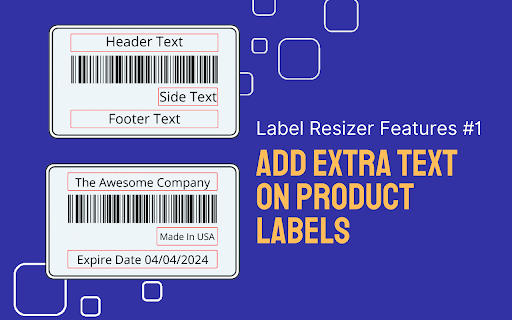


Print any Amazon FBA labels (product, shipping, LTL, SPD labels) directly to your thermal printer. Label Resizer Chrome extension allows you to use Label Resizer’s features directly inside platforms like Amazon Seller Central, Walmart Seller Center, UPS, FedEx, and Mercari. Instead of downloading label files, editing PDFs, and uploading them again, you can generate, resize, and customize your labels directly on the page you’re already working on. It works with FNSKU barcodes, product labels, shipping labels, box labels, LTL, SPD, and pallet labels. All labels can be generated and printed directly based on your Label Resizer settings, in formats like thermal printer sizes or Avery-style sheet labels. ---------------------------------------------------------------------- WHAT YOU CAN DO WITH LABEL RESIZER CHROME EXTENSION? ---------------------------------------------------------------------- Label Resizer is designed to handle the full labeling workflow for Amazon and Walmart sellers without switching tools. Inside Amazon Seller Central and Walmart Seller Center, you can manage the entire process of creating, resizing, and customizing FBA and WFS labels directly in your existing workflows. It also works on UPS, FedEx, and Mercari shipping pages, where you can quickly resize shipping labels to match your preferred label format and printer settings — without leaving the page or manually editing PDFs. ---------------------------------------------------------------------- HOW IT WORKS ---------------------------------------------------------------------- After installing the extension, Label Resizer automatically adds a “Resize Label” button directly inside supported pages. When you use it, Label Resizer generates a ready-to-print PDF file based on your saved settings and selected label size. All label sizes, formats, and layouts are adjusted automatically, so you don’t need to manually download, edit, or re-upload any files. Label Resizer helps Amazon FBA sellers create, customize, resize, and print Amazon FNSKU labels and product labels directly inside Seller Central, without downloading PDFs or using external tools. It is designed for sellers who want to print FBA labels faster, reduce labeling errors, and match different warehouse and printer setups without manual formatting. - Create and print Amazon FNSKU labels directly inside Seller Central - Resize labels for thermal printers (Zebra, Dymo, Rollo, etc.) - Print on Avery sheet labels (including 30-up formats) or custom label sizes - Support for non-standard label dimensions without manual editing - Prevent incorrect quantity shipments when working with Amazon FNSKU labels and product labels in FBA workflows - Automatically number labels (e.g. 1/100, 2/100 or 1–100) to ensure accurate FNSKU label sequencing and shipment control - Add separator labels or page breaks between SKU groups to clearly distinguish product labels and - FNSKU batches, preventing mix-ups during bulk printing - Improve picking and packing accuracy in warehouse workflows when handling Amazon FBA product labeling - Print full product titles instead of truncated names - Automatically add Merchant SKU to each label - Include LOT codes, expiry dates, and compliance information - Add custom information using free text (brand name, notes, handling instructions) - Add separator labels between SKUs or batches - Use page breaks for bulk Avery printing - Keep multi-SKU shipments clearly structured and easy to process Label Resizer simplifies Amazon FBA product labeling by keeping everything inside Seller Central, helping sellers save time, reduce errors, and improve warehouse efficiency without manual label handling. Label Resizer helps Amazon FBA sellers manage shipping labels, box labels, and shipment organization directly inside Send to Amazon workflows, without downloading PDFs or manually editing files. It is designed to reduce shipment errors, improve box-level visibility, and make multi-SKU shipments easier to handle in warehouse operations. - Add full product titles to single SKU box labels - Add Box ID directly to shipment labels for better tracking - Include SKU and quantity (QTY) on shipment labels - Insert custom free text for handling instructions or warehouse notes - Use separator labels or page breaks between single SKU box label sections to clearly distinguish each SKU during Amazon FBA labeling, helping prevent mistakes when transitioning between boxes - Generate Amazon FBA packing slips directly from shipment data - Create packing slips with a single click inside Seller Central - Improve shipment verification and documentation - Automatically handle Amazon split shipments by grouping box labels by SKU - Merge multiple shipment PDFs into a structured format - Output as a single organized file or separate files per SKU - Support both SPD and LTL shipments Label Resizer simplifies Amazon FBA shipping and box labeling by keeping everything inside Seller Central, helping sellers organize shipments better, reduce manual errors, and speed up fulfillment workflows. Label Resizer also fully supports Walmart WFS sellers, allowing you to manage product labels and shipping labels directly inside Walmart Seller Center using the same Label Resizer system. During Walmart WFS workflows, you can generate and resize labels based on your saved Label Resizer settings, just like in Amazon FBA product labeling. This means you can also use key product labeling capabilities such as: - Adding Merchant SKU to labels for better product identification - Automatically numbering labels to avoid shipment quantity mistakes - Printing full product titles for clearer warehouse handling - Adding custom free text such as notes, brand name, or handling instructions - Using separator labels or page breaks for organized batch processing - Applying consistent label formats across different workflows In short, Walmart WFS product labeling works with the same Label Resizer logic used in Amazon FBA, so you can keep your labeling process consistent across both platforms. Label Resizer also works across supported shipping carriers and marketplaces. With a single click, you can:

Amazon Product Finder - AMZScout PRO Extension
Find a profitable product and start selling on Amazon quickly! Amazon product research made easy! See sales estimates and FBA fees. How to check sales data for any product: 1. Install the AMZScout PRO Chrome Extension. Begin your FREE trial by entering your details with a quick sign-up. 2. Access Amazon and search for any items you want to analyze. 3. Open the extension. 4. Review the product and niche information. You can review sales history for both the product and the niche, as well as estimated net margin, sales, and revenue. You can also use a built-in FBA calculator to help you identify profitable products, and much more! What can you use the AMZScout PRO Extension for? • Evaluate niche potential • Check niche and product trends • Calculate potential product profitability • Check product and niche sales, price, and rank history • Evaluate competition in the niche • Estimate FBA costs • Find reliable suppliers • Monitor your competitors' sales, pricing, and keywords ✅ More than 300,000 users already trust AMZScout’s product analysis tools, keyword search, and much more. AMZScout PRO is simple to use and navigate. Here are some hacks for anyone who’s interested in become a seller: [Quickly assess the potential of your niche and product] AMZScout Product Finder provides a niche score rating and a product score for both the private label and reselling business models. With this tool, you can immediately determine if the product is worth considering without having to look deeper into detailed product analytics. [Find the best supplier] Find things to sell on Amazon, or any other marketplaces, to scale your business. Save time by filtering suppliers according to country and price range. [Improve your ranking] Export niche and product keywords to improve product listings and use them in your PPC campaigns. Help your listing rank higher in organic searches and get more sales. This smart product research tool is often considered to be the most accurate tool by sellers. It helps you find unsaturated opportunities, get sourcing options, monitor your competitors, and even improve your keyword research. Base your product choice on concrete data to protect your investment. Find a product to launch with FBA that will bring you $5,000/month or more! The AMZScout Chrome Extension works in the United States in addition to these other Amazon marketplaces: the UK, Germany, France, Italy, Spain, Canada, Mexico, India, Japan, UAE, Saudi Arabia, Australia, and Brazil. You can research 15 niches for free with the trial version. No credit card information is required. Download the PRO Extension and give this fantastic software a try! Q: How are the estimated values calculated? A: These values are calculated using formula-based, top-level categories (for example, Home & Garden or Books) and rank in one of these categories. Q: What does the “LQS” column mean? A: “LQS” is Listing Quality Score. AMZScout analyzes a variety of product description criteria and computes a score for it. A higher score indicates a higher position in the search results. To see details, place your cursor on any LQS value. Q: What does the “RPR” column mean? A: “RPR” means Revenue Per Review. A higher RPR means a better selling opportunity. Q: Can I also get help with how to start selling on Amazon? A: Of course, the AMZScout team publishes useful articles and videos every month that you can find on our blog. You can also participate in an AMZScout Seller's Course and free webinars. Q: If I have any other questions or problems with AMZScout, where can I get support? A: The fastest way to get support is by emailing your question to support@amzscout.net.

RevSeller
Product research tool for third-party Amazon sellers that estimates FBA fees, margin, ROI, and details about Variations. Amazon seller tool that estimates FBA fees, margin, ROI, and details about Variations. We make product research for 3rd party sellers on Amazon.com easier. Variation Viewer allows you to see the prices, offers and important data for variations on products like shoes and clothing. In stock, out of stock, price gaps and more. ** For the extension to work you need to create an account on RevSeller.com first and complete SP-API setup. Works on Amazon's .com and .ca marketplaces (currently not available for other marketplaces). Free trial for 30 days with no payment info required, then an annual subscription option. After adding the extension, please go to https://revseller.com to signup. Not Affiliated With Amazon.com or its Subsidiaries

Amazon FBA Calculator Free by AMZScout
FBA Calculator shows Amazon fees, sales margins, revenue and product net profit and is free to use. Selecting the product is a pivotal point for your Amazon business. Check items you are considering selling with the AMZScout FBA Calculator to ensure that it has the profit margins needed to actually grow your business. With the FBA calculator widget you will: - Know your expenses beforehand so that you can choose products with lower fees, and maximize your profits. - See exactly how much you’ll make on every sale. Use this data to determine expected revenue and know whether it’s worth it to sell an item. - Get valuable product information for any Amazon product at no cost, because it's a free app. FBA calculator Chrome extension is the best way to estimate both expenses and profitability since it will provide you with: In addition, this ultimate seller’s tool lists the weight and size of each item. It also allows you to take into account your product cost, shipping, and cost per click to produce estimates tailored for your specific supplier right on the spot. How to Use the FBA Calculator: 1. Install the Amazon FBA Calculator. 2. Go to Amazon.com. 3. Find the product you’re interested in and open the listing. 4. Open the FBA calculator. 5. Enter your product, shipping, and CPC costs. 5. Your fees and profit margins will automatically be calculated. Does the FBA Calculator work for all marketplaces? You can use this calculator for Amazon marketplaces in the USA, the UK, Canada, Germany, Japan, France, Italy, Spain, Mexico, India, UAE, Saudi Arabia, Australia, and Brazil. No. Get the Amazon FBA Calculator for free, now! Simply click the blue «Install» button at the top right corner of this page. If you have any questions, don't hesitate to contact us at support@amzscout.net.

SellerAmp SAS - Amazon FBA Analysis Tool
Analyze products to sell on Amazon via Online Arbitrage. Includes Keepa charts, FBA profit calculator, stock levels and more SellerAmp SAS (Sourcing Analysis Simplified) provides key data you need for Amazon Online Arbitrage and wholesale sourcing. Analyze products using SAS on ANY website with a SINGLE CLICK. SellerAmp SAS saves you hours when sourcing by searching Amazon’s database for matching products, and answers important questions: Can you sell it? - Are you eligible to sell the product - Is it Dangerous Goods - Is it Hazmat - Is it Private Label - Any known IP issues - Are there variations - Is it meltable …and more Does it sell? - Current and historic BSR (Sales Rank) averages - Estimated sales - Competing offers, prices and stock levels - Interactive price and BSR history charts driven from Keepa data Is it profitable? - Profit calculator factoring all Amazon fees and your costs - Instantly calculate ROI, profit, profit margin, break even sale price, etc. - Shows the maximum cost to meet your ROI and profit criteria SAS also provides powerful tools to help you find and organize your analysis: - History of all products you analyze - Storefront Search: see products of any Amazon storefront - Export data to Google sheets - Variations viewer - Integrations with sourcing and business management tools - Notes and tags to organize your sourcing SellerAmp SAS is available on the following Amazon marketplaces: US, UK, Canada, France, Germany, Italy and Spain. SAS subscription also includes use of a mobile app (perfect for Retail Arbitrage) and web app (great for full screen analysis) for use outside the extension. Download the extension and get your free trial started. You will speed up your sourcing analysis, gain valuable insights while you source with confidence. Visit selleramp.com for more information.
