
dkgjopcolgcafhnicdahjemapkniikeh
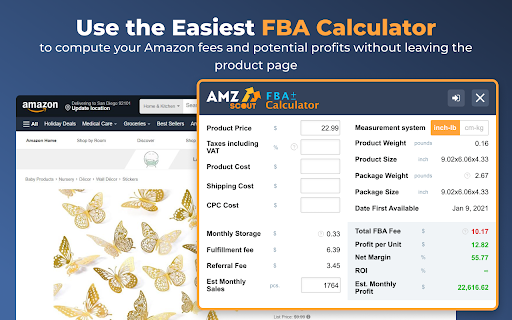

FBA Calculator shows Amazon fees, sales margins, revenue and product net profit and is free to use. Selecting the product is a pivotal point for your Amazon business. Check items you are considering selling with the AMZScout FBA Calculator to ensure that it has the profit margins needed to actually grow your business. With the FBA calculator widget you will: - Know your expenses beforehand so that you can choose products with lower fees, and maximize your profits. - See exactly how much you’ll make on every sale. Use this data to determine expected revenue and know whether it’s worth it to sell an item. - Get valuable product information for any Amazon product at no cost, because it's a free app. FBA calculator Chrome extension is the best way to estimate both expenses and profitability since it will provide you with: In addition, this ultimate seller’s tool lists the weight and size of each item. It also allows you to take into account your product cost, shipping, and cost per click to produce estimates tailored for your specific supplier right on the spot. How to Use the FBA Calculator: 1. Install the Amazon FBA Calculator. 2. Go to Amazon.com. 3. Find the product you’re interested in and open the listing. 4. Open the FBA calculator. 5. Enter your product, shipping, and CPC costs. 5. Your fees and profit margins will automatically be calculated. Does the FBA Calculator work for all marketplaces? You can use this calculator for Amazon marketplaces in the USA, the UK, Canada, Germany, Japan, France, Italy, Spain, Mexico, India, UAE, Saudi Arabia, Australia, and Brazil. No. Get the Amazon FBA Calculator for free, now! Simply click the blue «Install» button at the top right corner of this page. If you have any questions, don't hesitate to contact us at support@amzscout.net.

Helium 10 for Amazon Sellers, Influencers, and Walmart Sellers
Unlock product research, keyword insights, profit analysis to boost your Amazon, Walmart, TikTok sales! For sellers & influencers. Find your next winning product and scale your business more efficiently with a free trial of this powerful Chrome Extension for: Trusted by over 4,000,000 sellers, the Helium 10 Chrome Extension is designed to help you: ✓ Leverage data to assess market demand and validate product opportunities ✓ Discover new niches with upfront search-volume data ✓ Uncover high-value keywords to super-charge listings and PPC campaigns ✓ Gain a clear view of competitor strategies ✓ NEW: Check KDP list prices, UPCs, TikTok vs. Amazon profit, on- and off-site influencer commissions ✓ Calculate real-time profit margins with Profitability Calculator Simplify Product Research with Xray • Instantly unlock niche sales data on Amazon or Walmart. • Identify winning products by analyzing competition, demand, and sales metrics. Get Powerful Keyword Insights (Search Expander & Xray Keywords) • Generate long-tail keywords as you type on Amazon. • Reveal top keywords driving organic sales to competitors. Boost Efficiency with ASIN & UPC Grabber • Bulk-extract ASINs and UPCs (wholesale/resellers) to build targeted ads or catalog spreadsheets in seconds. Check Profit at a Glance (Profitability Calculator) • Factor in fees, costs, and shipping to forecast ROI. • NEW: Compare Amazon vs. TikTok profit potential for FBT sellers without leaving the page. Track Competitor Inventory • View live stock levels and spot hijackers instantly. KDP Sales Checker — NEW • For Amazon KDP authors: Pull the live list sales of any paperback, hardcover, or ebook and benchmark it against rivals. Influencer Insights Hub — Enhanced • View on-site and off-site commission rates for any product. • Send products straight to your Influencer Dashboard or Creator Connection to track performance and order history alongside Helium 10 analytics. Download and Install • Install the Helium 10 Chrome Extension from the Chrome Web Store. Create a Free Helium 10 Account • Log in or sign up for a free trial to start using the extension’s core features. Launch the Extension • Access the Helium 10 Chrome Extension on any Amazon or Walmart product page to view real-time product data. • Explore the suite of integrated tools (Xray, Search Expander, ASIN Grabber, etc.) to optimize your product research and decision-making. Helium 10 offers an all-in-one software suite engineered to help Amazon FBA sellers, Walmart sellers, Amazon Influencers, and Associates succeed. From discovering profitable product niches to optimizing PPC campaigns, Helium 10 covers every stage of the selling journey, including: Use strategic research tools to boost product visibility and drive targeted traffic. Craft high-ranking listings and optimize existing listings to stay ahead of the competition. Develop and scale your marketing and PPC campaigns for long-term growth. Streamline your business and easily monitor performance with intuitive dashboards. SUPPORT AND FEEDBACK • For additional help and detailed tutorials, visit our Knowledge Base: https://kb.helium10.com/hc/en-us/sections/360005055314-Helium-10-Chrome-Extension • If you have questions or need assistance, contact our support team: support@helium10.com TRY THE HELIUM 10 CHROME EXTENSION FREE • Discover your next winning product and build your e-commerce business on Amazon or Walmart with confidence. • Make data-driven decisions to save time, reduce risk, and maximize profits. • Join over 4,000,000 sellers who trust Helium 10 to help grow their businesses. Download the Helium 10 Chrome Extension today and try it FREE to get the insights you need to reach new heights—faster than ever before.

How Many?
The free version of this extension only works on amazon pages with the offer-listings in the url. You must be on that type of page… The free version of this extension only works on amazon pages with the offer-listings in the url. You must be on that type of page and then CLICK the icon and it will start to work. You do not need a license key to use the free version. it just works for 5 uses each day. Easily check how much your competition has available to purchase on amazon. Returns available amounts to purchase if under 1,000 directly on the page. Very fast and easy to use. Just get to the page and click the button. No more adding the item to cart and using the 999 trick manually. This extension does all that for you in the background. How Many Premium Edition includes the following 1. Gets the buy box quantity (when available) 2. Gets the merchants listed on the main product detail page's available stock 3. Estimates sales volumes or if you have Jungle Scout installed it will use those sales estimations (Check the options page) 4. Sub-totals the FBA and MCF available quantity 5. Gives estimated 30 day sell through price. Make more profit!! 6. Gets next lowest offer (not including shipping) and the available quantity on all offers pages 7. All new variation viewer (includes out of stock variations!!) 8. iOS and Android Companion App 9. Right-Click context menu 10. Get available quantity on storefronts 11. Reveal when a merchant is limiting their stock quantities 12. Reveal the true inventory number if merchant is hiding their stock amount up to 999 All this for a small monthly fee Current version does not work on some amazon Europe countries If merchant fullfilled offer is limiting quantity we only get the available quantity to purchase at any given time. If you need help please contact us at support@howmanyextension.com or visit our private policy here: https://howmanyextension.com/privacy-policy

Amazopen - Right Click Search
Search the selected text on amazon when you right-click. Faster way to search amazon by using the amazon right click search. No extension permissions needed! How to perform a search? ✜ Select the text ✜ Right click on it ✜ Click on the 'Search Amazon for...' ✜ In the new tab, you will see the results on Amazon. This add-on is not affiliated with amazon.com

Online Seller Addon
Free stock counter for Amazon sellers with unlimited daily product checks. This extension will show the inventory counts for the… Free stock counter for Amazon sellers with unlimited daily product checks. This extension will show the inventory counts for the different offers on an Amazon listing. You do not need to create an account or signup for anything. You can add the extension and start using it immediately. Works for all Amazon domains. Important Notice: Chrome will soon disable this extension. It uses an older version of Manifest that Chrome no longer supports; please consider migrating to Firefox to continue using it: https://addons.mozilla.org/en-US/firefox/addon/online-seller-addon/ How to use the Amazon stock checker: Add the extension to your browser (click the Add to Chrome button in the top right and confirm) Visit a product detail page on Amazon.com, and click the "Count Stock!" button or click the OS Addon icon in the top right of your browser. OS Addon does not collect or store data outside your local extension. Premium features may be added in the future, but the stock counter is completely free to use. Permissions: It can read and change data on all: - www.amazon.com, smile.amazon.com (and all the regional amazon tld domains) - allows the extension to appear and show quantity data on amazon websites - sellercentral.amazon.com (and all the regional amazon tld domains) - allows the extension to use amazon revenue calculator Disclaimer: The extension uses Google Analytics to collect extension usage statistics to help improve user experience. If you want to opt-out of Google Analytics tracking, please visit http://tools.google.com/dlpage/gaoptout
