
fifaampimdjablpkjapdjehjcfloecjp

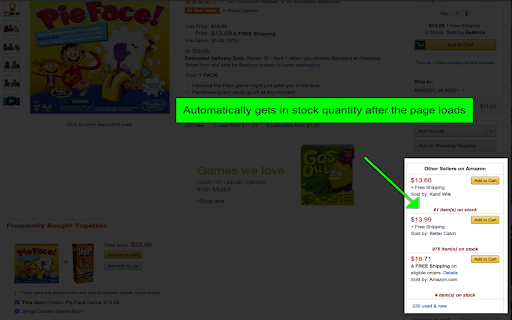
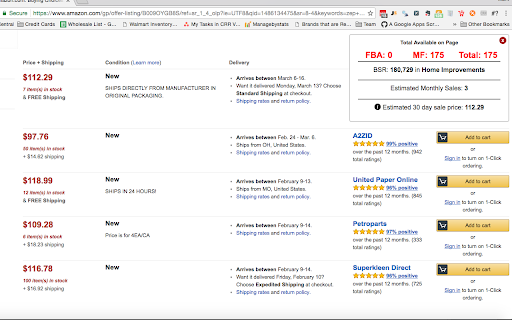

The free version of this extension only works on amazon pages with the offer-listings in the url. You must be on that type of page… The free version of this extension only works on amazon pages with the offer-listings in the url. You must be on that type of page and then CLICK the icon and it will start to work. You do not need a license key to use the free version. it just works for 5 uses each day. Easily check how much your competition has available to purchase on amazon. Returns available amounts to purchase if under 1,000 directly on the page. Very fast and easy to use. Just get to the page and click the button. No more adding the item to cart and using the 999 trick manually. This extension does all that for you in the background. How Many Premium Edition includes the following 1. Gets the buy box quantity (when available) 2. Gets the merchants listed on the main product detail page's available stock 3. Estimates sales volumes or if you have Jungle Scout installed it will use those sales estimations (Check the options page) 4. Sub-totals the FBA and MCF available quantity 5. Gives estimated 30 day sell through price. Make more profit!! 6. Gets next lowest offer (not including shipping) and the available quantity on all offers pages 7. All new variation viewer (includes out of stock variations!!) 8. iOS and Android Companion App 9. Right-Click context menu 10. Get available quantity on storefronts 11. Reveal when a merchant is limiting their stock quantities 12. Reveal the true inventory number if merchant is hiding their stock amount up to 999 All this for a small monthly fee Current version does not work on some amazon Europe countries If merchant fullfilled offer is limiting quantity we only get the available quantity to purchase at any given time. If you need help please contact us at support@howmanyextension.com or visit our private policy here: https://howmanyextension.com/privacy-policy

RevROI
A light & powerful tool to increase your ROI while doing online arbitrage sourcing or personal online shopping. 🚀 Maximize Your Margins with revROI! 🚀 Welcome to smarter shopping and bigger profits with revROI, the ultimate Chrome extension for arbitrage sellers! Find the Best Deals Instantly: • Never miss out on a bargain again! revROI brings you the top cashback offers and discount gift cards right as you shop, ensuring you get the best possible deal every time. • Boost Your Profits Effortlessly: As an arbitrage seller, every penny counts. revROI helps you stretch your dollar further, turning smart savings into increased margins. • Shop with Confidence: Know you're always getting the best offer without the hassle of searching or having half a dozen extensions pop up on every site. revROI does the heavy lifting, so you can focus on growing your business. • Just click, save, and earn – it's that easy! 🌟 Install revROI today and start enhancing your arbitrage strategy with every purchase. If you have any issues or questions please email chris@cleartheshelf.com

Amzpecty
Amzpecty easily checks and tracks Amazon competitors' stock, quantity, inventory, prices, and variations. ABSOLUTELY NO OBLIGATION. AVAIL THE 15-DAY FREE TRIAL Amzpecty.com offers a limited free trial up to 5 queries without the need to register or subscribe. After 5 queries, Amzpecty also offers another absolutely no-obligation, 15-day free trial to those who subscribe. Payment method is not required for the 15-day free trial. Upgrade anytime and go unlimited with paid subscriptions. In just 1 click, we provide you all of Amazon sellers’ product quantity. See product’s: > Estimated total listed quantity (all sellers) > Number of offers (Sellers) > Available quantity of each offer > Price and estimated and total shipping cost > FBA indicator > Product condition > Highest sales rank > Search result of CSV file download > Filter result by FBA/MFN and/or condition > Quantity on merchant’s store front 1. Install FREE Amzpecty. 2. Go to "Amazon Product Page" or "Amazon Search Result Page" or "Seller Central Manage Inventory". 3. Click Amzpecty icon. 4. Browse the seller quantities and total. Amzpecty aims to boost every entrepreneur’s selling/buying journey and experience and empower thousands of newbies and flourishing sellers alike. For feature requests, comments, or suggestions, please send them to support@amzpecty.com. We will be delighted to hear them.

TacticalExpander by TacticalBucket.com
The beauty → These sites AREN’T available to regular Tactical Arbitrage users. With a database of 400+ sites and growing, you can now source products from websites that you could never source from before. Things that aren’t in Tactical Arbitrage or that couldn’t be integrated with an X-Path. Tactical Expander will be your secret weapon to get even more out of Tactical Arbitrage than ever before.

Hummingbird Hover-Graph
On any Amazon product page click the extension icon to check price and sales rank history. Now anyone can check an Amazon product for price and sales rank history. The extension is really easy to use. Simply head to any Amazon product page and click the extension icon. Up will pop an interactive graph with data you can hover over to see key information you need to help you analyze any Amazon product for important sourcing decisions.
