
ehhhlpdgplkjdcgodmkgonnjhpkdiilc

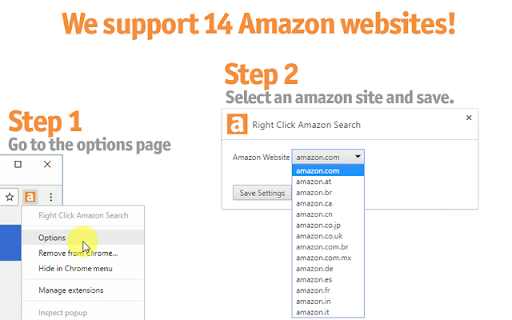
Search the selected text on amazon when you right-click. Faster way to search amazon by using the amazon right click search. No extension permissions needed! How to perform a search? ✜ Select the text ✜ Right click on it ✜ Click on the 'Search Amazon for...' ✜ In the new tab, you will see the results on Amazon. This add-on is not affiliated with amazon.com

Online Seller Addon
Free stock counter for Amazon sellers with unlimited daily product checks. This extension will show the inventory counts for the… Free stock counter for Amazon sellers with unlimited daily product checks. This extension will show the inventory counts for the different offers on an Amazon listing. You do not need to create an account or signup for anything. You can add the extension and start using it immediately. Works for all Amazon domains. Important Notice: Chrome will soon disable this extension. It uses an older version of Manifest that Chrome no longer supports; please consider migrating to Firefox to continue using it: https://addons.mozilla.org/en-US/firefox/addon/online-seller-addon/ How to use the Amazon stock checker: Add the extension to your browser (click the Add to Chrome button in the top right and confirm) Visit a product detail page on Amazon.com, and click the "Count Stock!" button or click the OS Addon icon in the top right of your browser. OS Addon does not collect or store data outside your local extension. Premium features may be added in the future, but the stock counter is completely free to use. Permissions: It can read and change data on all: - www.amazon.com, smile.amazon.com (and all the regional amazon tld domains) - allows the extension to appear and show quantity data on amazon websites - sellercentral.amazon.com (and all the regional amazon tld domains) - allows the extension to use amazon revenue calculator Disclaimer: The extension uses Google Analytics to collect extension usage statistics to help improve user experience. If you want to opt-out of Google Analytics tracking, please visit http://tools.google.com/dlpage/gaoptout

ASINFetcher Amazon ASIN Grabber Tool
ASINFetcher, the Amazon ASIN Fetcher Tool allowing Amazon Sellers grab ASINS easily ASINFetcher by asinzen is the FREE tool for Amazon Sellers to grab and to export the ASINs from any amazon page. Supports Amazon product pages, storefronts, amazon search pages. Great for ASIN Grabbing or storefront stalking. Features include: • Works on over 15 Amazon marketplaces .com .ca .co.uk .es .fr .de .it & many more • Grab a list of ASINs from any amazon page • Grab a list of all sellers from Amazon Product Page • Grab ASINS from any Amazon Search page • Export to system clipboard or CSV, excel • Get total ASIN count right on table • Get Price, Seller Name, Fulfillment type, full hyperlinks • 100% FREE • FREE Lifetime Updates • FREE Support ☎️ Got Question? Reach us on Live Chat: https://support.asinzen.com 👋 Check out our awesome tools for Amazon Sellers: https://get.asinzen.com/tools

Search eBay - Find Stuff Fast
Highlight text, right-click, and search eBay instantly. Supports 30+ international sites with powerful filters. No tracking, no ads. Search eBay Canada, UK, USA and 27 more countries instantly from anywhere on the web. HOW IT WORKS Highlight any text on a webpage, right-click, and select "Search eBay" - that's it. Your search opens immediately with all your saved preferences applied. No copy-pasting, no switching tabs, no typing. THREE WAYS TO SEARCH • Right-click any selected text • Click the extension icon and type your search • Type "ebay" in the address bar, press Tab, then enter your search POWERFUL SEARCH OPTIONS Set your preferences once, use them every time: • Choose from 30+ international eBay sites • Filter by Auction, Buy It Now, or Best Offer • Set price ranges and free shipping filters • Search completed/sold listings for price research • Sort by price, ending time, newly listed, and more KEYBOARD SHORTCUT Press Alt+Shift+E to instantly search your selected text. Customize this shortcut in your browser settings. PRIVACY FOCUSED No tracking, no ads, no data collection. Your search preferences are stored locally in your browser and synced only to your own account. We don't see or store any of your searches. DARK MODE Full dark theme support that follows your system preference, or set it manually to light or dark. FEATURES ✓ 30+ international eBay sites ✓ Search history with autocomplete ✓ Export/import your settings ✓ Title & description search ✓ Price range filters ✓ Free shipping filter ✓ Buying format filters ✓ Multiple sort options ✓ List or gallery view ✓ Open in new tab, window, or same tab Perfect for eBay sellers researching prices, collectors hunting for deals, or anyone who shops eBay regularly.Search eBay instantly from anywhere on the web. Bug Fixes - Fixed completed/sold listings filter - Searches no longer include completed listings when the option is unchecked Search Options • Title & Description Search - Search in listing descriptions, not just titles • Buying Format Filters - Filter by Auction, Buy It Now, or Accepts Offers • Price Range - Set minimum and maximum price filters • Free Shipping Only - Filter to show only free shipping listings • Display Mode - Choose Default, List View, or Gallery View User Experience • Dark Mode - Full dark theme support with Light/Dark/Auto options • Keyboard Shortcut - Press Alt+Shift+E to search selected text instantly • Omnibox Search - Type "ebay" in address bar, press Tab, then type your search • Search Autocomplete - Previous searches appear as you type • Configurable History - Set history limit from 5-20 items • Export/Import Settings - Backup and restore your preferences Technical • Complete codebase rewrite with ES Modules • Removed Milligram CSS dependency • Improved error handling • Cleaner, more maintainable codebase

DS Amazon Quick View Extended
Productivity extension for Amazon Productivity extension for Amazon NOTES: * Purchase a license key here - https://dmitry.artamoshkin.com/ds/buy.html * It's a one-time fee. * Here is the Firefox version: https://addons.mozilla.org/en-US/firefox/addon/ds-amazon-quick-view-ext Differences with free version are: * supports all amazon.* domains * has "price history" * has interactive Keepa graph (if you have Keepa premium account you'll have the BSR data there) * shows lowest FBA price * shows when an item has no BuyBox * filtering/sorting/export - filter and sort by Price, BSR, FBA Sellers, Reviews count, Reviews score, hide Prime and sold by Amazon products; export to CSV * shows extra details: dimensions, weight; for book - publisher and number of pages * you can copy title or first 6 words of the title in one click ********* IMPORTANT ********* Webstore doesn't send notifications about new bug reports. If you have any problems, please, contact directly to me by email: fromamid@gmail.com Thank you!
