
emcdddpfpajfemcjggaodbdecipdeeon

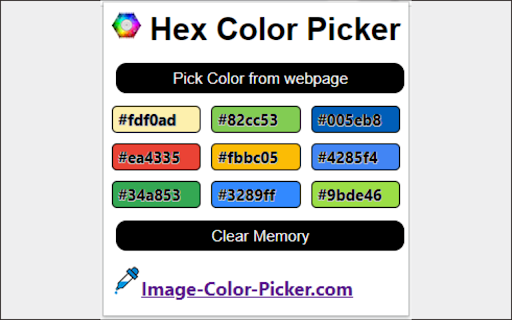
Pick colors from any web pages and get the HEX color code with fast and easily. Hex Color picker is a simple chrome extension which enables you to pick any color from the webpage and your screen. And the colors will be save in the list of selected colors. You can copy the Hex code to the clipboard with fast and easily. What is Hex color code? HTML color code or Hex code hexadecimal triplets representing the colors red, green, and blue (#RRGGBB). For example, in the color red, the color code is #FF0000, which is '255' red, '0' green, and '0' blue. There are 16,777,216 possible HTML color codes. Visit our website for more useful tools for designers. Thank you for using this tool.

Web Color Picker - online color grabber
Grab colors from web pages. Color picker, color history. Live smart color picker tool in HEX, RGBA. Eyedropper colorpick for free Web Color Picker revolution tool for designers. Now you can easily pick any from any website with our new extension. Eyedropper tool will get color palette from any webpage you need. It`s pretty useful tool for web developers or web designers. This extension is pretty simple to use and it has simple and user-friendly interface. We provide you and amazing and useful eyedropper tool so you can get RGB colors from any webpage. Extract palette from web pages while you're browsing the web. There are three color formats available: RGB, CSS, and HSL. It`s also pretty simple to use – just click on extension icon in the upper right and star working. - Identifying the RGB HEX CMYK - Saving pallets - Editing them into beautiful palette combinations is a quick and simple job. Color Picker features are: * Different formats: HEX, RGB, HSV * Detect most used color on the page * Color list of recently picked colors * Red-Green-Blue (RGB) wheel to adjust selected and lot of others

Pixie - Color Picker
Pick any color from a webpage, copy it in modern CSS formats, and save it to your history. Pixie is a free, lightweight color picker that lets you grab any color from a webpage and instantly copy it to your clipboard. Choose your preferred output format — from classic HEX and RGB to modern perceptual color spaces like OKLCH and OKLab — and Pixie copies it the moment you pick a color. Every color is saved with all format variants, so you can switch between them anytime. Key features: 🎨 Pick any color from any webpage with one click 📋 Copy colors instantly in your preferred CSS format 💾 Save up to 1,000 colors with automatic history 🎛️ Expand any saved color to access all format variants 🌗 Light and dark mode support 🔒 Fully private — no tracking, no data collection ✨ Completely free with no ads Pixie supports modern CSS color spaces alongside traditional formats, making it ideal for designers and developers working with wide-gamut displays and perceptual color models. All data is stored locally on your device. Pixie never sends your data anywhere.

Hex Color Picker
Allows you to pick colors from any web pages, color picker to get pixel code, rgb,... This software extension allows you to pick colors from any web pages, color picker to get pixel code, rgb value of any image on the website you're browsing. Find the exact RGB Value of any image once you install our software extension Hex Color Picker. To begin using the software extension Color Picker, you need to do the following 1) Install the software extension 2) Go to the website you wish to find the RGB Value for 3) Click on our software extension at the top right corner to activate the software 4) Click on the image you wish to find the RGB value for 5) Our software extension will give you the specific RGB color for the pixel/image you clicked Try using our software Color Picker to find the color codes for any pixel today.

Color Finder
Install color finder Chrome extension & detect RGB & HEX color codes with ease. Best Color Identifier for Chrome. Finding the perfect color just got easier in 2025. Color Finder is your go-to Chrome color picker for detecting and identifying RGB color codes and HEX color codes from any webpage. Designed for designers, developers, and anyone who needs accurate color detection, this free Chrome color tool lets you quickly capture colors with ease. Transform your browser into a powerful color code identifier and streamline your workflow with this efficient web color extraction tool. Accurate Color Detection: Precisely identify RGB color codes and HEX codes from any webpage, including gradients and subtle shades. This feature makes it an ideal HEX color finder and RGB color detector for all your web-based projects. Easy-to-Use Interface: Activate with one click and hover over any color to display its color code in a clear pop-up format. A perfect color picker for designers working on branding or digital art. Lightweight & Fast: A free Chrome color tool that integrates seamlessly into your browser without slowing down your experience. Free & Open Source: As an open-source color detector, Color Finder encourages community contributions and offers transparency for all users. Install the Extension: Click “Add to Chrome” to install Color Finder, the most reliable Chrome color picker. Activate Color Detection: Open any webpage and click the Color Finder icon in your toolbar to begin. Hover to Detect Colors: Move your mouse over any color on the page to view its RGB color codes and HEX codes instantly in a pop-up window. Copy the Color Code: Use the “Copy” button to save the color code to your clipboard and utilize it in your projects Color Finder stands out as the best web color extraction tool, offering hassle-free color detection directly from your browser. Whether you're creating consistent branding, web design, or digital art, this HEX color finder and RGB color detector enhance productivity by delivering accurate results in seconds. Choose Color Finder for its efficiency, ease of use, and reliability as a color picker for designers and developers. With this free Chrome color tool, you can ensure precise color codes for every project without any complexity. After activating Color Finder, hover over the desired color. A pop-up displays the color code, with a “Copy” button for easy copying to your clipboard. No, Color Finder is designed to be lightweight, so it won’t impact browsing performance or slow down your system. Yes, Color Finder is entirely free and open-source, making it accessible to all users.
