
necmnahhpjieeknfddniaagcnhlglgoa
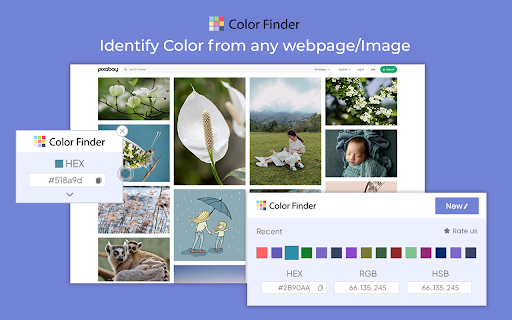
Install color finder Chrome extension & detect RGB & HEX color codes with ease. Best Color Identifier for Chrome. Finding the perfect color just got easier in 2025. Color Finder is your go-to Chrome color picker for detecting and identifying RGB color codes and HEX color codes from any webpage. Designed for designers, developers, and anyone who needs accurate color detection, this free Chrome color tool lets you quickly capture colors with ease. Transform your browser into a powerful color code identifier and streamline your workflow with this efficient web color extraction tool. Accurate Color Detection: Precisely identify RGB color codes and HEX codes from any webpage, including gradients and subtle shades. This feature makes it an ideal HEX color finder and RGB color detector for all your web-based projects. Easy-to-Use Interface: Activate with one click and hover over any color to display its color code in a clear pop-up format. A perfect color picker for designers working on branding or digital art. Lightweight & Fast: A free Chrome color tool that integrates seamlessly into your browser without slowing down your experience. Free & Open Source: As an open-source color detector, Color Finder encourages community contributions and offers transparency for all users. Install the Extension: Click “Add to Chrome” to install Color Finder, the most reliable Chrome color picker. Activate Color Detection: Open any webpage and click the Color Finder icon in your toolbar to begin. Hover to Detect Colors: Move your mouse over any color on the page to view its RGB color codes and HEX codes instantly in a pop-up window. Copy the Color Code: Use the “Copy” button to save the color code to your clipboard and utilize it in your projects Color Finder stands out as the best web color extraction tool, offering hassle-free color detection directly from your browser. Whether you're creating consistent branding, web design, or digital art, this HEX color finder and RGB color detector enhance productivity by delivering accurate results in seconds. Choose Color Finder for its efficiency, ease of use, and reliability as a color picker for designers and developers. With this free Chrome color tool, you can ensure precise color codes for every project without any complexity. After activating Color Finder, hover over the desired color. A pop-up displays the color code, with a “Copy” button for easy copying to your clipboard. No, Color Finder is designed to be lightweight, so it won’t impact browsing performance or slow down your system. Yes, Color Finder is entirely free and open-source, making it accessible to all users.

Color Picker for Chrome™
HEX, RGB Color picker, Advanched Eyedropper, Find color code on any page In 2026, the Color Picker extension Chrome is a powerful tool for Google Chrome that captures and recognizes colors on any website or webpage. Equipped with HEX and RGB color codes, an easy-to-use eyedropper for web pages tool, and an efficient layout, this tool lets designers, developers, and regular users easily capture color codes. That is, in addition to color, many design elements and customizable websites use HEX and RGB color codes – simply hover over the color and copy or use it at any time. Obtain easy and precise color selection for all web elements using this online color picker tool. Advanced Eyedropper Tool: How can one grab colors from websites so easily? This eyedropper for web pages allows users to capture colors from any pixel on a webpage with ease. HEX and RGB Support: Preview and transfer the color to your project in HEX and RGB color codes, making it suitable for different types of projects. Color History: Go back to the color palette you recently chose with the color history feature for easy access. User-Friendly Interface: Clean design that lets you select color and copy the color code identifier in just three clicks. Enhanced Color Palette: For more color choices beyond the webpage elements, use the integrated palette of this advanced color picker for designers. How to Use the Color Picker Extension Click the link from the Chrome Web Store to install the extension. Open a Webpage: The colors can be captured from any webpage whenever the user wants with the HEX color code picker. Enable the Color Picker: By clicking on the extension icon, the eyedropper tool will launch. Pick a Color: Power Tip: To capture the color of any element, move the mouse cursor over the screen and right-click: you'll see the RGB color grabber and HEX and RGB color codes formats. Copy the Code: Instantly copy the color code and paste it wherever you need it. 1. Can I see the color codes in both HEX and RGB? Yes, the Color Picker provides both HEX and RGB formats for each color. Yes, the extension keeps a history of your recently picked colors for easy access. 3. Does this extension work on all websites? Yes, it works on all websites and web elements, allowing color selection on any visible part of a page.

Color Picker HEX | Eyedropper | Pick color from image
Pick colors from image or screen. Extract HEX and RGB color codes. Advanced Color Picker for Chrome. Color Picker HEX is a powerful color picker extension for Chrome that lets you pick colors from any webpage, convert HEX to RGB, HSL, and CMYK, save color palettes, and build your personal color collection with one click. Install Color Picker to grab any color instantly, convert between formats, and manage your color palettes — all without leaving your browser. 🎨 Free Color Picker — Pick colors from any website, image, or element on screen 🔄 Color Format Converter — Convert between HEX, RGB, HSL, CMYK, and more 🕐 Color History — Save and revisit recently picked colors anytime 📋 One-Click Copy — Copy color codes instantly in your preferred format 👍 Easy to Use — Pick colors with a single click, no design experience needed 🌐 Works Everywhere — Compatible with any website or web app ✨ What You Can Do with Color Picker 🔽 Pick Any Color — Grab colors from websites, images, gradients, and UI elements 🔄 Convert Formats — Switch between HEX, RGB, HSL, and CMYK in one click 🗂️ Build Palettes — Group colors into collections for your projects 🕐 Browse History — Review and reuse colors you picked earlier 📋 Copy Instantly — Get the exact color code you need without typing 🔄 Multi-Format Conversion Instantly convert colors between HEX, RGB, HSL, CMYK, and more 🕐 Smart Color History Automatically saves your recently picked colors for quick reuse Pick any color from any website in one click Convert HEX, RGB, HSL, and CMYK instantly Review color history without losing picks Simple, fast, and reliable color tool for Chrome 🔐 Privacy and Security Color Picker does not collect, store, or transmit any personal data. All color data stays locally on your device. Color Picker (also known as Chrome color picker, eyedropper extension, or HEX color picker) is fully compatible with Chrome and designed for fast, accurate color picking. Color Picker is an all-in-one color picker for Chrome — pick colors from any webpage, convert between HEX, RGB, HSL, and CMYK, save palettes, and manage your color history with ease.

Color Code Finder
Utilize Color Code Finder with RGB color finder as screen color picker to get HEX code from image and find HEX color code. ⭐ Color Code Finder is the HEX & RGB Picker for Web & Images. A must-have eyedropper tool for designers! It streamlines the color selection process, increasing workflow efficiency by 30%. The extension supports five of the most widely used color models: HEX, RGB, HSL, HSV, and CMYK. 🎯 Color Code Finder seamlessly integrates with Google Docs, Canva, Figma, Adobe XD, Sketch, and all major IDEs. It supports Chrome, Edge, Brave, and runs smoothly on Windows, macOS, Linux, and Chromebook. 🎨 Discover the perfect shade effortlessly with this color code finder app: • Hover over elements to detect values in real-time; • Instantly retrieve RGB, HEX, CMYK, HSL and HSV values; • Easily copy codes to your clipboard; • Capture from images and web pages with precision. 🚨 The Challenge & ✅ The Solution 🚨 The Challenge: finding the exact color code from web elements, images, or UI designs is often tedious and imprecise, requiring multiple apps and manual adjustments. ✅ The Solution: this color dropper tool lets you instantly pick and copy colors from any webpage, image, or document with pixel-perfect accuracy. Supporting live sampling and multi-format conversion, it streamlines your workflow and eliminates guesswork. This solution is an alternative to ColorZilla, Eye Dropper, and Geco Colorpick extensions. 👩🎨 Need to convert codes? This color finder app has you covered: - Convert between HEX, RGB, CMYK, and HSV effortlessly - Generate complementary palettes instantly - Enable HSV color picker from image for specifc results - Instantly switch between formats with one click ✨ Take your workflow to the next level! This color inspector app is perfect to enhance your creativity, providing everything from detection to conversion in a single, lightweight extension. 🔍 Perfect for designers, developers, and marketers: ▸ Web designers looking for an eye dropper tool with pixel-perfect accuracy ▸ UI/UX developers who need quick references ▸ Digital artists and painters exploring new shades ▸ Marketers creating brand-consistent visuals 🏆 Why Choose our color code finder? ✅ Trusted by 17,000+ professionals across 146+ countries ; ✅ 4.4★ average rating on the Chrome Web Store; ✅ 7+ years of industry experience. 🌟 Unlike other extensions, this color dropper from image app offers a seamless experience: • No unnecessary clutter – just pure functionality; • Lightweight and doesn’t slow down your browser; • Supports all major web technologies; • Works even on complex dynamic pages. 🚀 The ultimate Chrome extension to pick colors from images & websites! Whether you're designing a website, tweaking a UI, or just curious about an element you see online, color finder from image is the simplest way to grab any code instantly. No more guessing – get precise, accurate values with a single click. 📌 Ready to identify, convert, and manage colors effortlessly? Download Color Identifier today and never struggle again! 1. Is there an app to find color on a screen? You don’t need an app! The color identifier tool works directly in your browser, letting you grab colors from any webpage or image with a simple click. 2. Can I extract a color code from an image online? Yes! Open the image, enable the color finder app, and tap anywhere to reveal the exact HEX or RGB code, making it easy to use the color in any project. 3. How to copy HEX code from a webpage? Easily! Whether it’s an online image or a website background, this eye dropper tool helps you find and copy color codes instantly, no extra software needed. 🚀 Get Started Today! Experience faster, more accurate color selection and improve your design workflow instantly. Download the Color Code Finder app now and take your code picking to the next level!

Color Finder
Install Color Finder with eyedropper tool to activate color identifier online with RGB and HEX code finder from screen. ❤️ Find colors effortlessly with Color Finder, the ultimate tool for designers, developers, and digital artists. It simplifies color extraction and improves workflow efficiency by up to 40%. Supports 5 major color models – HEX, RGB, HSL, HSV, and CMYK. Whether you need to pick, save, or analyze them, this extension has everything you need: 🎯 Whether you’re designing a website, working on digital art, or coding an app, Color Finder makes your job easier. No more guessing or using outdated tools - get accurate results with modern precision. 1. Get precise color values from any webpage. 2. Extract from images in real time. 3. Convert between HEX, RGB, HSL, HSV and CMYK formats. 4. Generate harmonious palettes instantly. 5. Identify shades with AI-assisted analysis. 🚨 The Problem: Web designers, marketers, and developers frequently struggle to accurately identify color codes from images or webpage elements. Extracting precise information from complex designs, PDFs, or UI components can be time-consuming and frustrating. ✅ The Solution: Color Finder instantly detects the exact color code of any element or pixel with a single click. It works on web pages, images, and even local files like PDFs, DOCs, and Excel spreadsheets. This tool serves as a fast and reliable alternative to ColorZilla, with added features for color grading, naming, and analysis. ▸ Identify styles from gradients and complex images ▸ Capture shades that match your brand identity ▸ Convert values between multiple formats with one tap ▸ Adjust opacity levels for more customization ▸ Instantly generate complementary color schemes ▸ Get codes directly from live previews ✅ Trusted by 6,000+ active users; ✅ 4.7★ average rating on the Chrome Web Store; ✅ Used across 50+ countries by professionals. • Essential for anyone needing a precise color code finder tool. • Perfect for UI/UX designers and front-end developers. • A must-have tool for artists and digital creators. • Useful for marketers building consistent branding. • Helps students and professionals working on design theory. 📌 Instead of relying on unreliable online tools, use this extension for real-time accuracy. The built-in HSL, HSL and CMYK color picker feature ensures that you get full control over your work without switching apps. 1. Select a pixel-perfect color from any page 2. Convert to different models in one click 3. Compare multiple shades side by side 4. Get a real-time preview of color combinations 5. Adjust transparency and tone with advanced controls ☝️ This tool is more than just a color code finder - it’s a complete toolkit designed for anyone working with digital styles. Say goodbye to guesswork and start using precision-based tools. 🎨 Color finder app adapts to your needs with intuitive controls. Save, modify, and copy codes effortlessly - turning your ideas into stunning visual creations. 🔍 Additional Features: • Zoom in on pixels for precise selection; • Detect multiple values at once from any area; • Save custom palettes for future projects; • Quick-access history for previously picked values; • Dark mode support for better accesibility. 📌 The next time you need a precise color, don’t waste time searching - color dropper tool is here to help. Install now and simplify your creative workflow! 1. How can I find the HEX code of a color on a webpage? 🧷 Just open the page, activate color finder, and click on the element you want to analyze. The HEX code will be copied automatically, no extra steps needed! 2. How do I quickly identify a color in any image? 🧷 Simply open the image in your browser, enable color finder app, and move your cursor over the desired spot. The tool will instantly detect and display the exact color code. 3. How can I easily find complementary colors? 🧷 Use smart palette feature in the color identifier tool! You can instantly generate color combinations, including complementary shades. 4. Is it compatible with web-design platforms, IDEs, and browsers? 🧷 Yes! The extension seamlessly works with Google Docs, Canva, Figma, Adobe XD, Sketch, and popular development environments (VS Code, Sublime, IntelliJ, WebStorm). Compatible with Chrome, Edge, Brave, and Opera. 📝 I’m Bill, a productivity software developer and creator of Color Finder. With 20+ years in web development and 8+ years building browser tools, my products are trusted by many talented designers, developers, and marketing professionals. Before launching this tool, I conducted 30+ in-depth interviews with industry experts to create a tool tailored to real-world design needs. 👉 Click Add to Chrome button, Install the Extension and Enhance Your Work Today!
