
onnmbokhmpeheaggdmglfffafmioikfi
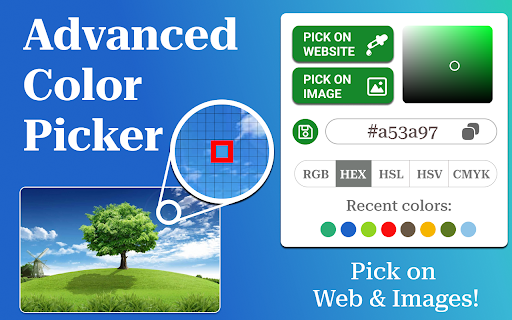
Install Color Finder with eyedropper tool to activate color identifier online with RGB and HEX code finder from screen. ❤️ Find colors effortlessly with Color Finder, the ultimate tool for designers, developers, and digital artists. It simplifies color extraction and improves workflow efficiency by up to 40%. Supports 5 major color models – HEX, RGB, HSL, HSV, and CMYK. Whether you need to pick, save, or analyze them, this extension has everything you need: 🎯 Whether you’re designing a website, working on digital art, or coding an app, Color Finder makes your job easier. No more guessing or using outdated tools - get accurate results with modern precision. 1. Get precise color values from any webpage. 2. Extract from images in real time. 3. Convert between HEX, RGB, HSL, HSV and CMYK formats. 4. Generate harmonious palettes instantly. 5. Identify shades with AI-assisted analysis. 🚨 The Problem: Web designers, marketers, and developers frequently struggle to accurately identify color codes from images or webpage elements. Extracting precise information from complex designs, PDFs, or UI components can be time-consuming and frustrating. ✅ The Solution: Color Finder instantly detects the exact color code of any element or pixel with a single click. It works on web pages, images, and even local files like PDFs, DOCs, and Excel spreadsheets. This tool serves as a fast and reliable alternative to ColorZilla, with added features for color grading, naming, and analysis. ▸ Identify styles from gradients and complex images ▸ Capture shades that match your brand identity ▸ Convert values between multiple formats with one tap ▸ Adjust opacity levels for more customization ▸ Instantly generate complementary color schemes ▸ Get codes directly from live previews ✅ Trusted by 6,000+ active users; ✅ 4.7★ average rating on the Chrome Web Store; ✅ Used across 50+ countries by professionals. • Essential for anyone needing a precise color code finder tool. • Perfect for UI/UX designers and front-end developers. • A must-have tool for artists and digital creators. • Useful for marketers building consistent branding. • Helps students and professionals working on design theory. 📌 Instead of relying on unreliable online tools, use this extension for real-time accuracy. The built-in HSL, HSL and CMYK color picker feature ensures that you get full control over your work without switching apps. 1. Select a pixel-perfect color from any page 2. Convert to different models in one click 3. Compare multiple shades side by side 4. Get a real-time preview of color combinations 5. Adjust transparency and tone with advanced controls ☝️ This tool is more than just a color code finder - it’s a complete toolkit designed for anyone working with digital styles. Say goodbye to guesswork and start using precision-based tools. 🎨 Color finder app adapts to your needs with intuitive controls. Save, modify, and copy codes effortlessly - turning your ideas into stunning visual creations. 🔍 Additional Features: • Zoom in on pixels for precise selection; • Detect multiple values at once from any area; • Save custom palettes for future projects; • Quick-access history for previously picked values; • Dark mode support for better accesibility. 📌 The next time you need a precise color, don’t waste time searching - color dropper tool is here to help. Install now and simplify your creative workflow! 1. How can I find the HEX code of a color on a webpage? 🧷 Just open the page, activate color finder, and click on the element you want to analyze. The HEX code will be copied automatically, no extra steps needed! 2. How do I quickly identify a color in any image? 🧷 Simply open the image in your browser, enable color finder app, and move your cursor over the desired spot. The tool will instantly detect and display the exact color code. 3. How can I easily find complementary colors? 🧷 Use smart palette feature in the color identifier tool! You can instantly generate color combinations, including complementary shades. 4. Is it compatible with web-design platforms, IDEs, and browsers? 🧷 Yes! The extension seamlessly works with Google Docs, Canva, Figma, Adobe XD, Sketch, and popular development environments (VS Code, Sublime, IntelliJ, WebStorm). Compatible with Chrome, Edge, Brave, and Opera. 📝 I’m Bill, a productivity software developer and creator of Color Finder. With 20+ years in web development and 8+ years building browser tools, my products are trusted by many talented designers, developers, and marketing professionals. Before launching this tool, I conducted 30+ in-depth interviews with industry experts to create a tool tailored to real-world design needs. 👉 Click Add to Chrome button, Install the Extension and Enhance Your Work Today!

Measure Pixel
Discover Measure Pixel — the ultimate solution for precise pixel measurements on webpages. 😊 Introducing "Measure Pixel" – your go-to Google Chrome extension for precise pixel measurements right on your webpages! 📏 Whether you're a web designer, developer, or just someone who loves to tinker with online content, this handy tool is your digital ruler online, making it effortless to gauge distances and sizes of elements with pixel-perfect accuracy. 🖥️ 🔥 Easy Measurement: With Measure Pixel, you can kiss guesswork goodbye. Simply install the extension, activate it, and hover your mouse over any element on the webpage. 🖱️ Instantly, you'll see precise measurements in pixels, giving you a clear understanding of the size and spacing of elements. Seamless Integration: This page ruler seamlessly integrates into your Chrome browser, becoming an essential part of your web development toolkit. 💼 It's there whenever you need it, effortlessly accessible with just a click. Precision at Your Fingertips: Say goodbye to the days of squinting at your screen and trying to count pixels manually. Measure pixel empowers you with the precision you need to ensure every element on your webpage is pixel-perfect. ✨ Visualize Spacing and Alignment: Whether you're adjusting margins, padding, or simply ensuring elements are properly aligned, this extension gives you a visual representation of every pixel, making it easy to spot inconsistencies and fine-tune your design. 🎨 Save Time and Effort: With Measure Pixel, there's no need to switch between tools or wrestle with complex settings. 🕒 It streamlines your workflow, saving you time and effort as you work on perfecting your web designs. Versatile Usage: Whether you're designing a brand-new website, debugging existing code, or simply curious about the layout of your favorite webpage, Measure Pixel is your trusty companion. 🤝 Its versatility makes it a must-have for anyone working with pixels and elements on the web. Educational Tool: Teaching web development? Use measure pixel to illustrate concepts such as element dimensions and spacing to your students. 📚 It's a hands-on way to engage learners and deepen their understanding of web design principles. Responsive Design Testing: Ensure your website looks great across various screen sizes by using our application to check element dimensions and spacing on different devices. 📱 It's an invaluable tool for responsive design testing. Customizable Options: Tailor Measure pixel to suit your preferences with customizable options. Whether you prefer a specific unit of measurement or want to adjust the extension's appearance, you're in control. 🎛️ Collaboration Made Easy: Working with a team? Share screenshots with pixel measurements directly from the extension, streamlining communication and collaboration on design projects. 📤 Stay Organized: Keep track of your measurements effortlessly with "Measure Pixel." Whether you're jotting down dimensions for future reference or documenting design decisions, this extension helps you stay organized and on top of your projects. 📝 Enhance Your Development Workflow: Integrating Measure Pixel into your development workflow enhances efficiency and accuracy, allowing you to focus on crafting exceptional digital experiences. 💻 Stay Updated: We're committed to continuously improving measure pixel to meet your evolving needs. Expect regular updates and enhancements to ensure you always have the best tools at your fingertips. 🔄 Customer Support: Have questions or encountered a bug? Our dedicated customer support team is here to help. Reach out to us anytime for assistance or feedback on how we can further improve your experience with "Measure Pixel." 🛠️ Unlock the Power of Pixels: Whether you're a seasoned pro or just dipping your toes into the world of web development, extension unlocks the power of measuring elements, giving you greater control and precision over your digital creations. 🔓 Analyzing elements on webpages has never been easier or more intuitive. 🌐 Say hello to your new favorite page ruler and take your web development skills to the next level!

Color Picker - Eyedropper Tool
Pick colors from web pages with Eyedropper. Picker, gradient generator, palette. Quickly grab HEX, RGB. Color Picker and Eyedropper Tool is a must-have browser extension for web developers, designers, and anyone who needs to choose colors from a webpage or extract a website's palette. Whether you're creating a website, designing graphics, or working on a digital project, extension will make the process of color selection easier and faster. Features: - Employ zoom technology to select and store multiple from any - Archive your preferred gradients; a single click on any stores its HEX value in your clipboard; - The site palette feature retrieves all the colors present on any webpage; - Personalize the type for automatic copying. Great for any designer, Chrome extension that easily allows you to identify the Hex colour code of any UI element you hover your mouse over. It's great for quick access to colours you gain inspiration from when browsing online. This extension stores the last six selected and represents the color in HEX, RGBA, HSVA, HSLA, and CMYK formats. Free open-source Color Picker extension. Source on GitHub. No ads, no tracking. Try using our software to find the color codes for any pixel today.

Pixel Measurement
An online ruler for measuring pixels on screen

Hex Color Picker
Allows you to pick colors from any web pages, color picker to get pixel code, rgb,... This software extension allows you to pick colors from any web pages, color picker to get pixel code, rgb value of any image on the website you're browsing. Find the exact RGB Value of any image once you install our software extension Hex Color Picker. To begin using the software extension Color Picker, you need to do the following 1) Install the software extension 2) Go to the website you wish to find the RGB Value for 3) Click on our software extension at the top right corner to activate the software 4) Click on the image you wish to find the RGB value for 5) Our software extension will give you the specific RGB color for the pixel/image you clicked Try using our software Color Picker to find the color codes for any pixel today.
