
eamkimleiebmdpifljjfilhbaehclahg
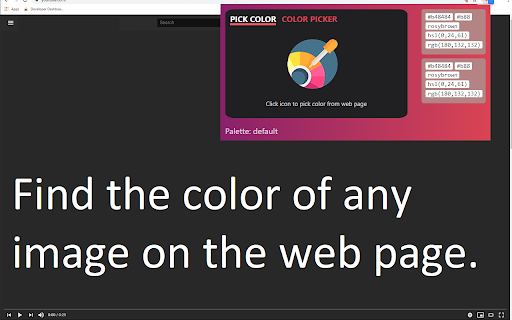



Allows you to pick colors from any web pages, color picker to get pixel code, rgb,... This software extension allows you to pick colors from any web pages, color picker to get pixel code, rgb value of any image on the website you're browsing. Find the exact RGB Value of any image once you install our software extension Hex Color Picker. To begin using the software extension Color Picker, you need to do the following 1) Install the software extension 2) Go to the website you wish to find the RGB Value for 3) Click on our software extension at the top right corner to activate the software 4) Click on the image you wish to find the RGB value for 5) Our software extension will give you the specific RGB color for the pixel/image you clicked Try using our software Color Picker to find the color codes for any pixel today.

Online Color Picker
Colors palette with color conversion to RGBA, HEXA and HSVA. This extension is a great utility for any graphics designers or web developers, or for anyone who just really likes colors. Find the right color for your design and search the web from the new tab every time. Color Picker lets you pick the color you want and shows you the HEX values, RGB channels, hue, saturation and value. By clicking "Add to Chrome", I accept and agree to installing the Online Color Picker Chrome extension and setting Chrome™ New Tab, Homepage takeover to that provided by the service with search results by Bing, and the Terms of Use and Privacy Policy. Features: - Extensive Range of colour code formats: RGBA, HEXA and HSVA. - You can get any format of color Like RGBA, HEXA, and HSVA etc on one click. - Copying the colour code to the clipboard with one mouse click. - Free to use, Online Color Picker is 100% free chrome extension, and you can use it as much as you want!

Balance – perfect daily ToDo list for New Tab
Balance - a very simple to-do list that will change your Life. By clicking "Add to chrome" you accept and agree to installing "Balance™" extension and setting Chrome New Tab to that provided by the service and the Terms of Use and Privacy Policy. The extension will update your search settings and will change your search engine to be provided by Microsoft Bing. Each new day like absolutely pure sheet and every new day you can choose how to fill this day. Each time it is only your decision. Every new day you have the opportunity to go either the usual way or completely new way. Most of us devote a lot of time for work and little time for ourselves and our lives. It depends on the social priority - the modern world every day plunges us more and more into the race for financial well-being, which forces us to work harder and better, and forget about the pleasure that we can get from both work and life. That is why every new day you will start with two empty lists of tasks that you will fill: each new day you have to choose between completing the tasks of the previous day or starting your day from scratch and follow the new path. You will have to divide Life and Work Tasks and write them in separate lists. Thanks to this division, it will be possible to note the existing disbalance between these two lists and focus your thoughts on what is really important, but ignored. We have created this Custom New Tab extension exactly for people who feel that there is another life way and everything can change. And we will show that it is real. And some legal links below: Read few words about our team and contact us: https://monetizi.net/

ColorPick Eyedropper
A zoomed eyedropper & color chooser tool that allows you to select color values from webpages and more. If you feel the need to alert the developer about a bug use the feedback forum instead of writing a review. Note: by default "Attempt to auto copy value to clipboard" disabled. You will be warned during install about a request for clipboardWrite permissions, but this is disabled by default until you enable it in settings because automatically overwriting the clipboard may be annoying. If you do use this setting you can decide whether to auto copy the hex or the rgb css. ColorPick needs permission on all websites so that it is at the ready when you need it. In order to use the tabs API this permission is required. Color pick does not abuse this permission and is highly configurable. You can always review the source code yourself, which is available online here https://github.com/qufighter/ColorPick PRs welcome! Please note that colors are picked from a snapshot of the page that is updated only when you scroll. To take a new snapshot press r or use the re-snap button. Sometimes if you just changed tabs, you may see a snapshot error - this is an intentional security feature. Press R or scroll to correct this, or exit color pick and try again. As with most extensions of this nature, it will not work out of the box on the web store, or on file:// pages. It will work on local file pages only after you "Allow access to file URLs" from the tools->extensions manager. However there is also an alternative feature "snap mode" that uses the active tab permission to take a screenshot anyway, which is then sent to a new tab where permission to run the extension may be granted, however you will have to click the extension icon again on this new tab at present. If you experience an issue, try the following: - Try a new website in a different tab and see if it works there - Try the same website in a new tab and see if that works - Reloading the extension or tab may sometimes be needed If you need to operate on unsupported pages try the desktop app version (mac+pc) at color-pick.com or if you are selecting colors from screenshots, images or photos try the mobile phone/tablet app for IOS and Android - search the store for "ColorPick" (which also includes color based mini games). If you're looking for a quick and easy to use color eye dropper with zoomed drag-able preview for fine tuning you've come to the right place. If you experience any bugs PLEASE report them using the feedback button, I want to fix them if they can be fixed. It has been reported that it may take a few tries before it starts working initially. You may have to refresh the page or re-load the extension. I have personally experienced bugs where mousemove event does not fire, etc, but then when I switch out of chrome and back, it starts working. There is little that can be done to fix this except be patient and try again. Keep in mind that your display's color space matters - if it or chrome is not set to sRGB (and restarted chrome) then some colors set to one value will pick as a different value (as if from a screenshot, which in some cases can have a similar effect). Color Pick attempts to use lossless PNG quality to detect colors. If you experience bugs or distorted snapshot of the page disable this feature to use JPEG quality. If your business is using this extension or the desktop app than you should urge them to purchase the appropriate license. Thank You, Sam ------------------------------------------- This program is a Color Picker, or an Eye Dropper, also a ColorPicker or EyeDroper depending on how you wish to spell it. It also contains webpage region magnification/zoom loupe features. Zoom features may help you to see pixel perfect alignment accuracy during web development adjustments. This extension may someday be supported by URL rewriting affiliate links. This may be disabled from options and is disabled by default. When you uninstall this extension you may be asked to complete a survey - you can disable this survey from options.

WhatFont
The easiest way to identify fonts on web pages. Say goodbye to the complexity of developer tools for identifying fonts. With WhatFont, discovering the fonts used on websites becomes as effortless as hovering over text. Want more details? A simple click on any element reveals the styles applied, making it easier than ever to uncover the secrets behind beautiful typography. Recommended by Wired WebMonkey, Lifehacker, and SwissMiss. History: • 3.2.0 - Improved toolbar icon compatibility • 3.1.1 - Removed unnecessary developer logging • 3.1.0 - Added multiple color format support • 3.0.1 - Restored escape key to exit • 3.0.0 - Completely Rewritten: The entire extension has been rebuilt for better performance and usability. - Updated Permission Model: We've revised permissions to better respect user privacy while maintaining functionalities. - Refreshed Appearance: The look has been updated for a more modern feel. - Isolation from Host Website Styling: Ensures WhatFont's appearance is unaffected by the website it's used on. - Adaptive Toolbar Icon: The toolbar icon now changes based on the system's appearance settings. - Support for New CSS Color Values: Enhanced support for the latest CSS color values. • 2.1.0 - A new design thanks to Siddharth Mate • 2.0.3 - Retina toolbar icon • 2.0.2 - Fix option page for button styles • 2.0.1 - Use native screen capturer • 2.0 - Improved sharing • 1.7 - Added font services detection for FontDeck (Thanks to Mark Perkins) - Improved font detecting algorithm - Improved overall performance • 1.6.1 - Added color detection for text • 1.6 - Added a tweet button for instant sharing through Twitter - Improved style reseting • 1.5 - Overall restyling • 1.4.4 - Supported light icon for dark themes • 1.4.3 - Fixed a bug related to Typekit service detection • 1.4.2 - Reduced loading time - Supported HTTPS protocol • 1.4.1 - Fixed stylesheet bug • 1.4 - Restructured source code - Supported font services detection for Typekit and Google Font API - Fixed toolbar button bug. Second click is now "Exit WhatFont"
