
dneifdhdmnmmlobjbimlkcnhkbidmlek
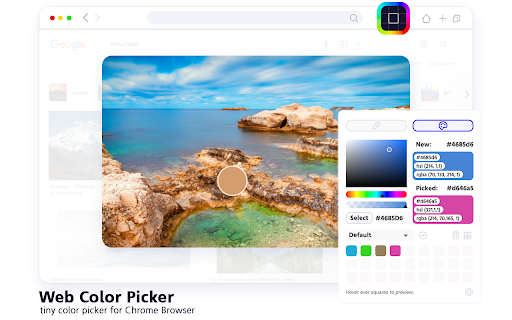
Grab colors from web pages. Color picker, color history. Live smart color picker tool in HEX, RGBA. Eyedropper colorpick for free Web Color Picker revolution tool for designers. Now you can easily pick any from any website with our new extension. Eyedropper tool will get color palette from any webpage you need. It`s pretty useful tool for web developers or web designers. This extension is pretty simple to use and it has simple and user-friendly interface. We provide you and amazing and useful eyedropper tool so you can get RGB colors from any webpage. Extract palette from web pages while you're browsing the web. There are three color formats available: RGB, CSS, and HSL. It`s also pretty simple to use – just click on extension icon in the upper right and star working. - Identifying the RGB HEX CMYK - Saving pallets - Editing them into beautiful palette combinations is a quick and simple job. Color Picker features are: * Different formats: HEX, RGB, HSV * Detect most used color on the page * Color list of recently picked colors * Red-Green-Blue (RGB) wheel to adjust selected and lot of others

Color Picker - Eyedropper Tool
Pick colors from web pages with Eyedropper. Picker, gradient generator, palette. Quickly grab HEX, RGB. Color Picker and Eyedropper Tool is a must-have browser extension for web developers, designers, and anyone who needs to choose colors from a webpage or extract a website's palette. Whether you're creating a website, designing graphics, or working on a digital project, extension will make the process of color selection easier and faster. Features: - Employ zoom technology to select and store multiple from any - Archive your preferred gradients; a single click on any stores its HEX value in your clipboard; - The site palette feature retrieves all the colors present on any webpage; - Personalize the type for automatic copying. Great for any designer, Chrome extension that easily allows you to identify the Hex colour code of any UI element you hover your mouse over. It's great for quick access to colours you gain inspiration from when browsing online. This extension stores the last six selected and represents the color in HEX, RGBA, HSVA, HSLA, and CMYK formats. Free open-source Color Picker extension. Source on GitHub. No ads, no tracking. Try using our software to find the color codes for any pixel today.

Color by Fardos - Color Picker
Pick colors from websites, save colors & gradients, get matching shades and tints and create beautiful gradients. ✅ Color pick and save multiple colors from any site (using zoom technology) ✅ Customize your color picker keyboard shortcut in options (default: Cmd/Ctrl + Shift + e) ✅ Add the color picker as the default in options ✅ Save your favorite colors and gradients, click any color and it's HEX is saved to your clipboard ✅ Find shades, tints, complementary and other color combinations for any color ✅ Create linear or radial gradients with unlimited stops ✅ Browse hundreds of beautiful gradients, edit, save and copy it's CSS whenever you need it ✅ Get color palettes from any gradient you create ✅ Site pallete fetches all the colors of any page ✅ Customize the color type when auto copying Have any new ideas to improve Color? Email us at support@fardoss.com and we will look into it. There are 5 different built in tools including a color picker to help you through your design journey. The first tool is the Color Picker. Our color picker uses zoom technology that will accurately get you the closest color to where you hover over. You can access the color picker by right clicking the page or Cmd/Ctrl + Shift + e. We made sure the experience of picking colors was smooth, quick and efficient. When you color pick on any website, we generate a picture from the site, and pinpoint the exact location of your cursor to find that color. Choose as many colors from any site, click Save & Exit and they are automatically added to your overall saves. Great color pickers are very hard to find which is why we added countless hours to make sure our color picker is the best. Our color picker is the most accurate, the fastest and we guarantee you will have the best experience with it. We created our color picker with the mind set of ease. Our color picker ensures that every color you pick is exactly that color or at least the closest color to it. With that in mind, our color picker is super quick and calculates that color hex wherever you hover over. The second tool is a Color Search. When developing this functionality, we took our personal experiences into consideration and found that finding colors that match each other was one of the hardest things. We would go to so many websites to find what we are looking for. We wasted so much time just to get the colors that worked together. If you are a designer or developer, you know what we are talking about. With Color by Fardos, it now takes seconds to get matching color combos like Shades, Tints, Complementary, Triadic, Analogous, Split Complementary and Tetradic colors. Within any color, there is an explosion of new similar colors that will work perfectly together all built into one extension. Within any color you choose, you can now save those colors so they stay with you wherever you go. We made sure this was a feature because everyone knows the pain of trying to find the color they used before. Accessing those colors on any Chrome browser is super easy. The third tool is a Color Chooser. We designed our color chooser with a black theme because we wanted to remove any distraction when trying to choose that perfect color. Whenever you change the color, it automatically changes the selected color within the entire extension. So, if you change from white to black and go to Color Search, that color is now black. This allows for a much more fluent experience within the entire extension. The fourth tool is Gradients. Gradients are incredibly painful to code. Finding the perfect blend of colors contributes largely to what works and what doesn't. We made sure that our gradient builder took that into consideration. With our gradient builder, every gradient is beautifully composed and generated. Add as many stops as you want, use your saved colors to make something beautiful, choose whether linear or radial and most importantly, save them so you can use them whenever you want. After you have created that gradient, all you have to do is click Copy CSS, and you are set. No more hassling if you missed a comma between your colors. Every gradient comes with a generated palette. Whether you are creating your own gradients, choose one of our gradients, color palettes help you find the perfect blend-able color. Copy the colors just by clicking and start using them in your designs. The fifth tool is Site Pallete. Site Pallete allows you to get all the colors of a page instantly. We quickly screenshot each section and allow you to add any of the colors you like, directly to your saved colors. Site Pallete is quick and easy and can be located in your toolbar next to the Eye Dropper / Color Picker. If you have any questions or issues about our Color Picker, Gradient, Color Search or other features, feel free to contact us at support@fardoss.com. Stay tuned for more life changing extensions like our Color Picker!

Responsive Viewer
A Chrome extension to show multiple screens in one view. the extension will help front-end developers to test multiple screens while developing responsive websites/applications. Clarification on privacy: This extension does not collect, store, or track any of your personal data. Your privacy is fully respected.

ColorZilla
Advanced Eyedropper, Color Picker, Gradient Generator and other colorful goodies ColorZilla is the most user friendly, full-featured, secure and reliable color picker and color related suite of tools. It is one of the most popular Chrome and Firefox developer extensions with over 10 million downloads worldwide. With ColorZilla you can get a color reading from any point in your browser, quickly adjust this color and paste it into another program. And it can do so much more... ✓ Eyedropper - get the color of any pixel on the page ✓ Advanced Color Picker (similar to Photoshop's) ✓ Ultimate CSS Gradient Generator ✓ Webpage Color Analyzer - get a color palette for any site ✓ Palette Viewer with 7 pre-installed palettes ✓ Color History of recently picked colors ✓ Various sampling sizes - 1x1, 3x3, 5x5, 11x11 and 25x25 pixels ✓ Sample average color of any selected area ✓ Displays element information like tag name, class, id, size etc. ✓ Auto copy picked colors to clipboard ✓ Keyboard shortcuts ✓ Manipulate colors by their Hue/Saturations/Value components ✓ Get colors of dynamic hover elements ✓ Single-click to start color picking (currently only on Windows) ✓ Pick colors at any zoom level ✓ All features here: https://colorzilla.com/chrome/features.html This permission is needed by ColorZilla for its basic functionality of picking colors from websites. ColorZilla **DOES NOT** collect any of your data or your browsing activity on any websites. We are pretty fanatical about privacy ourselves, and your privacy is extremely important to us. Please visit this page for more info - https://colorzilla.com/chrome/privacy.html == Feedback and bug reports == If you're having issues or found a bug, please don't post you bug report here, contact us directly so we can fix it: https://colorzilla.com/contact/ If you like ColorZilla, please help spread the word by giving it a 5 star rating here ;) If you're not fully satisfied, please contact us https://colorzilla.com/contact/ and we'll make sure to help. Additional info, help and more is here: https://colorzilla.com/chrome/ For new feature announcements or just to say hello, please follow ColorZilla on Twitter https://twitter.com/colorzilla
